

Read More


Recognized for AI Excellence at 2026 Globee® Awards - Read More

Vinit Kariatukaran
Cloud applications have become the backbone of modern businesses. The market is expected to be worth $1068.73 billion by 2030. And AI is quickly becoming the next layer of differentiation. With that, enterprises are under immense pressure to make cloud apps AI-powered.
One way to do that is to build a custom, cloud-based AI solution from scratch. But if you already have a cloud app with active users, a more practical, faster, and more cost-effective alternative is: adding AI features to existing cloud applications. But this too has challenges. Existing architecture has to be considered. Data readiness has to be ensured. Security, governance, and compliance needs have to be met. And user experience and business priorities need to be prioritized.
At Radixweb, we have worked through these AI integration realities with several enterprise cloud apps. And based on that experience, below we explain what enterprise leaders need to know before adding to cloud apps.
Adding AI to an existing cloud application starts with the business problem, not the model. Enterprise leaders need to start by assessing their cloud app architecture. Data, APIs, security, scalability, and organizational readiness should also be considered. Success also depends on choosing the right integration pattern based on how deeply AI needs to interact with workflows. The key to success is to start small, establish governance, and continue monitoring.
| Aspect | Details |
|---|---|
| What this guide covers ? | AI integration patterns for existing cloud applications, architecture and data readiness, security and governance, scalability, cost and timelines, modernization decisions, common integration risks, and production considerations |
| Who should read this guide ? | CIOs, CTOs, AI leaders, product leaders, enterprise architects, technology heads, and business decision-makers planning or scaling AI capabilities in existing cloud applications |
AI is not a plug-and-play component you drop into a cloud application and switch on. The right approach depends on:
For enterprise leaders, this makes establishing the business use case the first step. Instead of just adding AI because competitors have it, assess what users need help with and what measurable outcome AI should improve. This helps select AI features that retain users and reduce friction.
Once the use case is clear, the next step is mapping the AI integration architecture for cloud applications. The following four broad patterns cover most enterprise scenarios:
A parallel AI layer operates alongside the existing application, using approved data to deliver capabilities such as search, summarization, knowledge assistance, or document analysis without changing core business logic.
| Parallel AI Layer | |
|---|---|
| Architectural Impact | Low to moderate |
| Timeline | 3–8 weeks |
| Indicative Cost | $30K–$100K |
| Best For | Search, summarization, knowledge assistants, document analysis |
Inline AI becomes part of an existing application workflow, providing real-time assistance such as recommendations, classification, content generation, or decision support while users complete their tasks.
| Inline AI | |
|---|---|
| Architectural Impact | Moderate |
| Timeline | 4–10 weeks |
| Indicative Cost | $50K–$150K |
| Best For | Recommendations, classification, content generation, assisted transactions |
AI-powered workflows embed AI into defined business processes, allowing it to perform tasks, route information, or trigger controlled actions based on predefined rules, permissions, and human-approval requirements.
| AI-Powered Workflow | |
|---|---|
| Architectural Impact | Moderate to high |
| Timeline | 6–14 weeks |
| Indicative Cost | $75K–$250K |
| Best For | Document processing, routing, approvals, case handling, repetitive operations |
Sidecar analytics uses a separate AI or ML layer to analyze application and historical data and return predictions, scores, forecasts, or recommendations without placing the model directly in the application's core transaction flow.
| Sidecar Analytics | |
|---|---|
| Architectural Impact | Moderate to high |
| Timeline | 8–18 weeks |
| Indicative Cost | $100K–$300K+ |
| Best For | Forecasting, risk scoring, anomaly detection, demand planning |
There is no universal winner. The right pattern depends on how deeply AI must interact with your application. Ask these five questions to determine where AI should sit, how much control it needs, and how much architectural change your application can absorb.
| Decision Question | If Yes | If No |
|---|---|---|
| Does AI need to change a core transaction? | Consider Inline AI or AI-Powered Workflow | Parallel AI Layer or Sidecar Analytics may be sufficient |
| Does AI need to act automatically? | Use stronger controls with AI-Powered Workflow | Start with a lower-risk assistive pattern |
| Does AI require real-time application data? | Inline AI is often more suitable | Sidecar Analytics may be a better fit |
| What happens if AI becomes unavailable? | Design fallback mechanisms and isolate AI where possible | AI can have a less critical role in the application |
| How much architectural change is acceptable? | Deeper integration patterns may be appropriate | Start with a Parallel AI Layer to minimize disruption |
These answers also clarify the considerations for AI integration in cloud applications. The best architecture is not the most sophisticated one. It is the one that delivers the required outcome without introducing unnecessary technical or operational risk.
The core requirements of AI engineering do not change when you add AI to existing enterprise cloud applications. What changes is the starting point.
If you are building a cloud application with the goal of adding AI, teams can design the application architecture, data flows, identity model, infrastructure, and AI capabilities together. With an existing cloud application, those decisions have already been made. AI has to work within them.
That creates a different set of engineering considerations. The five areas below apply to almost any production AI system. But cloud-specific implications need special attention from enterprise leaders:
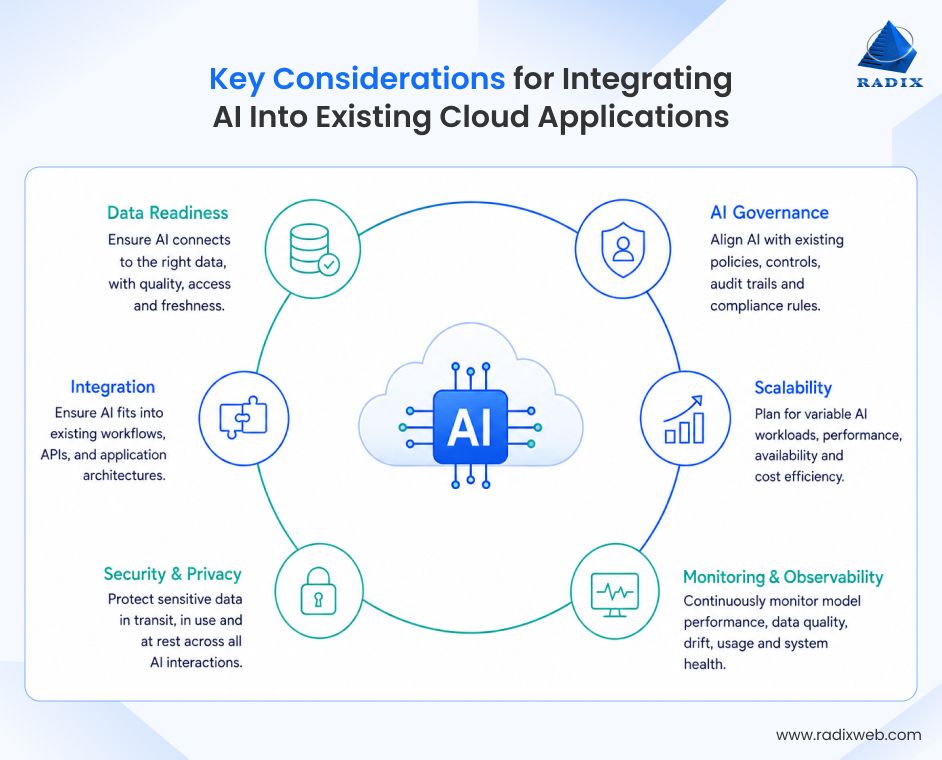
For any AI system, data quality matters. For an existing cloud app, the harder question is: how AI gets access to data without disrupting the existing data architecture.
Cloud applications typically spread data across operational databases, APIs, object storage, SaaS integrations, event streams, data warehouses, and sometimes legacy services. If you are planning to integrate AI with existing business solutions, it requires more than just preparing a dataset. You need to understand which source is authoritative, how data moves between services, and whether AI should access it directly or through existing application interfaces.
What to assess
This is where AI infrastructure requirements for cloud applications differ from preparing data for a standalone model. The goal is not to create a perfect new dataset. It is to connect AI reliably to the application's existing data ecosystem without creating synchronization, access-control, or operational problems.
Governance is an important aspect for the development of any enterprise AI system. But integrating AI into existing cloud applications introduces an additional concern: AI needs to operate within governance controls that already exist around the application.
The application may already have identity policies, role-based access, audit logging, data retention rules, regional hosting requirements, and approval workflows. AI should extend those controls rather than create a separate governance layer.
What to establish
When building AI applications for enterprise-wide implementation, the important question is whether AI fits the application's existing governance model. Adding a powerful model without extending those controls simply creates a new path around the application's established boundaries.
Any well-built cloud application will already have a scaling model. It has defined compute resources, database capacity, traffic patterns, autoscaling rules, availability targets, and possibly strict SLAs. Adding AI introduces a new workload that needs to fit into that model.
The mistake is treating AI capacity as an isolated concern. A model call that consumes too much latency or infrastructure can affect the application itself, particularly when AI is placed directly in a synchronous request path.
What to plan
This is central to AI scalability in cloud applications because the objective is not simply to scale the AI workload. It is to scale AI without compromising the application's existing availability and performance commitments.
Security becomes more complicated when AI is added to an existing cloud application because the AI capability introduces new data paths into an already established security boundary.
An application might already enforce access through an identity provider, API gateway, service layer, database permissions, and tenant isolation. If an AI service bypasses those controls and accesses data through a separate path, the integration effectively creates a second security model.
What to assess
Ensuring cloud security while integrating AI is, therefore, less about adding another security checklist and more about preserving the security model the application already relies on. AI should fit into the application's existing trust boundaries rather than quietly bypass them.
An existing cloud application already has users, established workflows, operational teams, support processes, and expectations around how the product behaves. AI changes those workflows without giving the organization a clean slate.
That makes adoption and operational ownership of AI outcomes particularly important. Users need to understand where AI fits into an existing process, while engineering and cloud operations teams need to support a new type of production workload alongside the systems they already maintain.
What to prepare
For enterprises integrating artificial intelligence with existing business software, the objective is not to create a separate AI operating model alongside the application. Wherever possible, AI should become part of the application's existing development, security, monitoring, support, and governance practices.
The key is to treat AI as another production workload within an existing cloud ecosystem, not as a separate layer sitting outside it. Its data access, identity, scaling, security, deployment, and operations should align with the application's existing foundations. That alignment is what turns an AI feature into a reliable part of the product.
Cost and timeline are two of the first questions enterprise leaders ask, and rightly so. But there is no single price for AI integration. The cost of adding to a relatively modern application is very different from what it would cost to add AI to a legacy application. It all depends on the use case, data condition, integration depth, security requirements, model choice, application complexity, and expected scale.
The delivery process is more consistent, even when the scope and investment change. A typical engagement follows six phases:
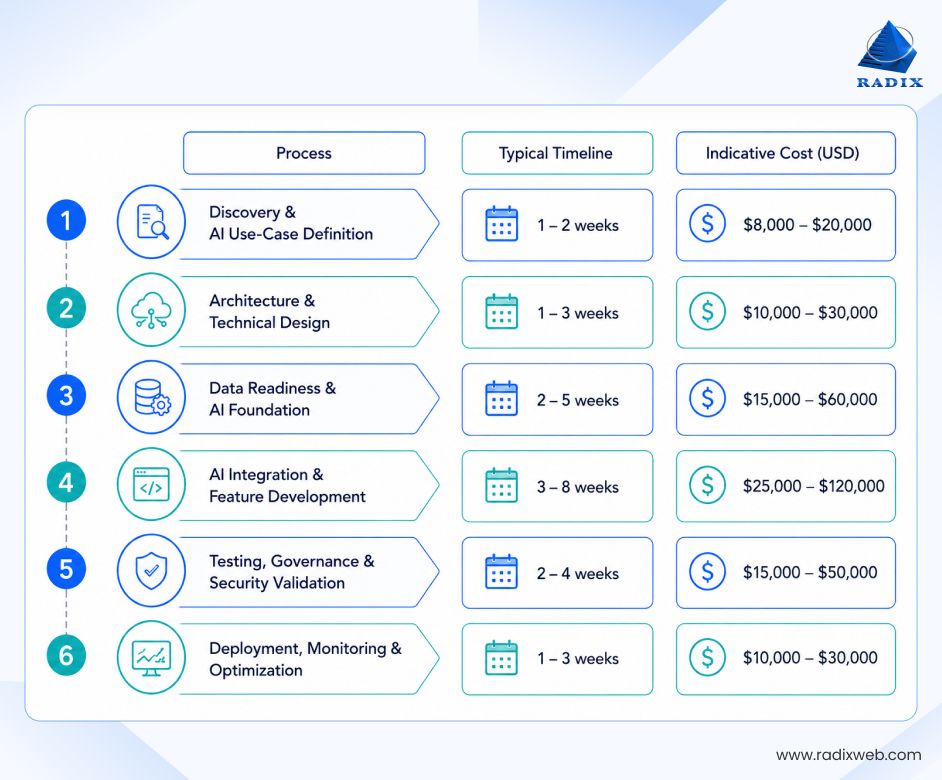
| Phase | Typical Timeline | Indicative Cost |
|---|---|---|
| Discovery and AI Use-Case Definition | 1–2 weeks | $8,000–$20,000 |
| Architecture and Technical Design | 1–3 weeks | $10,000–$30,000 |
| Data Readiness and AI Foundation | 2–5 weeks | $15,000–$60,000 |
| AI Integration and Feature Development | 3–8 weeks | $25,000–$120,000 |
| Testing, Governance and Security Validation | 2–4 weeks | $15,000–$50,000 |
| Deployment, Monitoring and Optimization | 1–3 weeks | $10,000–$30,000 |
These phases often overlap, so the timelines and costs should not be added together. A focused implementation could take 8–14 weeks, while a complex enterprise implementations may run for several months. For a mid-market enterprise, AI integration costs typically range between $75,000–$300,000. Complex multi-workflow, highly regulated, or enterprise-wide implementations can reach $300,000–$1.5 million or more.
The first phase defines what AI needs to accomplish.
Teams assess the business process, user needs, available data, application dependencies, success metrics, and technical constraints.
What drives cost: Use-case complexity and the number of systems involved.
This phase defines how AI will fit into the existing cloud application.
Teams establish the model approach, integration pattern, data flows, API strategy, security boundaries, observability, and failure handling. They also identify technical debt or architectural gaps that could affect delivery.
What drives cost: Application complexity, integration depth, and the need for architectural changes.
Teams prepare the data and services required to support the AI capability. This might include data pipelines, retrieval systems, indexing, storage, permissions, evaluation datasets, and supporting infrastructure.
What drives cost: Data quality and accessibility.
This is where AI becomes part of the application.
Developers build the APIs, workflows, interfaces, orchestration, prompts, retrieval mechanisms, model calls, validation, fallback behavior, and user interactions required for the feature.
What drives cost: Integration depth and model requirements.
AI requires more than conventional software testing.
Teams evaluate accuracy, relevance, hallucinations, prompt robustness, access controls, failure handling, latency, and relevant bias or edge cases. Security testing covers the complete AI data flow, while governance checks validate logging, model versions, data handling, approvals, and human oversight.
What drives cost: Risk level, regulatory requirements, and the impact of AI decisions.
Production is not the end of AI integration. Teams monitor model quality, usage, latency, cost, errors, data drift, retrieval quality, and user feedback. They then optimize the cloud system for cost and efficiency, as usage and requirements evolve.
A practical planning assumption for ongoing AI operations is 15–25% of the initial implementation cost per year. High-volume or highly regulated applications can exceed this range.
What drives ongoing cost: Usage volume, infrastructure, monitoring, model consumption, security updates, and engineering support.
The cost and timeline ultimately depend on how deeply AI needs to integrate with the existing application. A clear, phased approach helps set realistic expectations and control complexity. And that's the key to moving from AI planning to production with confidence.
Contrary to what the industry will have you believe, AI projects don't fail due to lack of access to capable models. They fail because teams underestimate the engineering work around them.
These mistakes lead to rework, higher costs, delays, poor adoption, and failed implementations. Here are the five most common mistakes when integrating AI into existing cloud applications and how to avoid them.
Teams sometimes choose a model before understanding the application. They then discover that the platform lacks the APIs, event flows, data access, or isolation the integration requires.
The first steps to integrate AI into existing cloud applications should include analyzing and understanding the cloud architecture. An old application does not automatically need modernization. But its technical constraints must be understood before AI is introduced.
A model does not automatically know an organization's proprietary information. AI needs reliable ways to retrieve, transform, secure, and update enterprise data. Poor data produces poor outputs and powerful AI systems need clean data. Weak access controls create security risks. Missing metadata makes retrieval unreliable.
This is one of the most common challenges of adding AI to existing cloud applications, especially when data is spread across systems or contains years of inconsistent records.
Traditional monitoring tells you whether a service is running. AI monitoring must also show whether it is producing useful results. Track response quality, latency, model errors, retrieval failures, user feedback, token usage, cost, and input-data changes. Maintain evaluation datasets and run them after model or prompt changes.
Without this discipline, AI quality can degrade while infrastructure metrics still look healthy.
Treating AI as an external API integration often pushes security reviews too late. AI may process confidential documents, customer information, employee records, or financial data. Review data flows, provider contracts, access controls, retention, logging, tenant isolation, and model behavior before production.
Good enterprise AI cloud integration treats security and governance as architecture requirements, not documentation exercises.
Sometimes the right first step is AI. Sometimes it is modernization. There is a definitive cost of delaying modernization. Technical debt from your legacy cloud app can limit new capabilities. But modernization should not become an excuse to rebuild everything because it unnecessarily expands timelines and adds the costs for legacy modernization to the AI initiative. In many cases, a well-designed AI layer can deliver value without replacing the underlying application. Here's when you should choose either alternative:
Modernize first when:
Add AI without major modernization when:
These are not the only mistakes AI integration projects can face. But they are among the most common ones we see in practice. With experience across enterprise AI integrations, Radixweb helps teams identify these risks early and avoid costly rework later.
Getting Started with AI Integration for Cloud Apps
The pressure to become AI-first is real. Enterprises want to showcase the strongest models. Customers and investors are both expecting visible innovation. But we have seen AI integrations look flawless in demos fizzle out in production. All because they added more architectural clutter than business value. That's why we strongly recommend that AI should not be tacked onto a cloud application simply to keep pace with the market. Enterprise leaders should first assess the business case, application architecture, data readiness, integration requirements, and operational impact. The goal is not to just to build an AI-enabled cloud application, but make it meaningfully better with AI.At Radixweb, we have 26+ years of software engineering experience and have completed 4,500+ projects for clients across 25+ geographies. With experience spanning AI, cloud, data, product engineering, application modernization, and enterprise software, we have expertise across the layers that an AI integration touches. That's what helps us recommend the right architecture, prepare data, and build secure AI. Start by scheduling a no-cost analysis session with our cloud and AI experts. We will help you define the right AI roadmap, along with the likely budget and timeline, before you build.
Ready to brush up on something new? We've got more to read right this way.

