Read More


Recognized for AI Excellence at 2026 Globee® Awards - Read More

Sarrah Pitaliya
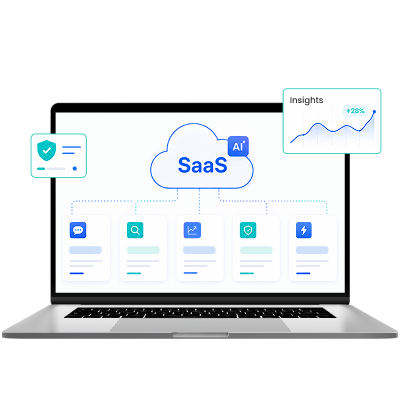
The AI SaaS market is expected to be worth $770 billion by 2031. 95% of SaaS businesses have already invested in AI-driven use cases. The numbers make it clear: if you are in the SaaS space, AI is the way to go.
But whether you're building a new AI-powered SaaS product or adding AI to your existing business platform, success depends on choosing the right features. An "AI-powered" label alone won't earn you a share of the market. Users adopt AI when it solves real problems, saves time, or improves decisions. The way you integrate AI matters far more than simply having it.
So, the real question isn't "what AI feature should we add?" It's "which AI features will users actually use every day, and which ones are shiny distractions that drain resources?"
At Radixweb, we've helped 50+ SaaS businesses across niches integrate AI into their core feature stack. That has helped us understand adoption patterns and what really yields outcomes. Plus, we spoke to actual SaaS users and product team owners. Based on all the information, below we tell you exactly what AI features your SaaS needs.
AI features fail when they create friction. They succeed when they eliminate it invisibly. The highest-adoption AI features in SaaS are those that work automatically within existing workflows, require zero setup, and deliver immediate, measurable value. By contrast, the features with the lowest adoption are the ones that sound impressive in demos but demand user behavior change, additional work, or conscious engagement to function.
| Aspect | Details |
|---|---|
| What this guide covers ? | Industry data on SaaS AI adoption trends, the 5 AI features SaaS users actually demand and use, 3 AI features that waste resources, Radixweb’s proprietary SaaS AI feature adoption framework, |
| Who should read this guide ? | Product managers, CTOs, technical foundersProduct teams, growth leadersBudget/investment decision makersEngineering leaders, product strategistsC-suite, technical leadership |

The AI conversation in SaaS has changed dramatically as AI features have now become table stakes. Users expect it. Investors look for it. Competitors are shipping it. But that doesn't mean every AI feature succeeds.
According to artificial intelligence industry statistics, 85% of AI initiatives fail. Around 73% of newly launched AI features see a significant drop in active users within 2 weeks. This creates an interesting contradiction. Users increasingly expect AI in the products they use every day. Yet they hardly use the AI capabilities already available to them.
Mr. Elvis, the Founder, TryOneTake saw this happen with his professional headshot generator SaaS. He reveals, “We invested in AI-driven "specific role" customization (e.g., generating headshots tailored to "3rd grade teacher" vs. generic "teacher"). Users told us they wanted this before we built it. Actual usage was ~15% of users fill in the specific role field. Most people are happy with the default profession-based results.”
The takeaway is clear: Users are not looking for more AI. They are looking for AI that fits naturally into their workflow and solves a problem they face repeatedly. Every unnecessary AI feature that you add just to chase the latest trends dominating the SaaS industry adds engineering effort, maintenance costs, UI complexity, and model expenses without improving product value.
That is why choosing the right AI features is one of the most important product decisions you'll make. Read on as we highlight 5 AI features you should include and 3 that you should steer clear of.
Based on our discussions with hundreds of SaaS teams and SaaS users over the past 24 months, here are 5 must-have AI features your SaaS needs now.
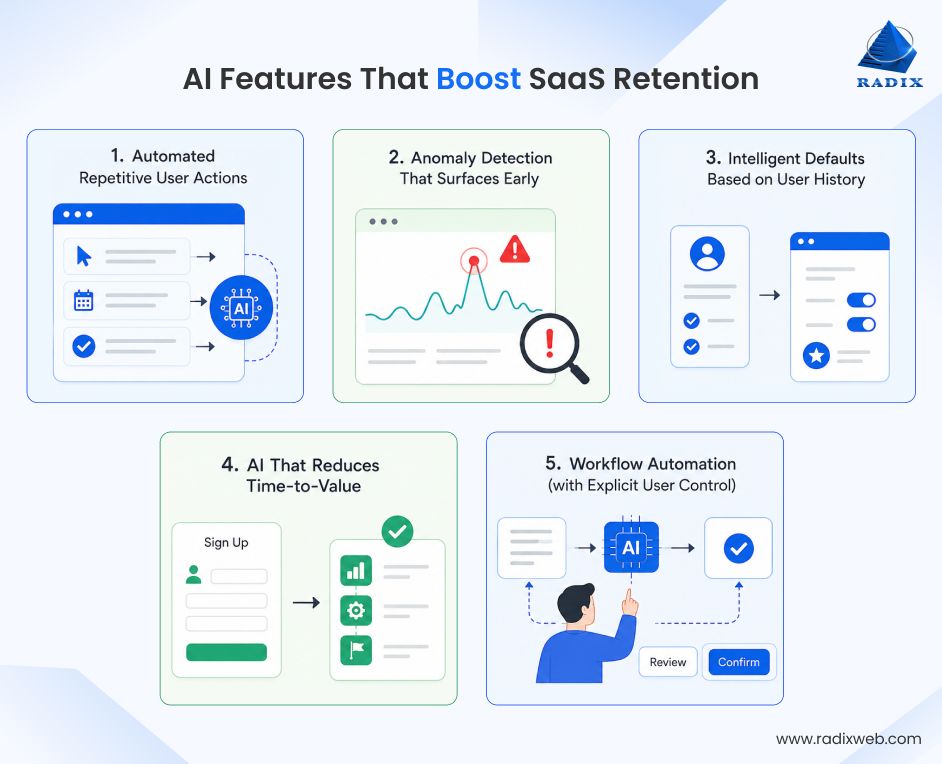
Users take the same sequence of actions every single session. Select format, choose platform, adjust tone. Add customer, select renewal date, generate proposal. The pattern is always there. Automating it is where AI pays for itself.
When you eliminate the three-click repetition that happens dozens of times per month, session time drops, weekly active usage goes up, and users come back. The secret is finding the repeatable pattern first.
Rachid Abadli, founder and CEO of LeaseBase realized that when a landlord uploads a PDF lease to their property management tool, they performed a set of repetitive actions. When they build an AI system that automatically pulls every key date, dollar amount, and clause. Every new lease coming into the system goes through it now. The reason this feature stuck as per Abadli, “It eliminated a specific, repetitive task landlords were already doing manually and hating. It fits exactly into an existing workflow step rather than creating a new one. "
| Metric | Value | Details |
|---|---|---|
| Development Time | 3-6 weeks | Behavioral analysis + logic layer + edge case handling |
| Engineering Cost | $35K–$60K | Primarily backend work; minimal UI changes needed |
| Time-to-Value | 2 weeks | Users see value immediately; no training required |
How to identify your sequence: Pull your product analytics for the last 30 days. Filter for sessions longer than 5 minutes. Find the three actions that appear together in 75%+ of those sessions. That's your candidate.
The AI feature that genuinely builds trust is the one that catches a problem before the user does, not after.
Nicholas Smith, the Founder of Anchor Filings, is one of the many SaaS users who explictly asked for such a feature. He says, "What I wish existed is an AI that flags anomalies before I hunt for them, say “refunds spiked Tuesday, here’s the pattern.”
When your product tells a user that, you become irreplaceable.
The value isn't in the AI being sophisticated. It's in the AI being faster than the human at noticing something is wrong. This works because it flips the user's mental model. Instead of the product being something you monitor, it becomes something that monitors for you.
| Metric | Value | Notes |
|---|---|---|
| Development Time | 4-8 weeks | Baseline modeling + threshold calibration + alert system |
| Engineering Cost | $50K–$85K | Requires data engineering for signal quality; alert infrastructure |
| Time-to-Value | 4 weeks | Requires historical data; calibration iterations with users |
The calibration problem is real: Too many false positives and users disable alerts. Too few and you miss the actual issues. Plan for 2-3 weeks of threshold tuning with real user feedback.
The best AI features are invisible. Users don't think about them as AI. They just say the product "got smarter." Examples of such features include:
These features have near-zero learning curve and high perceived value because they're not asking users to do anything new. They're just making the existing flow faster.
Rick Elmore, CEO of Simply Noted (a mail automation platform), experienced this first-hand when they added the AI-powered capabilities to auto-select handwriting styles, message variants, and send timing based on customer data. He explains, "When it works invisibly inside the customer's existing workflow, adoption is near-universal."
This is where subtle product intelligence turns into habit formation. A user who doesn't have to reconfigure settings every session is a user more likely to return tomorrow.
| Metric | Value | Notes |
|---|---|---|
| Development Time | 2-4 weeks | Data aggregation + simple predictive model + configuration layer |
| Engineering Cost | $20K–$40K | Primarily data pipeline work; lightweight ML requirements |
| Time-to-Value | 1 week | Immediate impact; no user education needed |
Start small: Pick one field where you have >500 historical entries, ceate a frequency distribution and set defaults to the mode. Then ship it. This isn't a complex model, just elegant simplicity.
Onboarding drop-off is one of the most expensive problems in SaaS. Half the cost of acquisition is lost in the first two weeks.
AI that shortens the gap between signup and first meaningful outcome has a direct line to activation rates. This can be as simple as analyzing the user's first inputs and generating a starting configuration. Or walking them through setup by inferring their use case from early behavior.
The key is inference, not instruction. Don't add another tutorial. Instead, infer what the user is trying to do and have the product ready for it. The way to do that is simple: watch what the user does in their first five interactions. Infer intent based on that and then pre-configure the product for that use case, so that they get the value faster than they expected.
| Metric | Value | Notes |
|---|---|---|
| Development Time | 3-5 weeks | Intent classifier + configuration generator + testing |
| Engineering Cost | $30K–$55K | Behavioral tracking + configuration logic + A/B testing infrastructure |
| Time-to-Value | Immediate | Users feel it on day one; retention impact visible within 4 weeks |
Measure this carefully: Track time-to-first-meaningful-action before and after. Not time-to-tutorial-completion. Actual time until the user accomplishes something real in your product.
The SaaS products seeing real retention lift from AI in 2026 aren't the ones with the most AI. They're the ones where AI automates the work, and the user stays in control of the outcomes.
Joe Troyer, CMO at Great Lakes Tiny Homes gave a great example of this. The AI feature that genuinely improved his daily workflow was the smart follow-up in his email platform. He explains, "It scans open threads and suggests the exact next message based on timing and past replies, which cut my morning catch-up from twenty minutes to about five. I now rely on it enough that switching tools feels like a step backward."
But remember that your AI automation should show the user what the AI did. It should also let them correct it before execution. This builds trust because the user never feels like the AI is acting on their behalf without consent.
For developing SaaS products that get this right use a pattern called "draft and confirm." The AI prepares the action and the user reviews it with one click of approval. Over time, as confidence builds, some actions can move to full automation.
| Metric | Value | Notes |
|---|---|---|
| Development Time | 6-10 weeks | Automation logic + approval workflow + audit trail + user education |
| Engineering Cost | $60K–$100K | Most complex of the five; requires state management + error handling |
| Time-to-Value | 3 weeks | Users need confidence in the system before trusting automation |
Build the approval interface first: Don't ship the automation without the review step. Let users see 50+ workflows before you automate. That's when trust exists.
Overall, before you add any AI feature to your roadmap, answer this question: does this feature make the user faster at something they already do, or does it ask them to do something new? If it's the second one, you're probably building for the demo, not the user.
When it comes to AI features, the possibilities are endless. But many of them won't fit your implementation roadmap just yet. These features aren't bad. They're just premature. This section explains three AI features that will almost certainly waste engineering effort.
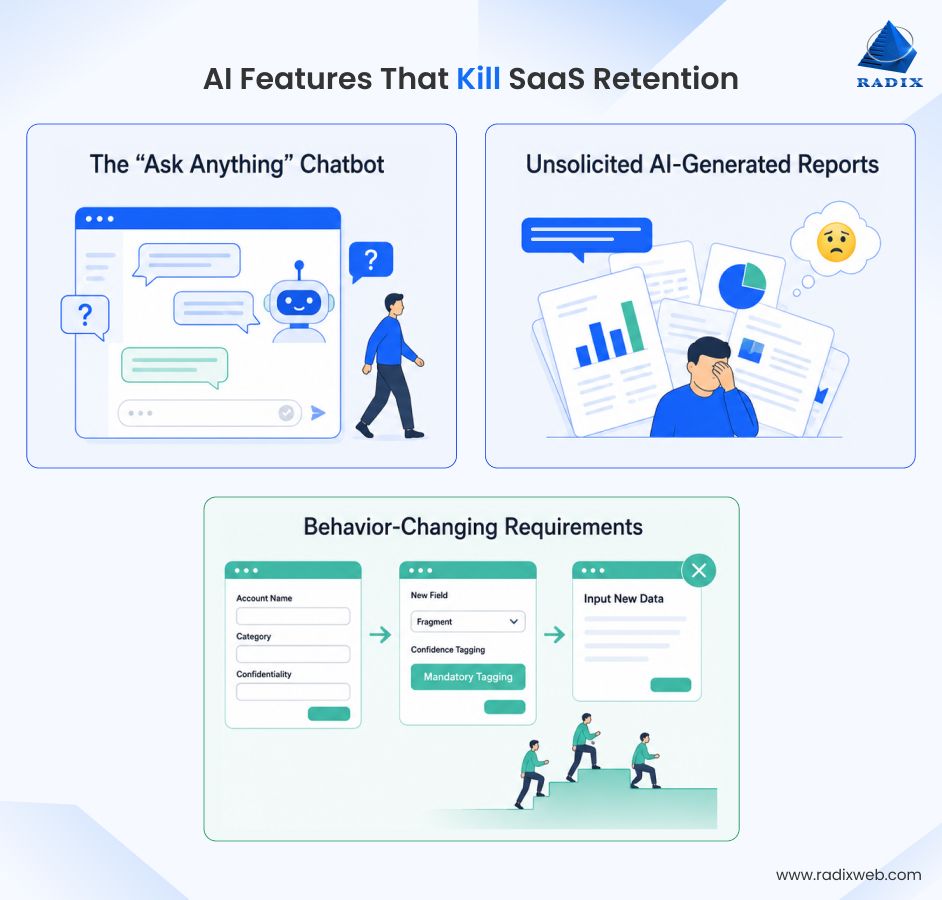
Every third founder asks for a general-purpose chat interface bolted onto their dashboard. "Users can just ask the product questions." But here's the problem: your users did not come to your product to have a conversation. They came to do a specific job.
When LeaseBase team implemented a conversational AI assistant to answer landlord questions about California tenant law, they noticed strong engagement the first two weeks, then usage fell off a cliff. The founder's read on this, "Landlords don't want to chat with a bot about compliance. They want a clear, actionable answer surfaced at the exact moment they're performing a specific task."
This inference applies across niches and geographies. When you are building a SaaS software that tackles enterprise growth barriers adding a general chatbot adds cognitive load. Users have to think about how to phrase a question instead of just doing the task. When the chatbot hallucinates, it generates support tickets. Even when it works fine, 85% of users ignore it after two weeks.
| Metric | Value | Failure Mode |
|---|---|---|
| Development Time | 4-8 weeks | Bot training + conversation design + edge case handling |
| Engineering Cost | $50K–$90K | LLM API integration + conversation state management + support ticket triage |
| Adoption Rate After 90 Days | 5–15% of MAU | Users abandon after discovering native interface is faster |
Why it fails: The chatbot is an addition, not an improvement. It makes the user think more, not less. Compare that to smart defaults, which make the user think less. Users will always prefer less thinking.
"Summarize this data with AI" sounds useful until you realize your users already know their data. They live in it. They refreshed the metrics five times this week. An AI summary of numbers the user pulled themselves isn't insight. It's noise formatted to look smart.
When you give a user a report they didn't ask for, you're creating extra work. They have to read it, decide if it's accurate, and figure out if they should act on it. Most choose not to.
Loc Dang, a Digital Marketing Specialist at Cricket One, explains this very well from a user perspective. He says, "What I want more of is AI that explains anomalies with evidence across tools. If spend jumps 18 percent while leads stay flat, I want the system to connect the likely cause, not just describe the chart."
| Metric | Value | Failure Mode |
|---|---|---|
| Development Time | 2-4 weeks | Report templating + LLM prompt engineering + QA for accuracy |
| Engineering Cost | $20K–$40K | Relatively low complexity; mostly prompt work |
| Usage Rate | 3–8% of users | Most users ignore; skim at best |
Why it fails: It creates noise without clarity. Users didn't ask for narrative. They asked for insight. Those are different things.
If the AI feature only works if the user changes how they input data, formats their workflow differently, or learns a new mental model, it will not get adopted. The AI has to meet users where they already are, not train them to meet it.
Example: A SaaS platform introduces "AI tags" that users can apply to records. The AI then uses these tags for categorization and recommendations. Sounds useful. Except it requires users to add tags to 500+ existing records before the AI has enough data. And it requires users to tag new records going forward, a step they didn't have to do before.
Adoption is predictably low. Most users don't tag. The few who do get value. But the feature drives no retention lift because 85% of the user base doesn't engage. Compare that to auto-categorization, where the AI tags records in the background. Users see the tags, approve or correct them, and move on. Zero new behavior required.
| Metric | Value | Failure Mode |
|---|---|---|
| Development Time | 3-6 weeks | Feature design + user education + workflow integration |
| Engineering Cost | $25K–$50K | Moderate; mostly product work, less AI complexity |
| Adoption Rate | 10–25% of users | Only power users and early adopters engage |
Why it fails: You're asking users to do more work before the AI helps them. This inverts the value proposition. Users came to do less work, not more.
Your engineering capacity is finite. Your retention problems are specific. AI should solve one of your specific problems, not just solve for the sake of novelty.
Here's a quick summary of the AI features that you should and shouldn't adopt in your SaaS
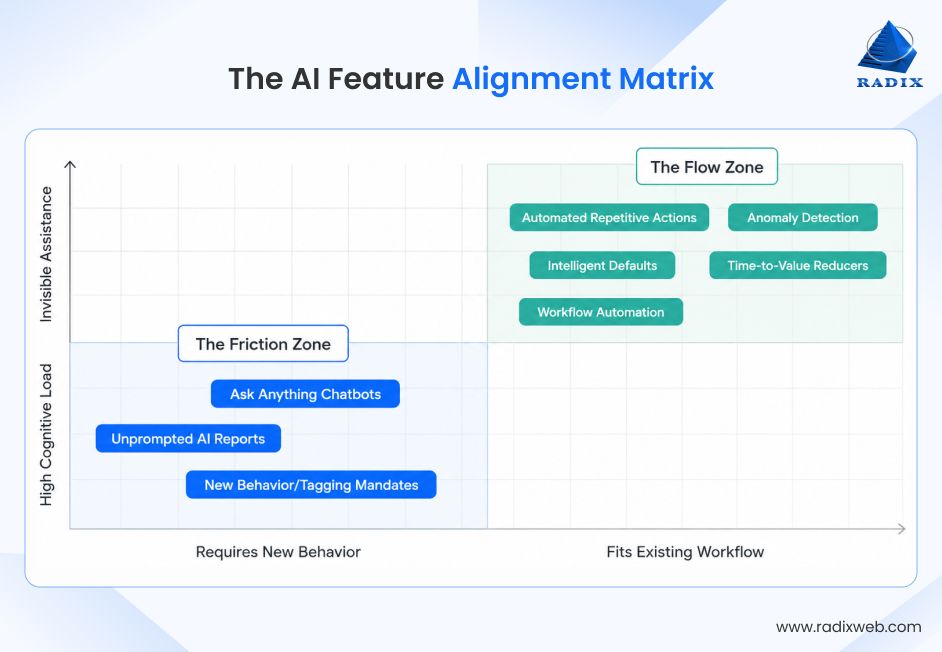
Remember: The features that don't make the cut this quarter might make sense next year, when you have more data, when the technology matures, or when user behavior shifts. So, when you are planning to develop a SaaS application, start by shipping it with AI features that work now instead of betting on speculative future value.
When SaaS companies come to us with AI integration needs, the first conversation isn't about models. It's about understanding which features will actually fit the core architecture of your SaaS solution and drive user retention.
Based on 100+ of these conversations we've had so far, we developed an evaluation framework that product teams can use before investing months of engineering effort. Here's how we help teams think through AI feature decisions:
Before building or shipping any AI feature, answer these questions about it:
1. Does this eliminate a step users are already doing manually?
2. Does this work without requiring major behavior change or new workflow?
3. Does this feature work without any friction (setup, configuration, learning, prompting)?
4. Can users engage with this feature automatically or conscious effort is needed?
5. Is the feature's output valuable without additional work from users?
6. Can users measure the time saved or value created immediately?
7. Is the value created by the feature obvious, or do users have to hunt for it?
Quick scoring guide:
The teams which deploy successful AI solutions aren't the ones with the most sophisticated models. They're the ones who understood that AI is just a tool. And the tool only matters if it removes friction from problems users actually have.

Build The Right AI Adoption Strategy for Your SaaS
The highest-adoption AI features solve problems (invisibly!) without asking users to change how they work. With our AI adoption framework, you can evaluate if your next AI feature will drive retention or be abandoned. It's the difference between AI becoming a retention driver or an expensive distraction. The teams winning at AI adoption are the ones thinking strategically and building intelligent SaaS that solves user problems at scale. Not the ones trying to AI-ify everything.At Radixweb, we've worked with 50+ SaaS companies and enterprise teams to implement AI features that actually drive adoption and retention. We know the frameworks that predict adoption before you invest engineering resources. And we understand not just the technical architecture of AI integration, but how it impacts your users, your retention, and your business. So, if you are looking to add AI capabilities to your SaaS solution, schedule a call with our AI SaaS strategists. We've helped teams like yours make these decisions and execute them successfully and we are ready to help you next.
Ready to brush up on something new? We've got more to read right this way.