Read More


Recognized for AI Excellence at 2026 Globee® Awards - Read More

Anand Trivedi
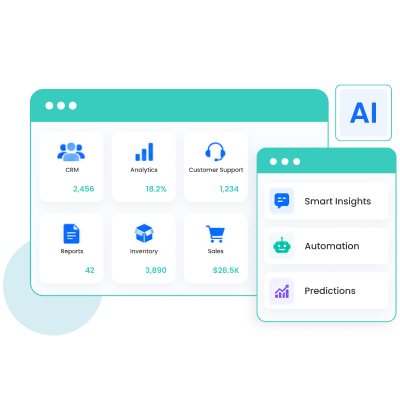
Quick Summary: Most organizations assume adding AI to legacy software means rebuilding the entire system. In fact, 78% of AI capabilities shipped in 2024-2025 reached production through integration, not rebuilds. So, if adding AI is your only reason for modernization, a full rebuild is rarely necessary. The right integration approach can deliver AI while keeping your existing application stable.
| Aspect | Detail |
|---|---|
| What this guide covers? | Four AI integration patterns, data separation principle, stability practices, when NOT to integrate AI, real delivery outcomes by pattern |
| Who should read this? | CTOs, Engineering Leads, and Product Managers deciding how to add AI to an existing application without disrupting what is working |
| TL;DR in <60 seconds | Adding AI to existing software is a design decision, not an architecture decision. Match the AI capability to one of four integration surfaces, keep AI outputs in a separate store from the core system, and the rebuild conversation mostly disappears. |
| Read Time | 15 minutes |
We recently worked with logistics company that needed predictive delivery estimates. Their initial plan was to rebuild their 10-year-old dispatch module before adding AI. We suggested adding a single API endpoint that the existing interface could call before displaying delivery windows. With that, the dispatch logic remained unchanged, and the AI ran as an independent service. The entire integration was done in just 3 weeks.
This is not a one-off example. Businesses are increasingly looking at faster, more efficient ways to become AI-powered. Waiting 12-18 months and investing millions in a full rebuild is getting difficult to justify.
So, while rebuilding legacy systems has its benefits, doing it just because you think it cannot support AI is often the wrong decision. Instead, AI can be added to your existing ERP, SCM, CRM and other systems through integrations that leave the core app untouched. So instead of asking how to rebuilt the system to add AI, it's worth asking if this capability be integrated instead?
For most use cases, the answer is yes. The challenge here isn't whether AI can work with your existing software. It is choosing the right integration pattern.
The rebuild instinct is typically triggered by one of three misunderstandings.
The first: AI needs to be embedded in the application's business logic. It does not. AI models can run as external services. Existing code calls them the same way it calls any other API.
The second: the existing architecture cannot accommodate AI requests. It almost always can. What it needs is an API call and a place to put the AI's output. Neither requires changing the architecture.
The third: AI integration requires a modern stack. It requires API capability, not a stack rewrite. A PHP monolith from 2008 can call a language model API. A Java enterprise platform from 2012 can run a sidecar analytics service. The age of the stack is rarely the constraint.
So, before any plan an application, ask yourself: does the AI feature need to live inside the existing codebase or does it need to be called by the existing codebase? In almost every case, the answer is the latter. And that's what makes integration possible without a rebuild.
What to Do When the Legacy System Has No API?The integration approach for AI addition assumes the AI has a way to access your application's data or functionality. In modern software, that's usually through APIs. But many older systems don't expose them. That doesn't mean you need to rebuild the application before adding AI.For systems with no API exposure, the integration just starts one level earlier: Building a thin API layer that the AI integration will call. With that, the legacy system continues operating as before. The wrapper gives the AI layer the data access it needs without touching legacy code.Best practices when building wrapper API layer:● Expose only the required data and functions.● Keep the wrapper lightweight and independent.● Document and version the APIs from day one so future AI integrations can reuse them.Done right, a wrapper API becomes a reusable integration layer for every AI feature you add in the future.
There isn't a single "best" way to integrate AI into existing software. The right approach depends on:
In practice, most enterprise AI implementations fall into one of following four integration patterns.
| Pattern | What Stays Untouched | What AI Layer Does | Timeline | Best For |
|---|---|---|---|---|
| Inline Assistance | Backend, database, business logic | Enhances a single UI interaction | 1-3 weeks | Search, autocomplete, text generation |
| Augmentation | Core feature logic and output format | Add intelligence to existing feature output | 2-6 weeks | Sorting, filtering, recommendations |
| Workflow Extension | Workflow structure and human-handled tiers | Handles one step or tier in existing workflow | 4-10 weeks | Triage, routing, automation |
| Sidecar Analytics | Entire core system and its database | Reads data, output insights to separate surface | 3-8 weeks | Dashboard, anomaly detection, BI |
Understanding these patterns helps you choose the fastest, lowest-risk approach without making unnecessary changes to your core system.
Inline assistance is the fastest and simplest way to add AI to existing software. The AI enhances a specific user interaction in real time. Whenever a user performs an action (such as searching, typing text, or filling out a form!) the existing interface sends a request to an AI service and displays the response.
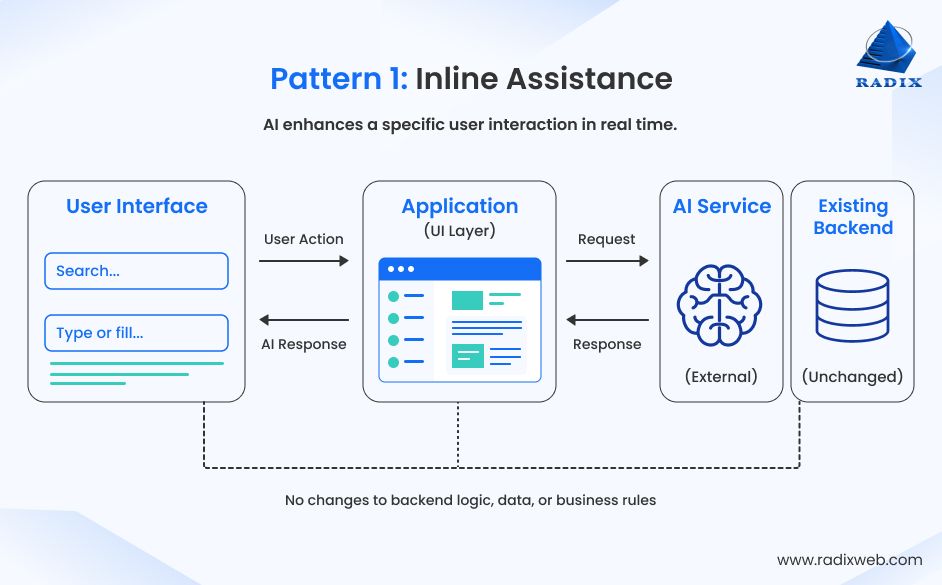
The integration happens at the UI layer. The backend logic, database schema, business rules, and all other features remain unchanged. The AI runs as a separate service that the application calls only when needed.
Common use cases
Implementation timeline: 1–3 weeks for a single feature.
We used this exact approach in the logistics dispatch system mentioned earlier. One API endpoint was added to the existing UI while dispatch logic ran unchanged. The AI delivery estimate appeared as an additional data point before the delivery window was displayed.
Augmentation makes an existing feature smarter without replacing it. The feature continues to work exactly as before. AI just evaluates its output and adds another layer of intelligence.
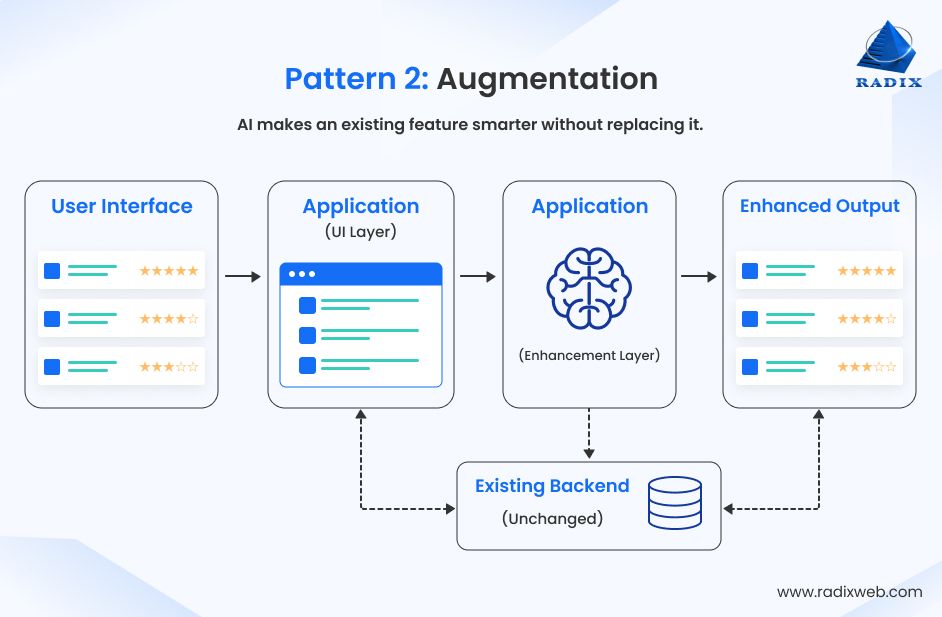
The AI may rerank results, improve recommendations, classify data, or highlight insights. But the underlying feature logic, output format, and data model stay exactly the same. AI acts as an enhancement layer rather than becoming the feature itself.
Common use cases
Implementation timeline: 2–6 weeks, depending on how many features are being enhanced.
Many AI features in productivity software use this pattern. Common examples include Smart Compose in email, AI-assisted formulas in spreadsheets, and presentation design suggestions. All these features are all build on existing functionality rather than replacing it.
Workflow extension inserts AI into one step of an existing process without changing the workflow itself. The AI takes over a specific task, performs it, and passes the result back to the next step in the process.
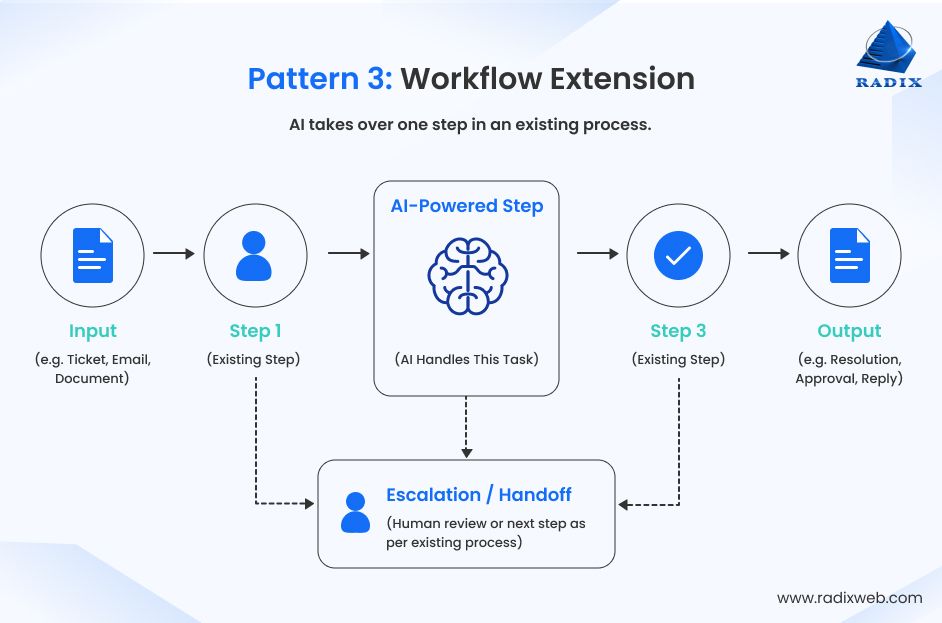
The overall workflow, downstream systems, escalation paths, and human approvals remain unchanged. Only one stage of the process becomes AI-assisted.
Common use cases
Implementation timeline: 4–10 weeks, depending on workflow complexity and handoff conditions.
Klarna's 2024 AI support deployment is the production-scale example of this pattern. The AI handled tier-zero customer queries. The existing escalation paths remained intact. The AI reduced volume on those paths without replacing them and the support platform didn't have to be rebuilt.
What's essential here is to build the workflow extensions with explicit handoff conditions. Or else you end up with a system where the boundary between AI-handled and human-handled cases is ambiguous. With that, users experience inconsistency and support teams receive cases without context.
Sidecar analytics is the right approach when AI needs to analyze business data without becoming part of your application's day-to-day operations. Instead of participating in user interactions or workflows, the AI runs alongside the existing system, continuously processing data and generating insights.
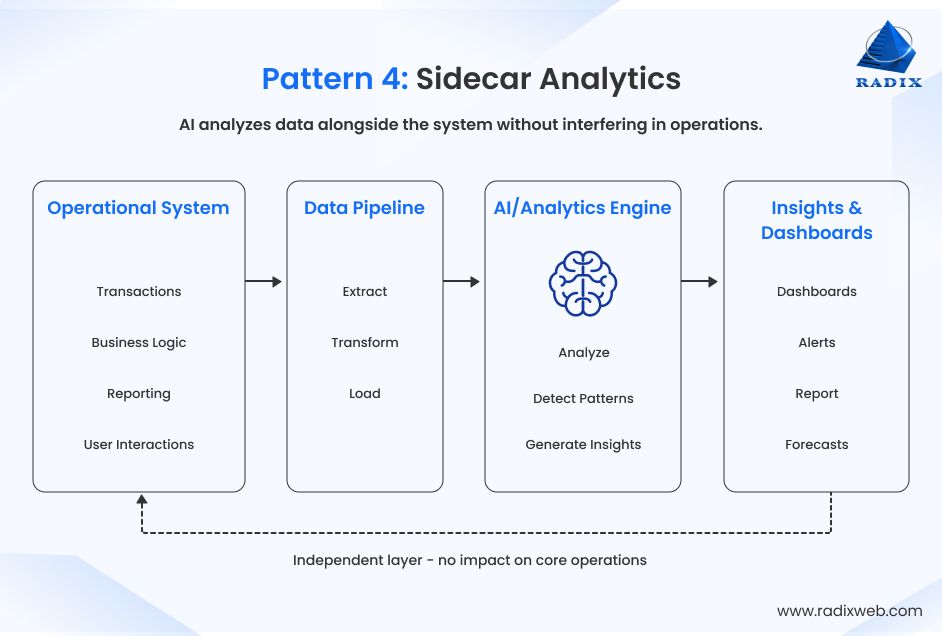
The application continues to handle transactions, business logic, and reporting exactly as it always has. The AI operates independently, reading operational data, identifying patterns, and surfacing insights through a separate dashboard, analytics portal, or reporting interface.
Common use cases
Implementation timeline: 3–8 weeks, depending on data pipeline complexity.
Because the AI layer remains completely independent, this pattern offers one of the safest ways to introduce AI into business-critical systems. Because it doesn't interfere with business workflows or transactional systems, teams can validate AI models, demonstrate business value, and build stakeholder confidence before expanding AI into customer-facing features or operational processes.
These four patterns cover the majority of enterprise AI use cases, making it easier to add AI capabilities while keeping your core application stable.
Choosing the right integration pattern is only half the equation. The other decision is: where the AI outputs should live? The answer is simple: keep AI separate from your core application.
AI generated outputs should never become part of your application's core data model. Instead, the AI layer should read data, generate results, and maintain outputs independently. Your app continues reading, writing, and processing data exactly as it always has. This makes the AI integration:
Safe to deploy: The AI layer can be deployed independently without changing the production database schema. If the AI service experiences an issue, the core application continues operating normally. Users may temporarily lose AI-powered functionality, but business operations remain unaffected.
Safe to roll back: If the AI integration needs to be removed or replaced, you simply disable the AI layer. There is no database migration, schema reversal, or redeployment as the system was never modified.
Data separation is a simple architecture principle. Yet, teams write AI outputs directly into existing databases because it feels faster. The trade-off here is a tightly coupled system that's harder to maintain, upgrade, and roll back. Keeping AI outputs separate from day one requires little additional effort. But you get a flexible and resilient architecture that's easier to maintain and evolve.
Not every AI integration approach fits every use case. The right choice depends on the specifics of your system and what exactly you need the AI to deliver.
Before discussing architecture or implementation, answer these three questions.
This question helps identify which integration pattern best matches your use case.
This determines how tightly the AI should be coupled with your app and where it should access data.
This determines how resilient your integration will be during deployments, updates, or outages.
Once those three decisions are made, the right integration pattern usually becomes obvious. Plus, they lay the foundation for a stable, scalable AI architecture.
One of the biggest concerns with AI integration in existing systems is the risk of disrupting something that already works. But this risk is manageable with the following 3 practices:
Treat the AI as a separate component with clearly defined interfaces. It should be deployed, updated, and rolled back independently of the core application.
This architectural separation ensures the existing system continues operating even if the AI layer is unavailable. It also makes rollback possible without modifying production code or causing service disruption.
Before exposing AI outputs to users, run the AI in shadow mode. The AI processes real production requests and generates responses. But those responses are logged instead of being shown to users.
This lets you evaluate how the AI performs with real-world data, identify edge cases, and fine-tune the integration before users interact with it. Finding issues in shadow mode is far less costly than discovering them after deployment.
Avoid enabling AI for every user on day one. Instead, use feature flags or a canary deployment to release the AI capability to a small group of users first.
This gives your team time to monitor performance, gather feedback, and resolve issues before a wider rollout. If something goes wrong, simply turn off the feature flag without the need to redeploy or modify the core application.
Before going live, confirm if the AI layer can be disabled without affecting the existing application. If the answer is yes, you've built an integration that's safe to deploy, easy to maintain, and simple to roll back. If not, the data separation principle was not followed correctly. Fix that before the first deployment.
Every AI integration project is different. However, successful implementations tend to follow the same principles. Here are three examples of how Radixweb integrated AI into existing software without rebuilding the underlying system.
GPT-powered Chatbot for ATS and CRM to Enhance Recruitment
AI-Powered Legal Document Search Software
AI Meeting Intelligence Platform for Executive Decision Automation
Across all three projects, the approach was the same: AI was an independent layer. The existing application continued to run without disruption, and every integration was designed to be deployed, updated, and rolled back without affecting the core system.
At Radixweb, we've delivered more than 3,500 software engineering projects. One thing that has remained consistent is no two projects are exactly alike.
So, while AI can "usually" be added to existing software without a rebuild, it doesn't mean it is "always" the right way.
Here are five situations where AI integration isn't the right approach
Some older applications are so tightly coupled that there is no way to expose APIs or create an integration layer. The presentation layer, business logic, and data access are deeply intertwined. This makes even a thin wrapper difficult to build.
Rather than a full rebuild, rebuild or refactor only the affected component first. Once a clean integration surface exists, AI can be added incrementally.
Some AI features need to process every transaction the moment it happens. If your existing application can't support real-time reads without affecting performance, adding an AI layer won't solve the problem.
Here you should modernize the data architecture by introducing streaming, replication, or other real-time data capabilities first.
Adding AI to a system with weak access controls, missing audit trails, or existing compliance issues only expands the problem. AI should never be used to extend an unstable or non-compliant foundation.
Address security and compliance gaps first. Once the core system meets regulatory and governance requirements, integrate AI on top of that foundation.
Some integrations require multiple middleware layers, custom connectors, and continuous workarounds for undocumented legacy behavior. Over time, maintaining these integrations can cost more than rebuilding the affected component.
Compare the 3-year cost of rebuilding vs. the cost of AI integration and the cost maintaining the legacy system If long-term maintenance outweighs the initial savings, rebuilding becomes the better investment.
Sometimes AI is only one of many challenges. If the software is difficult to maintain, expensive to operate, unable to scale, and nearing the end of its useful life, adding AI may only postpone a larger modernization effort. In the worst case scenario it may even add to the already high cost of delaying the legacy modernization effort.
Treat AI as part of a broader modernization roadmap instead of a standalone project. Rebuild the right components first to create a stronger foundation for AI capabilities.
The right decision isn't based on what is the quickest or cheapest. It is the one that delivers the highest long-term business value. So, evaluate your existing system before deciding to integrate AI or modernize first.

Start Your AI Integration Journey with Confidence
Choosing the right AI integration approach can have a widespread business impact. It saves months of engineering effort and significantly reduces implementation costs. The key is to evaluate your application before making architectural decisions. Once you identify the right pattern, artificial intelligence integration for your existing system becomes your business edge, without costly rebuilds.This is where Radixweb can help. We have more than 26 years of software engineering experience, 4,500+ successful projects, and deep expertise in legacy modernization and AI engineering. We've helped organizations introduce modern AI capabilities while keeping business-critical systems stable. So, if you're evaluating whether to integrate AI or modernize, start by booking a slot for a no-cost consultation with our AI experts. During the session, we assess your system architecture and your goals to identify the most suitable approach. With that, you can make a well-informed long-term technology decision.
Ready to brush up on something new? We've got more to read right this way.