Read More


Recognized for AI Excellence at 2026 Globee® Awards - Read More

Pratik Mistry
The App Gap: Application software is any program that helps end users accomplish real work. That makes application software important for individuals and organizations alike. But most organizations are making application software decisions backward. They're comparing feature lists before defining what's actually broken. This guide cuts through the confusion and walk you through what application software actually is, the 20+ types you need to know, and how to choose between buying and building. If your software is creating friction rather than removing it, read this.
The global application software market is projected to grow at a compound annual growth rate of 10–15% through 2033, yet most organizations I work with remain underinvested in truly understanding their software landscape.
Over 26 years of building and modernizing applications across healthcare, manufacturing, finance, and logistics, I've seen the same pattern repeat: companies struggle not because they chose bad technology, but because they never clearly defined what category of software they actually needed or how it should fit with everything else in their environment.
The confusion typically stems from one root cause: Confusing application software with system software or treating all application software the same way. That’s a grave mistake though. The application architecture, which is how the app is technically built, varies across different apps. For example, the architecture underneath a general-purpose productivity tool is completely different from a custom-built enterprise system. The licensing and deployment models are different. The way they integrate is different. And the decision-making process for choosing one should be fundamentally different from the other.
Get the category and the problem right first. Everything downstream (the budget, the timeline, the vendor relationships, the integration complexity) cascades from that foundation. Read on as I walk you through the practical definition of what application software is, the types, and how to make the right application software choice.
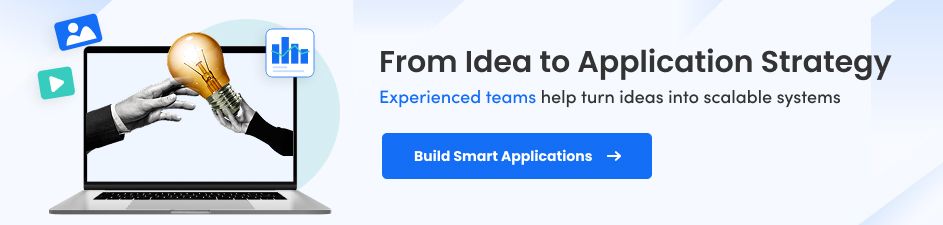
Application software is any program designed to help end users perform specific tasks like writing documents, managing finances, tracking customers, or running business operations. It is the layer of software built to directly support work users need to accomplish.
For example, the word processor your team writes proposals in is application software. The database your developers query is application software too. The CRM your sales team logs calls into, the ERP your finance team closes the month on, the custom platform your operations team uses that nobody outside your company has ever heard of... all application software.
What this category does not include: device drivers, firmware, operating systems, compilers. These are system software used to manage hardware and computing resources.
In practice, this distinction shows up more often than expected, especially when organizations evaluate or adopt new technology. So, it helps to clearly separate what belongs in the application layer versus what doesn’t.
To make the distinction clearer, here’s a side-by-side comparison of application software and system software:
| Aspect | Application Software | System Software |
|---|---|---|
| Purpose | Helps users complete specific work | Manages hardware and runs applications |
| Who Uses It | End users directly | The computer itself (mostly invisible) |
| Programming Languages | Python, Java, .NET, C++ | Assembly, C |
| Independence | Cannot run without system software | Runs independently |
| Examples | MS Word, Salesforce, Zoom | Windows, macOS, Linux, firmware |
| Complexity | Accessible to application developers | Requires specialized systems programming |
The boundary between the two blurs in embedded systems and certain infrastructure tools. But for the vast majority of business technology decisions, this distinction is a practical guide, not a theoretical one.
Every application, regardless of complexity, follows the same three-step cycle:
1. Input: The user provides data or instruction through an interface: typing, clicking, uploading a file, scanning a barcode, or triggering an automated event through an API. The application captures that input and passes it forward.
2. Processing: The application executes its logic against the input. This is where the actual work happens: calculations run, database queries execute, rules apply, content generates, workflows trigger. The sophistication here is what separates a spreadsheet from an enterprise planning system.
3. Output: The result returns to the user or passes to another system: a rendered document, a processed transaction, an updated dashboard, a report, an automated notification, or data handed off to the next application in the chain.
In isolated applications, this cycle is self-contained. In any real enterprise environment, it rarely is. Recently developed business applications and even legacy application software modernized with latest tech connect to each other through APIs, share data with centralized databases, feed analytics platforms, and trigger actions downstream. The output of one application becomes the input of another. That interdependency is where most software problems actually emerge, not inside any single application, but in the handoffs between them.
In fact, integration complexity is the most commonly mispriced variable in any technology decision, and underestimating it during evaluation creates disproportionate costs downstream.
Application software is an operational lever. That’s why building well-designed, properly-deployed, and continuously-maintained application software transforms how organizations scale, compete, and execute. The top benefits of using an application software for businesses include:
Well-designed application software removes repetitive tasks from every layer of the organization. Payroll that took a finance team two days processes automatically. Inventory reorders that required manual sign-off at every stage trigger on defined thresholds. The time recovered from manual processes goes into higher-value work—that's the real return on investment.
When operational data lives in one application rather than scattered across personal spreadsheets, email threads, and disconnected files, decisions improve dramatically. I've seen leadership teams make significant capital allocation decisions based on reports manually assembled from six systems that weren't reconciling. That's not a data problem. It's an architecture problem that application software fixes.
Institutional knowledge that lives in people's heads is a business continuity risk. When the right process is embedded in software, it runs the same way whether the person who designed it is in the building or not. In regulated industries, process consistency isn't just efficiency—it's compliance.
A business that doubles its customer base shouldn't necessarily double its support team. Application software enables operational capacity growth through process improvement rather than linear headcount expansion. That's the difference between a scalable business and one that grows costs in lockstep with revenue.
Custom-built application software can be modified as business requirements shift. Off-the-shelf tools update on the vendor's timeline. Organizations that own their software stack can respond to market changes faster than those waiting for a vendor's next release cycle. This distinction determines outcomes in competitive markets more often than most realize.
Enterprise application software includes access controls, encryption, audit trails, and compliance frameworks that are significantly more reliable than manual controls. For organizations operating under HIPAA, GDPR, SOC 2, or industry-specific requirements, developing an enterprise application is a prerequisite to operating legally and securely.
What’s also important to understand here is that the applications that are not just built right, but maintained throughout the lifecycle outperform those that are built but not maintained.
Application software spans a broad spectrum. Breaking it down by purpose makes it navigable and helps with decision-making.
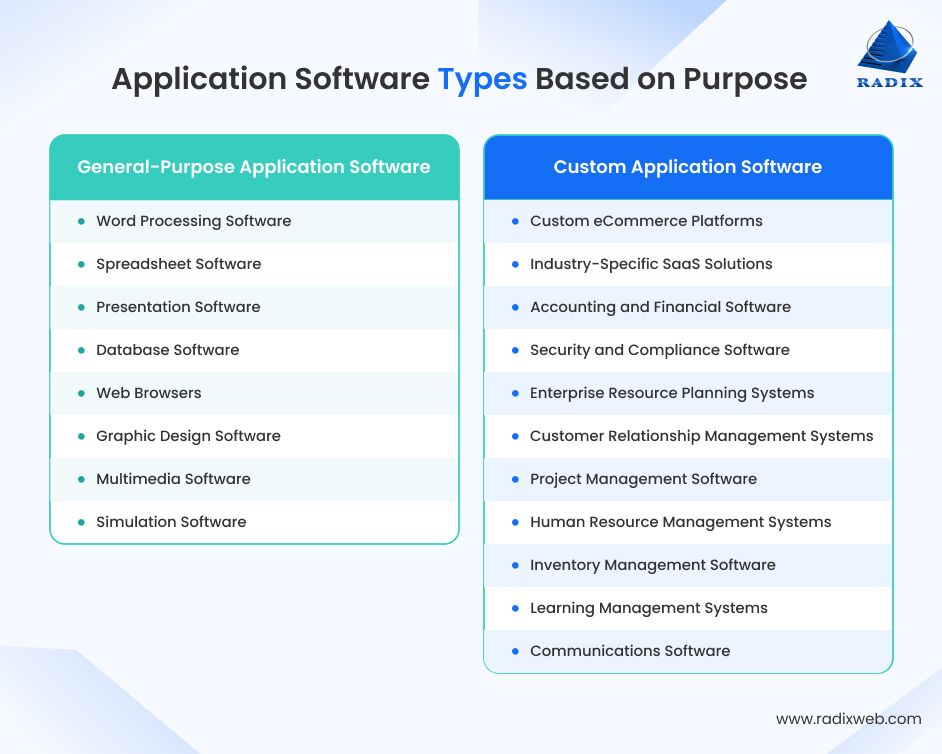
General-purpose software is built for wide audiences performing common tasks. It makes no industry assumptions and serves users across all sectors. Some of the most commonly used types of general-purpose application software include:
1. Word Processing Software
Creates, edits, and formats text documents with features now including real-time collaboration, grammar intelligence, and version control. The core function—producing polished written content—has remained unchanged since the 1980s, but the ecosystem around it has evolved substantially.
Examples: Microsoft Word, Google Docs, LibreOffice Writer, Notion
2. Spreadsheet Software
Organizes data in rows and columns, executes calculations through formulas, and generates charts and pivot tables. Finance and operations teams have relied on spreadsheets for decades. The risk emerges when spreadsheets get promoted beyond their design and is used as databases, project management systems, or CRMs. That's when they start costing more than they save.
Examples: Microsoft Excel, Google Sheets, LibreOffice Calc, Airtable
3. Presentation Software
Builds slide-based visual content for meetings, pitches, and training. Often the first artifact a decision-maker sees from any team. Tool quality matters less than the clarity of thinking behind it, though a poor interface does slow that thinking down.
Examples: Microsoft PowerPoint, Google Slides, Canva, Prezi
4. Database Software
Stores, organizes, retrieves, and manages structured data (also called Database Management Systems or DBMS). Every application that deals with user data, from simple form submissions to complex enterprise transactions, sits on top of a database. While databases are technically infrastructure, most users interact with them through application interfaces rather than raw queries, making them relevant to this category.
Examples: MySQL, PostgreSQL, Microsoft SQL Server, Oracle Database, MongoDB
5. Web Browsers
Retrieves and renders web-based content and runs cloud-hosted applications. In most enterprise environments today, the browser is where actual work happens. The shift to SaaS has made the browser the dominant application interface, with significant implications for security architecture that organizations are still catching up on.
Examples: Google Chrome, Mozilla Firefox, Microsoft Edge, Safari
6. Graphic Design Software
Creates and manipulates digital images, illustrations, and visual assets. Used across marketing, product design, and content production to produce everything from social media assets to brand materials.
Examples: Adobe Photoshop, Adobe Illustrator, Figma, Canva
7. Multimedia Software
Handles audio and video playback, recording, and editing. Ranges from media players used daily by individuals to professional editing suites used in broadcast and content production environments.
Examples: VLC Media Player, Adobe Premiere Pro, DaVinci Resolve, Audacity
8. Simulation Software
Replicates real-world conditions for training, testing, and research without the cost or risk of operating actual equipment. The value is particularly significant in high-stakes domains. A pilot who has never experienced a specific engine failure in a simulator is an operational liability risk. Simulation software mitigates that before it becomes real.
Examples: Microsoft Flight Simulator, MATLAB Simulink, Unity, SimMan
General-purpose software solves broad, horizontal problems that cut across industries and organizations. Its strength is wide applicability. But that also means that it rarely fits any specific use case perfectly without customization.
Custom software is built specifically for one organization's requirements. It doesn't exist on a shelf. You define its scope, commission its build, and own the result.
I consistently find clients approaching new technology decisions by starting with the product, not the problem. That's a flawed starting point. To build and launch custom applications the right way, you need to begin with precise problem definition, not product selection. The organizations that benefit most from custom builds are those where standard workflows don't exist. Think: businesses running proprietary processes, operating under specific regulatory requirements, or competing on how their technology works rather than what it does.
Now, custom software development isn't the answer for everything and the custom software vs off-the-shelf software debate is constant. But when custom software is the right answer, no amount of configuration on top of an off-the-shelf platform will substitute for it. Below are some types of application software that are frequently custom-built:
1. Custom eCommerce Platforms
Built for a specific brand's catalog structure, fulfillment model, and customer journey rather than adapted from a generic template. When a business's revenue depends on how the shopping experience feels and performs, a custom eCommerce platform built around business requirements outperforms any generic solution over time.
Examples: Proprietary platforms for high-volume retailers, luxury eCommerce, marketplace operators
2. Industry-Specific SaaS Solutions
SaaS applications built for defined verticals carry workflows, compliance requirements, and data structures that horizontal tools don't support. Healthcare appointment scheduling, legal case management, insurance claims processing... these aren't adequately served by generic productivity software with customization on top.
Examples: Medical practice management systems, legal matter management platforms, insurance underwriting tools
3. Accounting and Financial Software
Standard platforms work for businesses with standard financial structures. But organizations with multi-entity setups, complex revenue recognition requirements, or heavy regulatory compliance needs often find standard tools require so many workarounds that developing a custom accounting software tailored to business needs becomes the more rational long-term investment.
Examples: Custom financial consolidation systems, multi-subsidiary accounting platforms, specialized revenue recognition engines
4. Security and Compliance Software
Monitors systems, detects threats, enforces access controls, and generates audit trails aligned to specific regulatory frameworks. Off-the-shelf security tools generalize across industries. Organizations operating under HIPAA, GDPR, SOC 2, or sector-specific mandates often need controls designed around their exact data environment and compliance obligations.
Examples: Custom audit trail systems, healthcare-specific access control platforms, financial services compliance engines
5. Enterprise Resource Planning Systems (ERP)
Integrates finance, procurement, manufacturing, HR, and supply chain into a single system with shared data and unified reporting. A well-designed custom ERP application eliminates the data silos that force leadership to wait for manually assembled reports from six different systems that aren't reconciling to each other. ERP implementations fail almost always because organizations tried to implement software without first understanding the processes it was supposed to support.
Examples: SAP S/4HANA, Oracle NetSuite, Microsoft Dynamics 365, custom ERP builds
6. Customer Relationship Management Systems (CRM)
Manages every interaction across the sales, marketing, and support lifecycle. Using an off-the-shelf, customized, or custom-built CRM software gives revenue teams a complete picture of each customer relationship rather than fragmented views spread across email threads and personal spreadsheets. The technology is straightforward and you just need your team to actually make the most of it.
Examples: Salesforce, HubSpot, Zoho CRM, custom CRM platforms
7. Project Management Software
Gives teams visibility into tasks, timelines, resource allocation, and dependencies. It is a known fact that tools and technology rarely causes project failures. Process clarity and team discipline determine outcomes. Adding a project management software to the flow is what makes the existing state of both more visible.
Examples: Asana, Jira, Monday.com, ClickUp, Basecamp
8. Human Resource Management Systems (HRMS)
Handles recruitment, onboarding, payroll, attendance, performance management, and benefits in one platform. A custom HRMS built to your specific business workflows becomes worth considering when compensation models, workforce structure, or regional compliance requirements make standard platforms a permanent compromise.
Examples: BambooHR, Workday, Zoho People, custom HRMS platforms
9. Inventory Management Software
Tracks stock levels, purchase orders, supplier relationships, and warehouse movement in real time. A well-designed inventory management system connects procurement, warehousing, and fulfillment into a single data layer. Organizations still tracking inventory in spreadsheets aren't saving money on software. They're spending it on the errors spreadsheets can't catch.
Examples: TradeGecko, Zoho Inventory, ShipHero, custom inventory platforms
10. Learning Management Systems (LMS)
Delivers, tracks, and manages training content for employees, customers, or students. Organizations that build an LMS from scratch typically do so because generic platforms can't accommodate proprietary course content, specialized certification workflows, or compliance tracking requirements specific to their industry.
Examples: Canvas, Litmos, Google Classroom, custom enterprise LMS
11. Communications Software
Supports real-time messaging, video conferencing, and asynchronous collaboration. The proliferation of communication tools in most organizations has created a problem: nobody knows which channel to use for what. That's not a software problem. It's a process and governance problem that more software won't solve.
Examples: Microsoft Teams, Slack, Zoom, Google Meet
Custom software is built around specific problems and organizational realities. Its advantage is precision fit but it does require higher upfront investment and ongoing maintenance responsibility.
Licensing model is another important way to understand application software. It determines how the software is accessed, what rights the user has, and how much control an organization ultimately retains. It also has a direct impact on cost, flexibility, and long-term ownership.
Below are the main types of application software based on licensing model:
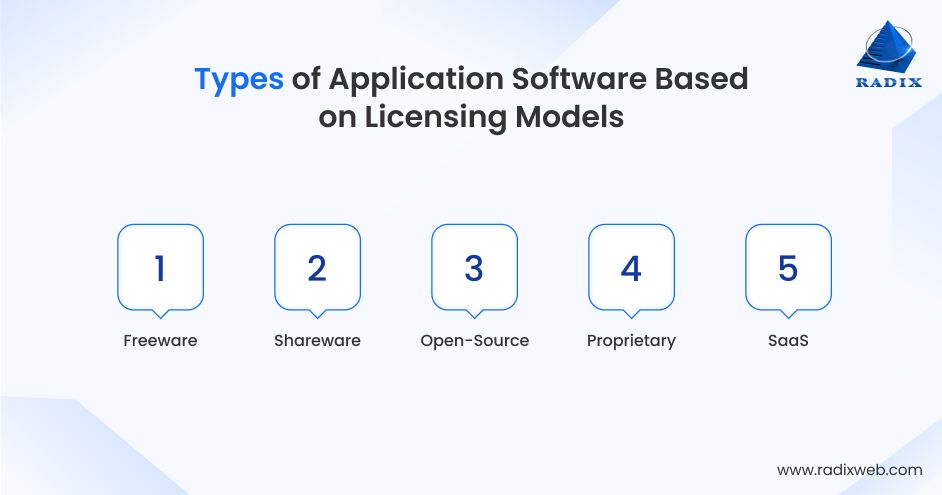
Freeware refers to software that is available at no cost, but remains fully owned and controlled by the vendor. The source code is not accessible, and users are granted permission to use the software without any ownership rights.
Examples: Adobe Acrobat Reader, VLC Media Player
Shareware follows a try-before-you-buy approach. Users can access the software either for a limited time or with restricted features, after which payment is required to continue full use. It is essentially a trial model designed to support evaluation before purchase.
Examples: WinZip, various productivity and utility applications
Open-source software makes its source code publicly available, allowing users to view, modify, and redistribute it under the terms of its license. While the software itself may be free to use, “free” here refers to openness rather than cost. In many cases, organizations still pay for enterprise support, managed services, or hosted versions. The key value lies in transparency and community-driven development, while the trade-off is the responsibility of maintenance and governance.
Examples: Linux, LibreOffice, WordPress, Apache, Kubernetes
Closed-source software is licensed for use but keeps its source code private. Users can operate the software but cannot inspect or modify how it works. This is the most common model in enterprise environments, where vendors provide functionality, updates, and support in exchange for licensing fees, while retaining full control over the product.
Examples: Microsoft 365, Salesforce, SAP, Adobe Creative Cloud
SaaS is a delivery and pricing model where software is hosted and managed by the vendor and accessed over the internet, typically through a subscription. Estimates suggest that over 75% of new enterprise software purchases are now SaaS-delivered. Developing a SaaS application for your organization helps remove the need for installation or infrastructure management on the user side and enables faster deployment and automatic updates. But remember: it also introduces dependencies on vendor uptime, pricing decisions, and long-term platform direction.
Examples: Salesforce, Microsoft 365, HubSpot, Slack, Zendesk
Licensing models ultimately shape more than just cost. It also defines how much control, visibility, and flexibility an organization has over the software that it depends on over time.
Whether you are buying an off-the-shelf application software or hiring a team of software developers to build a custom solution, it is important to understand the capabilities that determine how well it will perform in real-world use. These features influence not just functionality, but also usability, scalability, and long-term fit within your organization.
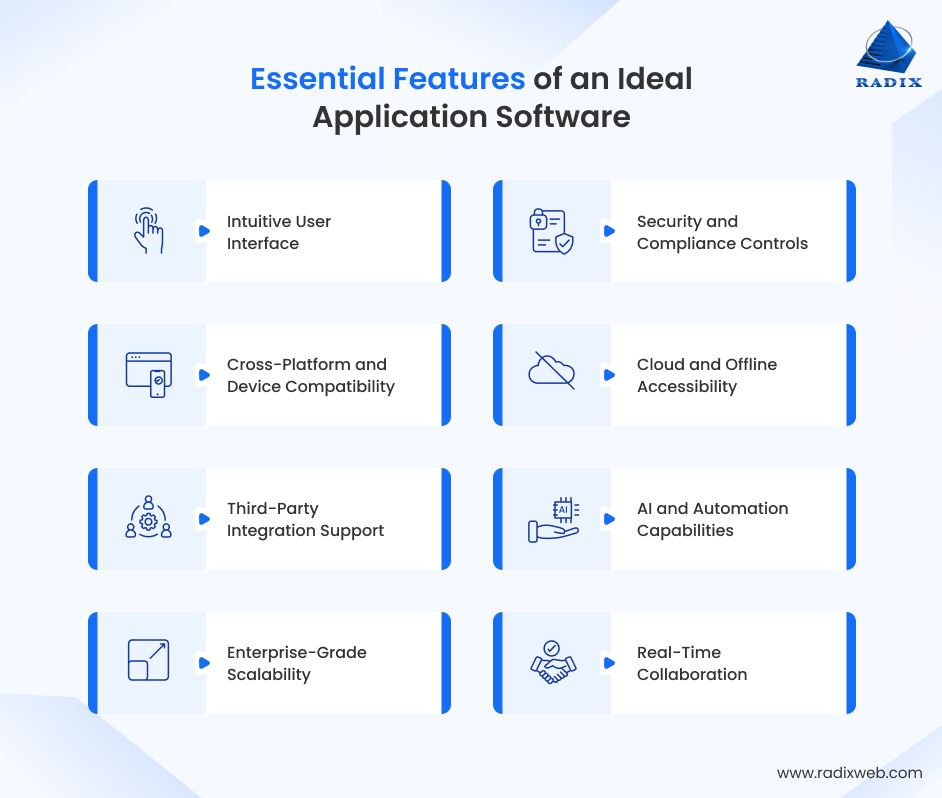
It is also important to understand that these capabilities shift over time. What's premium today becomes standard tomorrow. So, base your decisions around designing, developing, and deployment custom software on where the category is heading, not just where it is now.
Getting a software application developed for your business is often the highest-leverage organizational decision, yet they're often approached with less rigor than they deserve. Follow this process.
Every important software evaluation I've been part of that went wrong shared one failure: it started with a product, not a problem. A vendor's demo is engineered to make their solution look essential. The question you need to answer first is not "does this software look good?" It's "does this software fix the specific thing that's costing us time or money?"
Before engaging any vendor, document the process that needs to change, who it affects, how often it fails, and what that failure costs in measurable terms. That documentation becomes your evaluation filter, not the vendor's feature checklist.
Application software that can't connect to existing systems creates new silos rather than eliminating old ones. During evaluation, review the technical and functional aspects of application integration: How does this connect to your ERP, CRM, data warehouse, and communication tools? What happens to data format and fidelity at each handoff? What does the API contract look like and who maintains the connectors?
Integration complexity is the most underestimated cost in any software selection. It's also the hardest to fix after go-live. This deserves dedicated analysis, not a checkbox on a vendor scorecard.
Buy off-the-shelf when: Requirements match standard workflows closely enough that gaps are manageable through configuration, and the goal is speed of deployment.
Build custom when: Standard workflows don't match how the business actually operates, integration with proprietary or legacy systems is complex enough that configuration won't solve it, the software represents a source of competitive differentiation, or regulatory compliance requires specific controls that off-the-shelf platforms don't fully cover.
The hidden cost of choosing wrong is workaround accumulation. Teams build manual steps around gaps the software can't fill. Those workarounds slow people down, introduce error, and become invisible costs that never showed up in the original comparison. Over three to five years, that friction often exceeds the cost of a well-scoped custom development engagement.
Software that fits the organization at 50 people often becomes a constraint at 200. Assess scalability explicitly: What happens to performance, licensing cost, and feature availability as user count and data volume grow? A tool that is cost-effective today and prohibitively expensive at scale is not a solution. It's a deferred problem wearing a different label.
Technology implementation success depends as much on adoption as it does on capability. How easy is the tool to learn? What training and change management will your organization need? A powerful platform nobody uses is an expensive placeholder. Evaluate the adoption barrier, not just the feature set.
Is the vendor financially stable? Do they have a credible product roadmap? For custom software, do you have a sustainable relationship with your development partner? Software is not a one-time purchase. It's an ongoing dependency. Verify that dependency is sustainable.
The Path Forward: Building on the Right Foundation
Application software determines how work gets done. Every process your team runs digitally, every customer interaction logged in a system, every report your leadership bases decisions on traces back to an application. Understanding the category clearly is the first step to making better decisions about it.The organizations I've seen succeed aren't necessarily the ones that chose the fanciest technology. They're the ones that are building business applications based on a clear definition of the problem, a realistic integration assessment, and an honest view of what the right fit looks like versus what a compelling demo looks like.If your current application software is creating more workarounds than it's eliminating, that's a signal worth paying attention to. At Radixweb, we have built and modernized application software for businesses across North America and Europe for over 26 years, across manufacturing, healthcare, logistics, fintech, and enterprise services.We specialize in custom application development, legacy system modernization, and integration architecture that actually works. So, whether you're evaluating whether to build or buy, need help assessing integration complexity, or are ready to scope a custom platform, our team understands what success looks like. Schedule a meeting with our application software experts to discuss what the right solution looks like for your operation.
Ready to brush up on something new? We've got more to read right this way.