Read More


Recognized for AI Excellence at 2026 Globee® Awards - Read More

Vinit Kariatukaran
Python is used by 58% of developers in the 2026 Stack Overflow Developer Survey, following a seven-point increase the previous year. It also ranked first on the TIOBE index in September 2026, with a rating of 17.76%.
These numbers reflect Python’s popularity, but its enterprise relevance goes beyond developer adoption. Today, Python for automation and AI helps businesses streamline workflows, improve productivity, reduce manual effort, and build scalable, intelligent solutions. It is a practical choice for enterprises who need to automate operations, connect applications, process data, and build AI-enabled capabilities. Its value lies not in any single use case, but in the ability to support different workloads within the same technology ecosystem.
This makes using Python for enterprise transformation a question of long-term engineering strategy, not just language selection. The right approach to using Python to connect data and AI with enterprise systems and drives measurable outcomes while keeping systems maintainable and secure.
Python has evolved from a scripting language into a practical foundation for enterprise automation, system integration, data engineering, and AI development. Its extensive ecosystem helps businesses extend existing systems with intelligent capabilities without rebuilding everything from scratch. By combining rule-based workflows with AI where it adds value, enterprises can improve efficiency, automate complex tasks, and make better use of business data. The key is to start with measurable needs, choose the right tools, and build secure, scalable solutions that support both current operations and future growth.
| Aspect | Details |
|---|---|
| What this guide covers ? | Python’s evolution in enterprise technology, rule-based and AI-enabled automation, enterprise use cases, emerging AI applications, a practical implementation roadmap, frameworks and libraries |
| Who should read this guide ? | Enterprise technology leaders, CTOs, IT managers, software architects, automation teams, data engineers, AI teams, businesses planning modernization |
Python’s enterprise role has expanded as businesses have needed more than isolated scripts. Its readable syntax and broad library ecosystem made it useful for connecting systems and automating repetitive work. As data engineering, cloud platforms, and AI matured, the same language became relevant to increasingly complex enterprise workloads.
The journey can be understood through three stages.
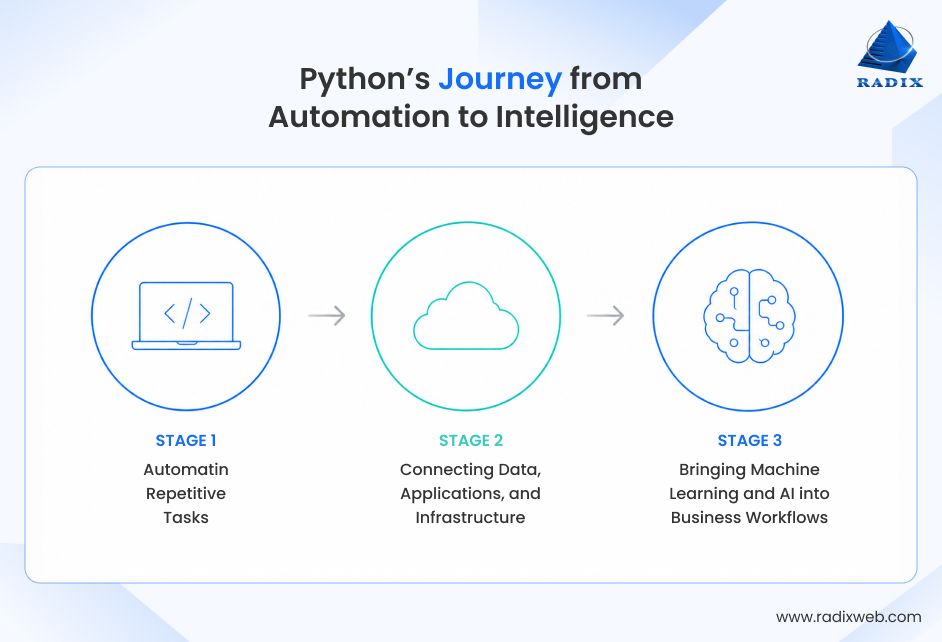
Python initially gained traction in many business environments through small scripts that handled work people would otherwise perform manually. Teams used it to process files, transform data, run scheduled tasks, and connect applications that did not communicate easily.
Its relatively straightforward syntax made these Python automation scripts easier to develop and maintain than many one-off solutions.
Common applications of Python for business process automation included:
These use cases of Python for software development remain relevant even today. Enterprises still benefit from eliminating manual handoffs and reducing errors in repetitive processes. The difference is that successful automation increasingly needs monitoring, access controls, failure handling, and clear ownership instead of functioning as a script that only one employee understands.
As enterprise systems became more distributed, Python found a broader role in data pipelines, cloud operations, application backends, and system integration. Teams could use the same language to prepare datasets, call APIs, manage workloads, and support business applications.
This reduced the friction between different parts of the engineering process.
Some use cases of Python for enterprise workflow automation:
At this stage, Python was no longer limited to connecting separate tools. It could support the services and data flows that connected business operations end to end.
The growth of machine learning and generative AI expanded Python’s role again. Libraries for data analysis, model development, natural language processing, and deep learning made it possible to develop intelligent capabilities within the same ecosystem used for automation and integration.
Enterprises can now use Python to build web apps that power workflows for interpreting information, generate predictions, classify content, and support decisions.
Examples of using Python for intelligent process automation include:
Not every AI application needs to be built entirely in Python. Models may run on managed platforms, and some business systems may use other languages. Python’s strength is its ability to coordinate data preparation, model interaction, business logic, and integration across these environments.
This transition from automation to AI does not mean rule-based automation has become obsolete. Many enterprise processes still depend on explicit conditions, predictable inputs, and consistent outcomes.
AI becomes useful when a workflow must interpret unstructured information, identify patterns, or handle variations that fixed rules cannot cover effectively.
| Aspect | Rule-Based Automation | AI-Enabled Automation |
|---|---|---|
| How it works | Executes predefined rules and conditions | Uses models to interpret inputs, classify information, or generate predictions |
| Best suited for | Repetitive tasks with clear, stable rules | Tasks involving unstructured data, variation, or probabilistic decisions |
| Example | Route an invoice based on a fixed amount threshold | Extract invoice details and flag unusual entries for review |
| Predictability | Generally deterministic when inputs and rules are unchanged | Outputs can vary and require evaluation |
| Human involvement | Needed for exceptions and rule changes | Often needed for validation, uncertain results, and high-impact decisions |
| Main considerations | Rule maintenance, exception handling, and integration | Model quality, data privacy, evaluation, monitoring, and governance |
A practical enterprise workflow may be used for both. Rules can validate required fields, enforce approval limits, and control system access, while AI extracts information or identifies cases that need attention.
This combination helps businesses apply intelligence where it adds value without introducing unnecessary complexity into predictable processes.
Python is widely used for enterprise automation because it combines accessible syntax with libraries for data processing, application integration, infrastructure management, and AI. It allows teams to build across several layers of a workflow without requiring a separate language for every task.
Its usefulness, however, depends on how the language is applied. Production systems still need sound architecture, testing, security, observability, and operational ownership.
Here’s what makes Python the default for automation, AI, and enterprise transformation:
Python’s syntax is relatively easy to read, which can make automation logic simpler to review and modify. This matters when workflows change because of new business rules, regulatory requirements, or updates to connected systems.
But readable code does not automatically guarantee maintainability. Teams still need clear module boundaries, automated tests, documentation, code reviews, and consistent development practices. With these foundations, Python can support automation that evolves alongside business operations rather than becoming a collection of fragile scripts.
Python offers libraries for file processing, data manipulation, API communication, testing, machine learning, and AI application development. Teams can select tools based on the problem instead of building common functionality from scratch.
For example, Pandas can help process tabular data, HTTPX can support service communication, and scikit-learn can provide machine learning algorithms. More specialized Python frameworks support orchestration, distributed processing, and AI workflows.
The advantage is breadth, not a requirement to use every available library. Selecting a small, well-supported set of dependencies helps control maintenance and security risks.
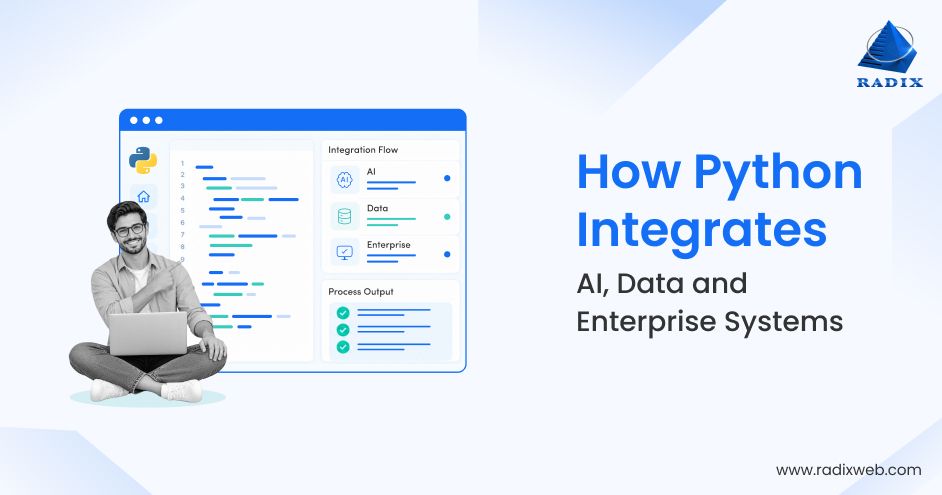
Enterprise automation and even AI solutions rarely operate in isolation. They often need to exchange information with databases, SaaS platforms, legacy applications, message queues, and cloud services.
Python supports the integration of smart features with existing systems through APIs, database drivers, SDKs, and messaging libraries. This makes it useful for extending existing technology rather than replacing it outright.
Teams should still evaluate authentication methods, rate limits, data contracts, error handling, and compatibility. The integration quality depends on those engineering decisions as much as on the language itself.
Python can connect several stages of a workflow: collect data, validate it, apply business rules, call a model, and send the result to another application. Using a shared language across these stages can simplify development and collaboration between engineering, data, and AI teams.
That does not mean every component should use Python. Performance-sensitive services, embedded software, or existing enterprise platforms may be better served by other technologies. A sound architecture uses Python where its ecosystem and development speed provide a clear advantage.
Python has an established community, extensive documentation, and a broad range of third-party packages. These resources help teams find implementation guidance, evaluate existing solutions, and recruit developers with relevant experience.
The ecosystem also requires careful management. Package quality varies; dependencies can introduce vulnerabilities, and libraries may change or lose support. Enterprise teams should use dependency scanning, version pinning, approved package sources, and regular maintenance to keep applications dependable.
Together, these characteristics make Python a practical foundation for enterprise automation, provided that the implementation is designed for production requirements rather than only for a successful demonstration.
Python’s future in enterprise technology is closely tied to how businesses adopt AI and how they build intelligent systems for various business needs. The next opportunity is not simply to add a model to every workflow. It is to identify tasks where AI can improve how information is processed, or if decisions are supported, then integrate those capabilities into controlled business processes.
Here are some of the latest use cases of Python in an AI-first technology ecosystem:
Many business operations depend on information stored in invoices, purchase orders, claims, contracts, and forms. Traditional automation can process predictable document formats, but it becomes harder to maintain when layouts and content vary.
Python can connect optical character recognition (OCR), document extraction models, validation logic, and enterprise applications. A workflow might extract invoice fields, compare them with purchase-order records, flag discrepancies, and route uncertain cases to a finance employee.
The business value of automating processes with built-in intelligence comes from reducing manual data entry while preserving validation and approval controls. Sensitive or high-impact decisions should retain appropriate human review.
Generative AI can help employees find information, summarize documents, and draft responses based on internal knowledge. However, a model alone does not provide reliable access to current enterprise information.
Python can connect document ingestion, retrieval systems, embedding models, vector databases, and language models in a retrieval-augmented generation workflow. The application can retrieve relevant material before generating a response and provide source references for verification.
For enterprise use, designing a Generative AI solution should also account for permissions, data freshness, access logging, and the risk of unsupported answers. Retrieval quality and governance are essential to making the application useful beyond a prototype.
Enterprise AI agents built with Python can use models and tools to carry out sequences of tasks, such as gathering information, interpreting results, and requesting an action from another system. Python frameworks can help orchestrate these steps and connect models to approved tools.
A support workflow, for instance, might classify an incoming request, retrieve relevant account information, draft a response, and prepare a service ticket. The application should limit which actions the agent can take and require approval for consequential operations.
Agents are not the right answer for every workflow. Where rules and conventional orchestration are sufficient, they may be simpler, cheaper, and easier to test. Agentic system development is the most useful when a process requires flexible reasoning across multiple steps.
Enterprises can use machine learning to forecast demand, estimate equipment failure risk, identify suspicious transactions, and predict customer churn. Python supports data preparation, feature engineering, model training, evaluation, and deployment through established libraries and frameworks.
A production-grade ML model built for practical use also needs a process for monitoring accuracy, detecting data drift, managing versions, and retraining when appropriate. Without these controls, model performance may deteriorate as business conditions change.
Python can support these lifecycle activities, but reliable outcomes depend on data quality, model selection, and ongoing operational management.
AI delivers limited value when its outputs remain disconnected from business operations. To be useful, predictions and generated information must reach the systems where employees make decisions and complete work.
Python can expose model capabilities through APIs and connect them with ERP, CRM, customer support, finance, and operational platforms. An AI application might summarize a service history and provide recommendations inside an existing support tool instead of requiring employees to switch between separate applications.
This approach helps businesses introduce AI to existing systems incrementally. Teams can start with a defined workflow, measure the results, and expand only after validating security, reliability, adoption, and business value.
The direction is clear. Python can support automation and AI within a shared engineering ecosystem. Enterprises still need to decide where intelligence is justified, which systems should remain authoritative, and what controls are necessary before AI can influence business decisions.
Python lets enterprises extend existing automation with data processing, model services, and API integrations. Teams can retain working systems, introduce AI at selected decision points, and modernize components as needed. The transition is usually an incremental engineering effort, not a wholesale rebuild.
Here’s how the transition from rule-based automation to intelligent automation maps out:
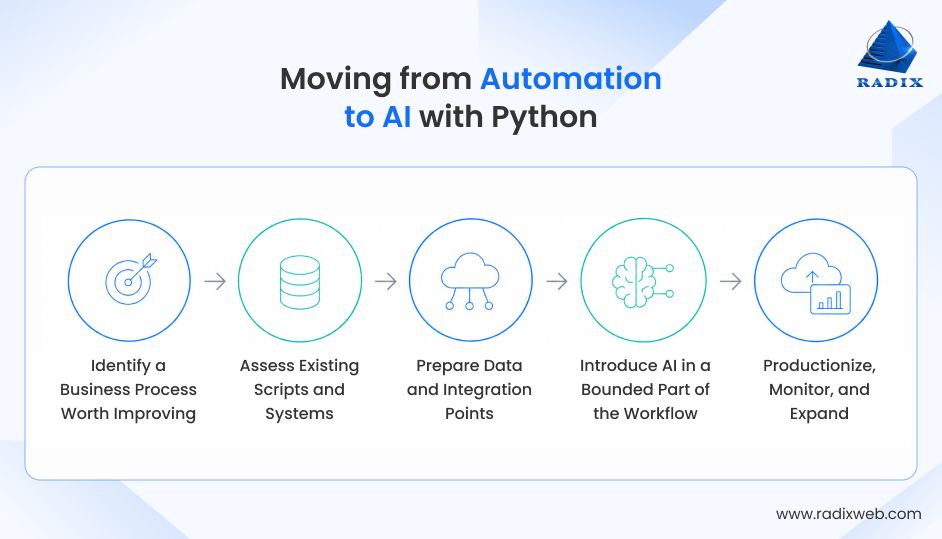
Start with a process that has a clear operational problem, such as repeated manual data entry, slow document review, inconsistent classification, or time-consuming information retrieval. These types of processes benefit the most from automation and yield the fastest ROIs too. Establish a baseline using measures such as processing time, error rates, cost per transaction, and exception volume.
Then determine whether the problem requires conventional automation, AI, or a combination. A stable, rules-driven task may not benefit from a model. A workflow involving variable documents or ambiguous text may justify AI evaluation.
Practical consideration: Choose a use case with accessible data, a clear owner, and measurable outcomes. Avoid starting with an enterprise-wide AI initiative before proving value in a specific process.
Review the Python scripts, APIs, databases, scheduled jobs, and third-party platforms already involved in the process. Identify duplicated logic, undocumented dependencies, manual handoffs, security gaps, and failure points.
Not every existing script needs to be replaced. Some may be suitable for reuse after adding tests, configuration management, logging, and error handling. Others may need refactoring or migration into a managed service.
Practical consideration: Document dependencies and define how each component exchanges data. This makes it easier to introduce new capabilities without disrupting established operations.
AI-enabled workflows depend on reliable inputs. Check whether clean, AI-ready data is available, which means ensuring that the data is accurate, accessible, current, and permitted for the intended use. Establish data validation rules, access permissions, retention requirements, and processes for handling incomplete records.
Next, define the Python AI integration interfaces between existing systems and new components. APIs, queues, and scheduled data pipelines can help separate responsibilities and prevent tightly coupled changes.
Practical consideration: Use representative data to test the workflow, including missing fields, malformed records, duplicate events, and unexpected responses. Decide how the system should behave when a dependency becomes unavailable.
Before building smart features or capabilities with AI, consider where the model addresses a defined limitation. This might mean extracting fields from variable documents, classifying customer requests, summarizing knowledge articles, or predicting demand.
Keep deterministic checks around the model. Validate outputs against expected formats, apply business rules, and route low-confidence or high-risk cases for human review. For generative AI, test for unsupported answers, inappropriate data disclosure, and prompt injection.
Practical consideration: Begin with a pilot that runs alongside the existing process or requires human approval before taking action. Compare its results with the baseline before increasing automation.
A successful pilot needs more than a working code. Prepare deployment pipelines, secrets management, access controls, monitoring, alerting, rollback procedures, and documented ownership. Track model quality where applicable, along with latency, operating cost, failure rates, and business outcomes.
Establish a process for reviewing incidents, updating dependencies, evaluating model changes, and retraining models when justified. Expand additional workflows only when the current implementation meets agreed performance and governance requirements.
Practical consideration: Assign responsibility for both the application and its outcomes. A model or workflow that no team owns will become difficult to maintain as systems and business requirements change.
The goal of these steps is to transition from traditional automation to AI is not to convert every Python script into an AI application. It is to build a maintainable path from task automation to intelligent workflows, adding complexity only when the business case supports it.
Python’s ecosystem covers much of the technology required to build automation and AI-enabled enterprise applications. The appropriate Python libraries for AI and automation and other tools in the enterprise stack depend on data volumes, existing infrastructure, latency requirements, team expertise, and operational constraints.
The tools below are examples, not a checklist that every project needs to be adopted.
| Category | Tools and technologies | Typical use |
|---|---|---|
| Data processing and analysis | Pandas, NumPy | Cleaning, transforming, and analyzing structured data |
| Distributed data processing | PySpark | Processing large datasets across distributed environments |
| Data validation | Pydantic | Validating data structures and application inputs |
| Workflow orchestration | Apache Airflow, Prefect, Dagster | Scheduling and coordinating data and automation pipelines |
| Durable workflow execution | Temporal | Managing long-running workflows, retries, and recovery |
| Task queues | Celery, Redis | Running asynchronous and background jobs |
| Browser automation and testing | Selenium | Automating browser interactions and testing web workflows |
| Machine learning | scikit-learn | Classification, regression, clustering, and model evaluation |
| Natural language processing | spaCy, Hugging Face Transformers | Text processing, language tasks, and model integration |
| Deep learning | PyTorch, TensorFlow | Building and running neural network models |
| AI workflow orchestration | LangGraph, AutoGen | Coordinating multi-step or agent-based AI workflows |
| Tool and service connectivity | Model Context Protocol (MCP) implementations | Connecting compatible AI applications with tools and data sources |
| API development and service communication | FastAPI, HTTPX | Exposing services and communicating with external APIs |
| Databases and retrieval | PostgreSQL, pgvector, Redis | Storing application data, supporting vector retrieval, and caching |
Important: Tool selection should follow architecture and business requirements rather than popularity. A small scheduled automation may need only Python, a database driver, and basic logging. A data platform may require distributed processing and workflow orchestration. An AI application may need model evaluation, retrieval, access controls, and additional monitoring.
Teams should also account for dependency maintenance, licensing, deployment compatibility, and the skills required to operate the stack. Using fewer well-understood components is often easier to secure and maintain than adopting multiple overlapping frameworks.
Python provides the building blocks, but the architecture determines how well they work together. The most effective enterprise modernization strategy uses proven components, clear interfaces, and operational controls to support current requirements while leaving room for future capabilities.

Build Your Enterprise Transformation Strategy with Python
Python can support enterprise transformation by connecting the work businesses need to do today with the capabilities they may need tomorrow. From routine automation and system integration to machine learning and AI-enabled workflows, the priority is to solve the right business problems with maintainable software. The next step is to start leveraging Python development for enterprise transformation to address current operational needs while preparing systems for future requirements.Radixweb brings 26+ years of software engineering experience to enterprise application development, integration, and modernization. We help businesses assess existing systems, identify practical opportunities for automation and AI, and build solutions around their technology landscape, business goals, and long-term needs. Schedule a consultation with us, and we’ll help you identify the best roadmap for enterprise transformation with Python.
Ready to brush up on something new? We've got more to read right this way.