Read More


Recognized for AI Excellence at 2026 Globee® Awards - Read More

Dhaval Dave
AI models have become exceptionally capable. Yet even when two teams use the same model, their deployments can produce very different results. There are many reasons why one AI project fails while another succeeds, but one matters deeply: the architecture built around the model. How it connects to data, APIs, applications, and enterprise systems determines whether it works reliably in production or stays a promising experiment.
This is where Python emerges as the glue between AI, data, and enterprise systems.
At Radixweb, we have used Python as the connective layer across multiple projects, and here is what that experience tells us: Python didn't become the default for AI by being fast, strict, or elegant. It connects everything else, including native libraries, Spark clusters, model servers, and the legacy system nobody wants to touch. That’s what makes Python AI integration the real story. Also, the effectiveness of Python for data engineering is the reason it sits inside most enterprise stacks. Read on to see why the "slow" language runs a surprising amount of the world's fast code.
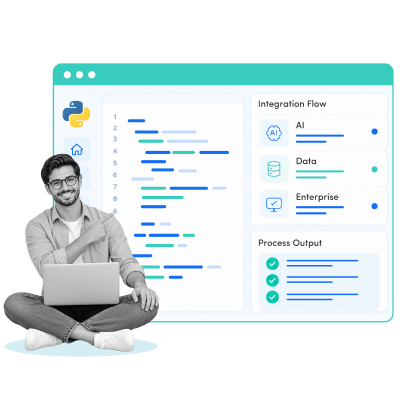
Python has become the glue between AI, data, and enterprise systems because it connects different technologies without forcing businesses to replace the systems they already rely on. It can orchestrate data pipelines, integrate AI models, expose APIs, connect legacy applications, and coordinate distributed workloads while specialized systems handle heavy computation. The real benefit of using Python for enterprise AI is not raw speed, but making AI, data, and existing technology work together reliably in production.
| Aspects | Details |
|---|---|
| What does this guide cover? | How Python connects AI, data, and enterprise systems, five integration patterns, a real-world example, implementation steps, limitations, security, and governance |
| Who should read this guide? | CTOs, CIOs, heads of AI and data, enterprise architects, and engineering and product leaders evaluating Python for their AI and data stack |
Organizations have been using Python for developing software solutions for decades, and it has been used for everything from simple web applications to scientific computing. But AI has given the language a much bigger role in enterprise technology. As businesses bring AI into existing data environments and applications, they need a language that works across every layer. Python fits that job well. It can read and transform data, work with machine learning frameworks, call foundation models, expose APIs, orchestrate workflows, and talk to databases and existing applications.
Underneath, specialized technologies do the heavy lifting: NumPy and PyTorch rely on optimized native code and GPU kernels, while PySpark distributes large-scale processing across clusters. Python coordinates these pieces and gives engineering teams a common way to work with them.
Consider a claims-scoring workflow at an insurer. Python pulls policy records from a legacy database, cleans them with Pandas, hands the heavy joins to Spark, and calls a PyTorch model running on a GPU. A FastAPI service returns the score to the claims application, which may still be written in Java. One workflow, five technologies, and Python is the only thing that touches all of them.
That is what makes Python popular for AI and data engineering in modern enterprises. It may not be the fastest language for every workload, the strictest for every application, or the best fit for every production service. But when AI, data, and existing systems need to work together, Python can sit between them and make the connection practical. That is the real reason it earned the "glue language" label.
AI, data, and enterprise systems rarely speak the same technical language. Models rely on Python and specialized ML frameworks; enterprise data sits across databases and distributed platforms, and core applications often still run on Java, .NET, or legacy technology. That is why designing AI solutions for enterprise-grade use is as much an architecture problem as a modeling one. Connecting these layers takes a language that can move between them.
This is where Python for AI and data engineering becomes useful. Python AI integration connects AI models, data pipelines, APIs, and enterprise systems to help businesses deploy AI solutions in existing technology infrastructure.
Python as an integration layer lets teams bring technologies together without rebuilding the whole stack around one language. Five patterns show how.
| What needs to connect | How Python bridges the gap | Integration pattern |
|---|---|---|
| AI models and high-performance computing | Connects Python applications with optimized C, C++, CUDA, and GPU libraries | Native extensions |
| Enterprise data and AI workloads | Connects data workflows with distributed processing through Spark | PySpark |
| AI models and enterprise applications | Exposes models and workflows through APIs | FastAPI |
| AI and legacy enterprise systems | Adds an integration layer around existing systems | Python service layer |
| AI agents and business tools | Orchestrates models, APIs, tools, and business workflows | Agent orchestration |
Python doesn't have to perform every computationally intensive task itself. It defines the workflow, while optimized native libraries and GPUs handle the operations where performance matters most. NumPy and PyTorch, for example, run optimized C, C++, and GPU code beneath their Python interfaces, handling matrix calculations and tensor processing.
| Layer | Responsibility |
|---|---|
| Python | Defines application and AI workflow logic |
| C/C++ libraries | Handle performance-sensitive operations |
| CUDA/GPU | Execute highly parallel workloads |
| Python | Coordinates results with the rest of the application |
Cython, ctypes, and cffi expose native functionality to Python when an enterprise needs to integrate its own optimized code or third-party libraries, and buffer interfaces let data move between Python and native code without unnecessary copying.
The result is a hybrid architecture: Python stays in the connective layer while specialized technologies do heavy computation. That's what gives teams the flexibility of using Python for AI data processing without putting performance-critical operations into pure Python.
For organizations pursuing the use of AI beyond basic capabilities, the question is not whether Python should do everything. It's where Python should sit and where specialized technologies should take over.
AI is only as useful as the data it can reach, and enterprise data rarely comes from one source. Databases, applications, data lakes, event streams, and external systems may all feed the same workflow.
Using Python for data integration offers the most valuable information here. Through PySpark, Python works with Apache Spark, so data engineering teams can build large-scale pipelines without moving to another language. That is especially useful when integrating data across enterprise sources and systems for AI workloads.
| Data layer | Python's role |
|---|---|
| Enterprise sources | Connect and orchestrate data ingestion |
| Distributed processing | Use PySpark to work with Spark clusters |
| Transformation | Apply Python-based data preparation logic |
| AI pipeline | Deliver processed data to ML and AI workloads |
PySpark uses Py4J to communicate with Spark's JVM environment, and Apache Arrow moves data between Python and JVM processes in efficient columnar batches. Python isn't replacing Spark. It gives data engineers a familiar interface to a distributed engine.
The same approach covers both batch and streaming. A nightly job that rebuilds a feature table and a Structured Streaming job that scores events as they arrive can share the same Python transformation logic, which keeps training data and production data consistent.
One performance rule applies though: use Spark's built-in functions first, vectorized Pandas UDFs when custom Python logic is needed, and standard row-by-row UDFs sparingly, since they add serialization and execution overhead.
A trained model is not yet an enterprise capability. Applications and workflows need a reliable way to send data to the model and consume its results, and that is where AI integration moves from the model into the application architecture. FastAPI lets teams wrap models, data-processing logic, and AI workflows behind APIs that other applications can call.
| From | Python layer | To |
|---|---|---|
| AI model | FastAPI service | Enterprise application |
| Prediction logic | API endpoint | Business workflow |
| AI pipeline | Python service | Internal system |
| Model output | Validated response | Application or user |
FastAPI runs on ASGI and uses Pydantic to validate requests and responses, which suits typed API services around AI workloads. It also fits alongside the wider Python data engineering ecosystem of pipelines and orchestration tools.
Developing web-based solutions with Python in this setting doesn't mean owning the whole application. The service may simply expose an AI capability to the applications that already run the business. What decides whether it stays a prototype is the production detail: loading models once at startup, queuing long-running inference, versioning response schemas, and handling authentication.
Not every endpoint needs to be synchronous, either. A fraud check that must answer in milliseconds belongs behind a direct API call, while a document-classification job that takes thirty seconds is better handled with a queue and a status endpoint, so callers aren't left waiting on an open connection.
AI integration is far more practical when organizations don't have to replace the systems they depend on. Banks, insurers, healthcare providers, and manufacturers often run critical applications and databases that can't be rewritten for a new AI capability. A Python service placed between the existing system and the AI capability offers another route:
Legacy application → Python integration service → AI model → approved result → existing application
| Integration pattern | Python's role | Typical use |
|---|---|---|
| Read-only access | Retrieve and prepare existing data | AI analysis and recommendations |
| Data export | Transform existing records | Model training or batch processing |
| Event consumer | Process events from existing applications | Real-time AI workflows |
| API integration | Connect AI capabilities with business functions | Application augmentation |
| Controlled write-back | Return approved AI-generated results | Human-reviewed workflows |
Starting with read-only access is usually the lower-risk option. It lets teams validate the capability and its data needs without changing the system of record. It's also why a Python integration layer is often more practical than modernizing every application first.
The same principle applies to adding AI to existing cloud applications or integrating AI capabilities into existing business systems: introduce the capability where it creates value and keep the surrounding architecture stable.
Python's role becomes more visible when AI moves from generating responses to taking actions. An agent may need to pull data from a CRM, check an ERP record, query an internal database, create a support ticket, or trigger a workflow. The model decides what to do, but the agent needs to be designed and architected in a reliable way so that it can act within enterprise systems.
AI model → Python orchestration layer → enterprise tool/API → business system → result → AI model
| Agent requirement | Python's role |
|---|---|
| Access a CRM | Manage API and tool integration |
| Query an ERP | Handle authentication and requests |
| Call an internal service | Orchestrate tool execution |
| Wait for approval | Manage workflow state |
| Recover from failure | Handle retries and timeouts |
| Record activity | Support logging and observability |
This is more than wiring an API to an LLM. The orchestration layer also has to enforce identity, permissions, approval policies, audit trails, and failure handling, because an agent with access to enterprise systems can amplify weaknesses already present in them. Least-privilege access, human approval for sensitive actions, clear tool boundaries, and thorough logging belong in the architecture itself.
More complex deployments extend the same principles into multi-agent cloud architecture, where several AI components coordinate with each other and with enterprise services.
Across these five patterns, Python is rarely the technology doing everything. Native libraries handle intensive computation, Spark handles distributed processing, enterprise applications keep running core business processes, APIs expose capabilities, and AI models handle inference and reasoning. Python sits between them and helps them work together.
That is the value of Python as a bridge between AI and enterprise systems. It connects AI to compute, data to processing engines, models to applications, and agents to the tools businesses already use. A quick way to apply this is to ask which layer should lead:
| Layer | Who should lead |
|---|---|
| Workflow logic, orchestration, and glue code | Python |
| Data preparation and model serving | Python, with Spark or native libraries underneath |
| Heavy numerical computation | C, C++, CUDA, and GPUs, called from Python |
| Large-scale distributed processing | Spark, driven from Python |
| High-volume transactional cores | Java, .NET, Go, or Rust |
Teams that apply it this way end up with intelligent data engineering solutions powering smart businesses without rebuilding the stack. The goal isn't to use Python for everything. It's to use it where a flexible, well-supported layer can connect the rest.
Python Handling Data, AI, and Legacy Enterprise Systems in Actual SystemsJ.P. Morgan’s Athena is a platform that shows what Python looks like when AI, data, and enterprise systems have to operate at financial-services scale. Athena is a Python-based platform used across pricing, trading, risk management, data science, and machine learning. Its architecture has grown to tens of millions of lines of Python code and thousands of developers, while connecting models, analytics, data, and production workflows.Python provides the common layer, while specialized infrastructure handles compute-intensive workloads. In its cloud modernization, J.P. Morgan moved risk calculations onto AWS, scaling infrastructure on demand and reducing calculation times by 30%. The lesson is less about Python replacing other technologies and more about Python connecting models and data with the enterprise systems that turn those capabilities into production outcomes.
Understanding how to develop Python applications is the easy part. Getting them to work alongside AI models, data pipelines, and enterprise systems takes a sequence, and skipping steps is where projects stall.
Python for connecting AI models to enterprise systems and data works best when it is built in layers, one boundary at a time. Here's the order we follow, from first audit to steady-state operations.
List the databases, APIs, and legacy applications your use case touches, and mark each one's system of record. Then choose a single boundary to start with, such as a read-only feed from your core application. One boundary, one model, and one owner keeps the first release small enough to finish and large enough to prove value.
Done when: every system in scope has an owner, and the first boundary is agreed.
Reuse existing pipelines wherever possible. Pandas handles cleaning for smaller datasets, and PySpark takes over as volume grows. Keep AI data processing inside the application's existing permissions, so the model never sees rows a user couldn't see. However, make sure your data is AI-ready and clean. Define freshness requirements (real-time, near-real-time, or batch) here.
Done when: production-shaped data flows end to end under real permissions.
Start with a managed model or a standard library such as scikit-learn or PyTorch before building anything custom. Create an evaluation dataset early and keep it fixed, so every change to the model, prompt, or retrieval can be compared against the same baseline.
Done when: the model beats a simple baseline on your fixed evaluation set.
Package the model behind a FastAPI endpoint with Pydantic schemas. Load the model once at startup, version the response format, and move slow inference behind a queue if the latency budget is tight. This layer keeps the model replaceable without touching anything that calls it.
Done when: another team can call the endpoint without knowing which model sits behind it.
Python integration with enterprise systems should start read-only, using REST endpoints, events, or a replica. Pass the user's identity through, give each tool its own least-privilege service account, and require human approval before any AI output writes to a record. Add write-back later, one reviewed step at a time.
Done when: a read-only integration runs against real systems with audit logging switched on.
Containerize the service and deploy it through Docker and Kubernetes. Pin dependencies, scan packages, and run everything through CI/CD with tests that include your evaluation set. Define a rollback you've actually tested, and set a latency budget so a slow model can't drag down the application around it.
Done when: a failed deployment can be rolled back, and the team has rehearsed it.
Track response quality, latency, cost, and input drift alongside standard uptime metrics, because AI can degrade while infrastructure looks healthy. Schedule dependency upgrades, review access logs, and plan for ongoing costs of roughly 15 to 25% of the build per year. Only then add the next boundary.
Done when: someone reviews quality, cost, and drift on a schedule, not only when users complain.
Notice what the process doesn't include: a rewrite. Every step adds a layer around your existing systems, which is why each one can be tested, reversed, or replaced on its own. The order matters because the hard questions about data, access, and ownership get answered before the model does anything visible.
A lot of AI product problems are Python engineering problems. But only up to a point. Despite Python being an excellent integration and orchestration layer, forcing it into every part of an AI or enterprise architecture can create unnecessary latency, operational complexity, or security risk. The better question is not whether Python can do something, but whether it is the right tool for that particular workload.
Here are five situations where another technology should lead.
Imagine a financial trading platform where an AI model helps identify market signals, but the final transaction has to execute within microseconds. Python can prepare data, call the model, or coordinate surrounding workflows, but it should not sit in the critical transaction path simply because the rest of the AI stack uses Python.
Python's interpreter overhead and concurrency model make it a poor choice for ultra-low-latency transaction processing. C++, Rust, Java, or another performance-oriented technology may be better suited to the execution core, with Python operating around it.
Where it breaks: high-frequency trading, real-time bidding, telecom control systems, or other workloads where predictable sub-millisecond latency matters more than development speed.
Consider a retailer processing billions of events from stores, websites, mobile apps, and logistics systems. Python can orchestrate the pipeline and handle transformations, but pushing every record through custom Python functions can introduce unnecessary serialization and execution overhead.
This is where distributed engines such as Spark, Flink, or native database processing should take the lead. Python can still provide the interface and business logic where appropriate, but the heavy data processing belongs in the system designed for it.
Where it breaks: massive batch processing, high-throughput streaming, or pipelines where row-by-row Python execution becomes the bottleneck.
A data scientist can build an impressive fraud-detection model in a notebook in a few days. That does not mean the notebook is ready to run a bank's fraud operation. Production introduces authentication, observability, dependency management, rollback procedures, model monitoring, failure handling, and ownership.
This is one of the most common Python AI integration challenges: the model works, but nobody has designed the system around it. Moving from notebook to production may require a service layer, queues, containers, CI/CD, monitoring, and a clear operating model.
Where it breaks: prototypes that depend on local files, hard-coded credentials, manually installed packages, or a single developer's environment.
Suppose an AI system processes patient records, financial information, or confidential corporate documents. Python's extensive open-source ecosystem can accelerate development, but every additional package, dependency, model, and integration introduces another component that needs to be assessed and governed.
These Python enterprise AI security challenges are not solved by Python itself. Teams need dependency scanning, software supply-chain controls, secrets management, access policies, audit trails, data classification, and secure deployment practices.
This is also where it pays to work with expert Python developers who understand production security rather than treating the project as a collection of scripts and libraries.
Where it breaks: regulated workloads where teams cannot clearly establish what data an AI system can access, which dependencies it uses, who can change the model, or how actions are audited.
A manufacturing company might want an AI-powered quality-control system that processes camera feeds at the edge of a production line. The AI model may have been developed in Python, but deploying the entire solution in Python may not make sense. The edge device may require highly optimized inference, native hardware acceleration, or a runtime designed for constrained environments.
The same applies to enterprise systems that already have mature Java, .NET, or Go services. Replacing those systems with Python merely to make an AI capability fit the team's preferred language can increase migration risk without creating business value.
When building an artificial intelligence solution for organizational needs, architecture should follow the workload and the existing environment, not the language preference of one team.
Where it breaks: edge AI, embedded systems, high-performance services, or enterprise environments where another language already owns the critical production workload.
The answer in these situations is rarely "remove Python." It is to give Python the role it handles well and let other technologies handle the workloads they were designed for. A Python service might orchestrate an AI workflow, Spark might process the data, CUDA might handle GPU computation, and a Java or .NET service might remain responsible for transactions.
That is also why teams facing complex AI projects should engage specialist AI developers, not generalists. The right architecture may involve Python, but it may also require several other technologies working alongside it. The goal is not to make everything Python. It is to make every part of the system fit its workload, security requirements, and production constraints.
Using Python to Bring Together Data, AI, and Enterprise Tech
Python earned its place between AI, data, and enterprise systems by staying in the middle. It has real limits in speed, dependencies, and security, and the best teams plan for them early. The teams building with Python as the core tech and succeeding are those whose systems talk to each other reliably, keep working after the first upgrade, and survive an audit. The practical way in is small: pick one legacy boundary and one model, build the service layer between them, and measure before you expand.Radixweb has spent 26+ years building and modernizing enterprise software, with 4,500+ projects across 25+ geographies and hands-on work spanning AI, cloud, data, and legacy systems. Working with AI development specialists who have already hit these failure points saves months, and a team of certified Python developers can carry a design through to production. To see where Python fits in your stack, schedule a no-cost call with our Python experts and leave with a clear architecture view, a realistic budget range, and a prioritized roadmap.
Ready to brush up on something new? We've got more to read right this way.