

Read More


Recognized for AI Excellence at 2026 Globee® Awards - Read More

Dhaval Dave
That gap is what this blog is about. We built an AI-driven development lifecycle (AIDLC) that we use on client work: the traditional SDLC, with AI agents handling much of the building and testing while a person approves everything that matters. The industry is starting to use the term AIDLC, but we didn’t coin it. What we did was build a working version and run it.
So, this is an honest walkthrough of implementing AI in the software development lifecycle and how everything fits together: the agents, the pipeline that keeps them in line, and the two points where a human always steps in.
Developers will find the architecture. Clients and decision-makers will find out why delivery gets faster without corners being cut, and exactly where the control stays with people. Read on.
An AI development lifecycle (AIDLC) works when AI agents do the building, and people keep the final say. Radixweb’s working version runs Developer, QA, and Scrum Master agents through a fixed, no-skip pipeline, with human sign-off on the plan and the final result. Bounded retries, enforced permissions, and captured lessons keep delivery fast, safe, and getting sharper with every ticket.
| Aspect | Details |
|---|---|
| What does this guide cover? | How AIDLC differs from the traditional SDLC, The agent team (Developer, QA, and Scrum Master, plus a human approver), The fixed state-machine pipeline and bounded fix loops, AIDLC challenges, how AIDLC affects cost, timelines, developer roles, and security. |
| Who should read this guide? | CTOs, engineering leaders, and delivery heads evaluate AI-assisted development. Developers and architects who want the technical blueprint. Clients and decision-makers who need to know where humans stay in control. |
The software development lifecycle (SDLC) is the structured path software follows from idea to release. It includes gathering requirements, design, development, testing, deployment, and long-term software maintenance. Teams steer that path with different methodologies used across the software development lifecycle, from Waterfall’s strict phases to Agile sprints to DevOps pipelines. The stages are familiar to every engineering team, and they don’t disappear when AI enters the picture. Requirements still come first, and testing still comes before release.
The AI-driven development lifecycle (AIDLC) keeps that spine and changes the labor.
In an AIDLC, AI agents take on analysis, planning, coding, and testing, while people move to the decisions that carry risk, like approving the plan and approving the result. Put simply, here is the AI lifecycle explained in one line: the SDLC, with agents doing the work and humans holding the gate.
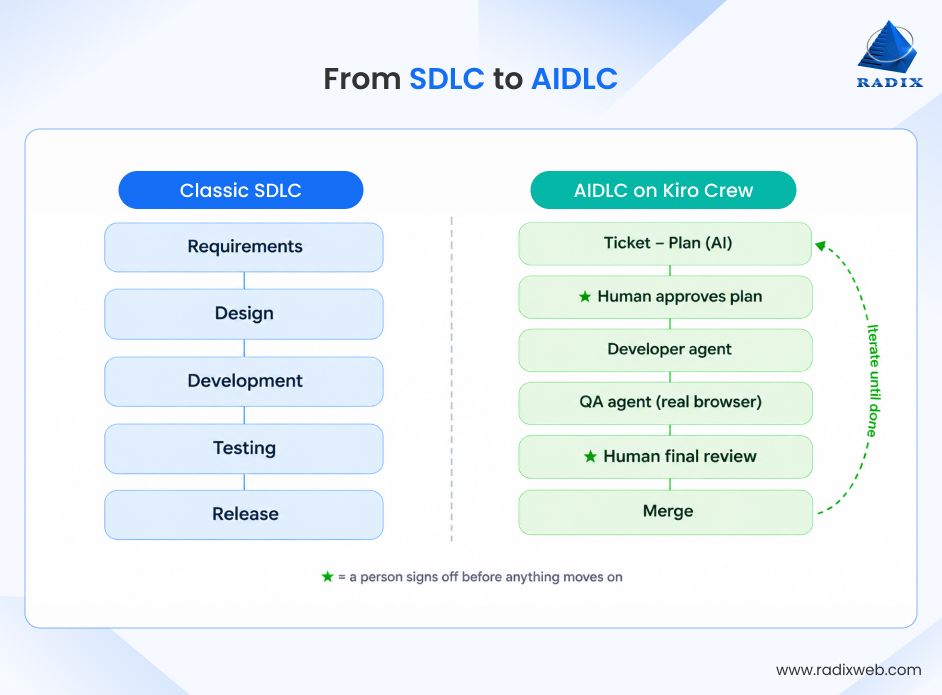
The move from SDLC to AIDLC is less a replacement than a handoff. In a traditional SDLC, people carry every stage and the tools assist. In an AIDLC, agents carry the stages and people supervise. And no, this is not about handing the keys to intelligent AI agents designed to act autonomously and hoping for the best. Each agent has one defined job inside a fixed process, and a human checks the work at the points that count.
Here is a quick comparison of traditional SDLC vs. AI-driven development lifecycle:
| Aspect | SDLC | AIDLC |
|---|---|---|
| Who does the work | Developers, testers, and project managers carry every stage; tools assist | Specialized AI agents (Developer, QA, Scrum Master) carry the stages; people supervise |
| Process | Depends on the methodology; steps can be compressed or skipped under pressure | A strict state machine; no stage can be jumped |
| Planning | Written by people, often alongside or after work begins | Drafted by an agent ahead of time, approved by a human before any code |
| Testing | Tests written alongside or after the code | Test scenarios defined in the plan; a separate QA agent verifies them in a real browser |
| Human role | Involved at every step | Two sign-offs: the plan and the final result |
| Failure handling | Depends on team discipline | A bounded fix loop (three attempts), then escalation to a person |
| Learning | Lives in people’s heads and retrospectives | Captured as durable lessons that feed back into the agents |
| Visibility | Tickets, documents, and chat | Versioned artifacts: plan, handoff, QA report, defect log |
So, the AI-driven software development lifecycle stages stay the same as a regular SDLC. What changes is just who carries them and where people step in. That’s the move from SDLC to AIDLC and for us, and for the clients we build for, it’s already how the work gets done.
AI Product Lifecycle vs. AI-Driven Lifecycle: Two Different ThingsPeople mix these two up all the time, so here is the difference. The AI product development lifecycle covers how you build a product whose core is a model. You scope the use case, collect and prepare data, train and evaluate models, deploy, then monitor drift.The AIDLC or the AI-driven development process covers something else entirely. It covers how any software, whether a payments portal or a recommendation engine, gets built when agents do much of the work. The model-building side has its own name, the ML lifecycle process, and it can run inside an AIDLC like any other project. The former describes what you build. The latter describes how you build it.
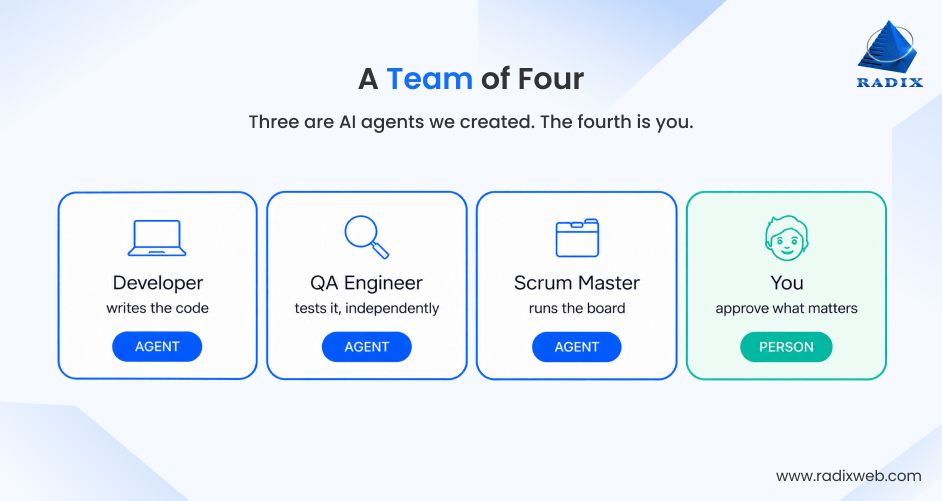
AIDLC integrates AI agents across software development stages, from requirements and planning to coding and testing, while retaining human oversight of critical decisions. The simplest way to understand how the lifecycle of an AI-driven software project is to picture a team of four. Forget “AI platform” for a second. Just picture a small delivery team you’d actually recognize:
Now here’s the twist: the first three are AI agents. The fourth is a real person. The agents do the heavy lifting, while the human holds the final say. That is the AI-driven development lifecycle at its smallest scale, and below we walk you through them in the order a ticket meets them.
The tempting approach is one all-powerful AI that does everything. But at Radixweb, we deliberately don’t do that, for the same reason you wouldn’t ask one person to write code, test it, and sign off on it alone.
Our 'Developer' is a specialized agent with one job: take an approved plan and implement it.
It builds what was agreed, not a fresh re-guess of the ticket. It writes tests against the scenarios defined before any code, runs the quality gates (lint, build, tests, coverage), works on its own feature branch, and touches nothing it shouldn’t. And if it finds mid-build that the approved plan was wrong, it stops and flags a human rather than quietly improvising.
What this means for our clients: the AI writing your code can only touch what we allow, and it builds the approved approach, not a surprise. If reality doesn’t match the plan, a human hears about it immediately.
One rule is non-negotiable: whatever writes the code is never the only thing that checks it.
So, for our AI-driven projects, we add a second, separate QA agent. It tests the Developer’s output on its own, driving a real browser to confirm the feature behaves as expected against predefined test scenarios. The plan sets those scenarios up front, the Developer builds to them, and QA verifies them independently, so nobody moves the goalposts. QA never assumes that passing developer tests means the feature works. It checks behavior itself, reports pass or fail for each scenario with evidence, and classifies every issue it finds.
What this means for our clients: You get a genuine second opinion, run in a real browser against criteria written before the code existed. It mirrors why real teams separate the people who write from the people who test.
When QA Fails: A Tight, Bounded Fix LoopQA finding problems isn’t a breakdown. It’s the system working. On a failure, the pipeline enters a defect loop:QA logs each defect with evidence → the Developer is re-spawned with the specific failed scenarios → it fixes only those → QA re-tests only what failed.All pass, and the work moves on.The important part: the loop is bounded. After a small number of attempts (we cap it at three), it stops and escalates to a human instead of grinding forever or shipping something broken. An AI that knows to raise its hand is worth far more than one that pretends it solved the problem.For our clients, that means the bugs get caught and fixed automatically within bounds, but the system knows its limits and brings in a person rather than flailing. No silent failures, no endless churn.
Scrum sprints are the lifeline of software projects, but a team needs someone to run the board. That’s our orchestration layer, and it’s the busiest member of the team, with a few capabilities working together:
The pipeline responds to state changes instead of waiting to be told.
A new ticket is detected → it runs requirements analysis and produces a plan → the plan is approved → it transitions the ticket and hands off to the Developer → Development passes its gate check → it flows straight into QA.
These handoffs are workflows that trigger on transitions, so the ticket’s state is the signal. After the first human approval,
Development → QA → defect loop → sign-off runs fully autonomously until the final review.
A good Scrum Master doesn’t hand the team a mountain. When a ticket is too large to deliver cleanly in one pass, it splits the work into subtasks in the tracker and runs them one at a time, each through the same plan → build → QA cycle, rather than letting one sprawling change balloon out of control. Controlled flow beats one giant leap.
The agents reach the tracker, the repo, and the browser through a scoped set of connectors. Not open access, just the specific doors we opened. Whatever Agile project management tool you use (Jira, Linear, Redmine, and others), it plugs in the same way, moving tickets across board columns and creating subtasks as work progresses.
Schedulers run recurring jobs on their own. Every day, a scheduled job sweeps the board, reads each new ticket, and drafts a complete implementation plan ahead of time, then parks it for a human to review. By the time a person looks at the board, the thinking is already done and waiting. They’re approving a plan, not staring at a blank ticket.
What this means for our clients: With our AI-driven development process, work doesn’t sit in a queue waiting to be noticed, and big work gets broken into reviewable chunks instead of one risky mega-change. That’s a big part of why delivery speeds up.
This is the most important member of the team.
Most “fully autonomous” demos quietly fall apart right here. Full autonomy sounds impressive and ships disasters. We understand the role of humans in AI-driven software development and that's why our pipeline stops on purpose at exactly two points.
Because ticket descriptions are often thin, the agent will not guess business behavior. If something’s unclear, it asks. The plan that lands on your desk covers the ticket in full, including functional and non-functional requirements, acceptance criteria as testable assertions, dependencies, the affected files (verified by reading the repo), the implementation approach and steps, the full test-scenario contract (happy-path, edge, negative, error, and UI cases), estimation, every assumption it made, and any open questions, each with why it matters and what breaks if guessed wrong.
Then it stops and waits for a project stakeholder (the client and members of our project team) and the answer doesn't just have to be yes or no.
They can approve, approve with notes, answer the open questions (plan updates, stays parked), request changes (analysis re-runs and comes back), or reject. The Developer only starts once the plan is explicitly approved. A plan existing is not approval. Only your sign-off is.
With the work built and every scenario green, the AI-powered software development lifecycle stops again, prepares the change on its feature branch, and hands it back for your final call.
What this means for our clients: Nothing is built on a guess and nothing ships without a person approving it. A human checks the plan before work starts and the result before it goes out. Two sign-offs, not blind trust. Autonomy was never the goal. Leverage, with a person holding the safety catch, is.
Four roles is where we started, not where it has to end. Because every member is just a scoped agent on the same pipeline, adding a teammate is adding a role, not rebuilding the system. Doing it well follows the stages of an AI agent development project in miniature: define the job, scope the permissions, write the test scenarios, then let the new agent earn trust on low-risk tickets.
The obvious next step is to add a DevOps agent, one that takes an approved, QA-passed change and handles the release side (environments, build pipelines, deployment, post-deploy checks), all behind the same human approval gate.
From there the roster is open-ended: a security-review agent, a documentation agent, a performance agent. Each one opens up new applications of artificial intelligence inside delivery itself, and each slots into the same spine, inheriting all of it for free. So, the system scales to your process instead of boxing you into ours, and the team can grow safely under the same human control. And whether you’re building business software with artificial intelligence features or a plain internal tool, the pipeline works the same way.
The question everyone asks first is the right one: if the AI is doing the work, what’s stopping it from going off the rails? The answer is that the agents don’t get to improvise the AI-powered software development lifecycle. The pipeline is a strict state machine. Every ticket moves through the same sequence, in the same order, every time. Those are the different stages of AI-driven software development as we run them:
Ticket detected → Requirements analysis → Plan created → Human approval → Development → QA → Ready for sign-off → Done
A stage cannot be jumped. Development literally cannot begin until the plan is in the APPROVED state. QA cannot be bypassed to rush something out. There are gate checks between stages: the plan is validated for completeness before approval, and the build and coverage are verified before QA. If anything fails a checkpoint, the pipeline stops and reports instead of pushing forward.
For clients, this means no shortcuts, even under deadline pressure. Every piece of work gets analyzed, planned, approved, built, and independently tested, in that order, or it doesn’t move.
Adding AI to the software development lifecycle is a real help in delivery. It drafts plans overnight, writes code, and tests it without waiting in a queue.
But helpful is not the same as trustworthy on its own, and letting agents run unsupervised creates problems of its own: vague inputs, legacy systems, thin review, and too much access.
At Radixweb, we’ve refined our AI-driven project lifecycle across multiple live deployments, and these are the challenges we plan and manage for. The aim is not to avoid every constraint. It is to balance software speed and security in the AI era, treating each limit as a design input rather than an obstacle.
Most ticket descriptions are two lines and a hope. The agent won’t guess business behavior, so it asks, but someone still has to answer. The quality of what goes in sets the ceiling for what comes out, at every one of the different stages of AI-driven software development, from analysis to final review.
A vague ticket produces a plan full of open questions, and a plan full of open questions sits parked until a person with real context shows up. Organizations new to this approach can benefit from planning their AI software initiatives with experienced consultants.
Most clients don’t have a blank repository. They have ten-year-old ERPs, thinly documented APIs, and integrations nobody quite owns. Teams that want to integrate AI into existing organizational software should budget real time for discovery, because an agent is only as good as the context it can actually read and the permissions it has been given.
If the project also adds model-driven features, the AI product development lifecycle runs alongside the AIDLC, with its own concerns around data quality and drift. Both need planning, and neither one replaces the other.
Agents do their best work where there is a strong test culture and a mainstream stack. In our experience, the programming languages best for AI-assisted development tend to be those with deep public codebases and mature tooling, such as Python, TypeScript, and Java. Niche or heavily customized stacks need more human steering, and more captured lessons, before the pipeline holds up.
Trust isn’t only about where humans step in. It’s also about what the agents can’t do even if they tried. These are hard permission rules, not polite requests.
The agents are forbidden from:
They work on a local feature branch and stop; a human takes it from there. These limits are enforced at the tool level with allow-lists and deny-lists, checked on every action, with deny always winning.
For our clients, this means that the AI physically cannot ship to production or merge code on its own. The fence is enforced by the platform, not by hoping the AI behaves.
When AI output disappears into a chat log, nobody can trust it or build on it. So, we make sure that our agents produce artifacts: durable, versioned work products such as the plan, the developer’s handoff, the QA report, and the defect log. These are real documents with a history you can open, compare, and roll back.
That versioning is exactly what makes the daily plan reviewable in the first place. So, nothing is a black box. Every piece of work is visible, reviewable, and traceable through its versions.
Two sign-offs only work if the person signing off has the time and context to mean it. A plan covers functional requirements, test scenarios, assumptions, and open questions, and skimming it defeats the gate. The bottleneck moves from writing to judging, so we design the review step as carefully as the build. Plans are drafted overnight, so reviewers start the day with the thinking already done. Large tickets are split into subtasks, so each plan is a reviewable chunk rather than one sprawling document, and a completeness check runs before anything reaches a human. Every open question arrives with why it matters and what breaks if guessed wrong. Reviewers can approve, approve with notes, answer questions, request changes, or reject, which makes “approve with notes” a working tool rather than a formality.
Every challenge above comes down to the same thing: the agents carry the volume, and people carry the judgment. Planning for both, from ticket quality to review capacity, is what keeps the speed worth having.
Here’s what separates a real AI-driven delivery pipeline from a flashy demo, and what matters most when scaling AI projects from demos to enterprise projects: it learns.
Whenever an agent hits a wall (a wrong assumption, an edge case, a tricky integration), we capture it as a durable lesson that feeds back into the agents. Next time, on a completely different task, the team already knows not to repeat it.
The result is that the pipeline becomes measurably harder to break the longer it runs, accumulating hard-won judgment instead of forgetting it, the way a good team gets sharper every sprint. So, the quality curve goes up, not flat. You’re not buying a static tool, you’re working with a team that compounds in reliability. That’s the AI lifecycle explained from the inside: a loop, not a line.
What Comes Next: Delivery Teams Built Around AI Agents, Steered by People
The move from SDLC to AIDLC keeps the stages you know and changes who carries them. Agents analyze, build, and test inside a fixed pipeline, while people approve the plan and the result. Our artificial intelligence development specialists run this on live client work, and every lesson feeds the next ticket. That is how speed and control end up working together.At Radixweb, we bring 26+ years of enterprise engineering expertise to this shift, and we build software with AI as well as software with AI built in, from agents to intelligent workflows, ML systems, computer vision solutions, NLP, LLMs, and more. So, if you are exploring how AI can improve your project development lifecycle, schedule a consultation with our experts, and in one short conversation see exactly where AI agents can speed up your delivery without loosening your control.
Ready to brush up on something new? We've got more to read right this way.

