

Read More


Recognized for AI Excellence at 2026 Globee® Awards - Read More

Dhaval Dave
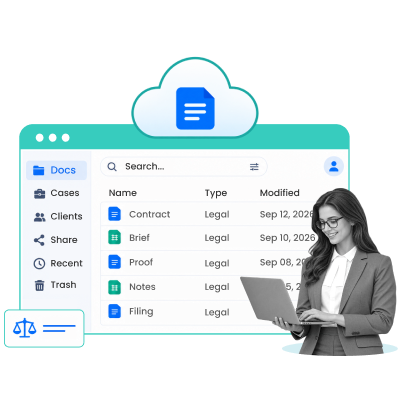
A UAE-based legal firm was losing 3+ hours every day dealing with document retrieval, storage, and handling. The team worked across paper files, local storage, and online systems. Finding historical records was slow. Remote retrieval was inefficient. Managing different versions made routine legal work harder than it needed to be.
Unfortunately, they aren't the only ones struggling with this. 44% of legal professionals cite administrative burden as a driver of cost challenges. A major part of this administrative work is documentation related.
But simply moving documents to cloud storage doesn't solve this problem. The solution: A cloud document management system for law firms that organizes legal files, controls access and versions, automates workflows, and connects docs with legal ops.
When we built such a cloud-based legal document management software for our client's team of 150+ professionals, they saw annual operating costs go down by $25,000+. It also helped them meet compliance deadlines on time more than 98% of the time. The lesson here is clear: law firms need more from cloud document management than a place to store files.
Most law firms today just move files to a cloud storage in the name of document management. Real cloud document management systems, however, offer matter-centric document management, manage RBAC, automate workflows, ensure compliance, and offer document version control for law firms. They also integrate with your other legal software and tools. So, while storage is passive, true cloud document management for law firms is an accountability infrastructure. Choose off-the-shelf DMS for simplicity, customize existing platforms for slightly complex cases, and build custom law firm document management for scale. The reclaimed hours, reduced risk, and operational clarity justify that investment.
| Aspect | Details |
|---|---|
| What this guide covers? | Modern legal document management software features that matter, the real costs of staying stuck, the build-versus-buy decision for cloud-based document management for law firms |
| Who should read this guide? | Senior partners, managing counsel, practice leaders, operations directors, and anyone responsible for IT strategy at a legal firm |
Here's what most firms don't measure: the hidden cost of a broken document system.
One study tracking legal operations found that lawyers spend an average of 12 hours per week on non-billable administrative work. A significant chunk of that is searching for documents, managing versions, and chasing down who has the latest contract. For a 50-lawyer firm, that's roughly 600 hours per week of billable time vanishing into document chaos.
Then there's the compliance risk. Law firms face an exposure to regulatory fines if they can't produce a document retention audit trail or cannot prove that they are managing documents correctly.
The operational drain is real too. Billing codes get attached to the wrong files. Client confidentiality gets compromised because three people accidentally have access to something they shouldn't. A junior associate re-edits a final contract because she didn't see the version control history. A compliance deadline passes because nobody knew who was supposed to track it.
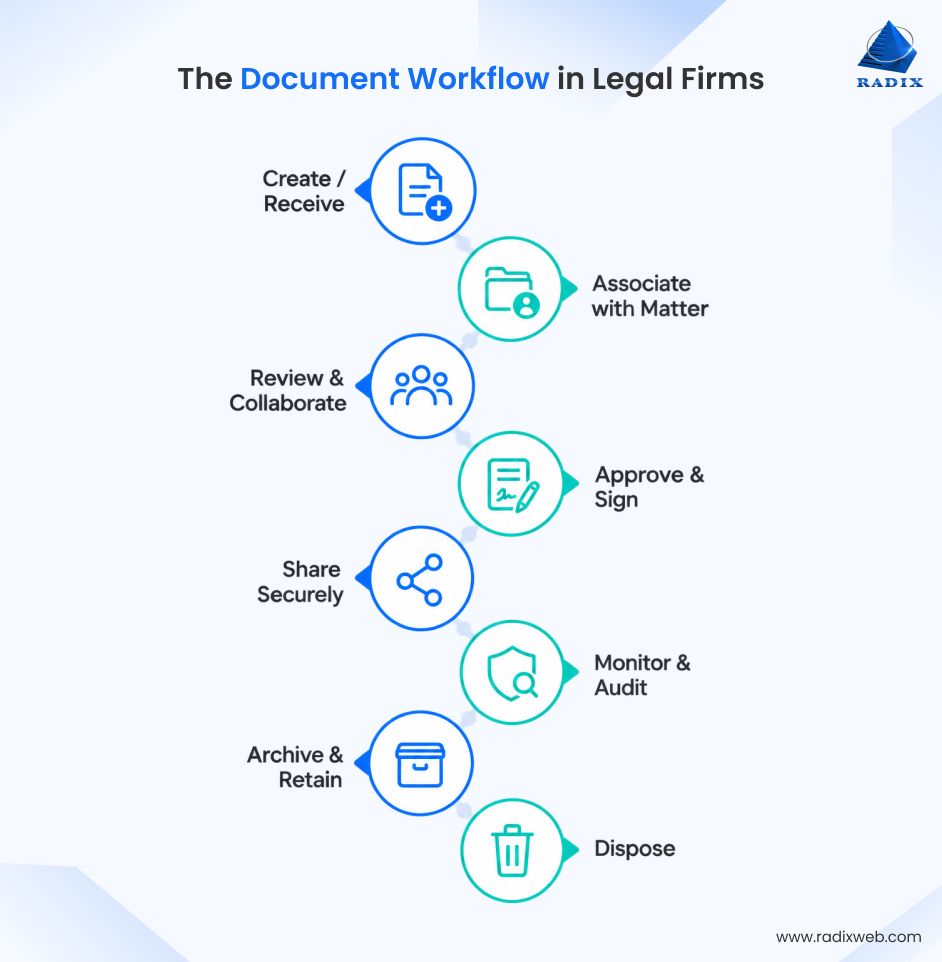
These aren't hypothetical costs. Firms experience them daily. They just don't always connect the dots back to document management.
Also Read: How to Develop a Custom Legal Case Management Software
A document management system isn't a filing cabinet. It's accountability infrastructure for lawyers. Here's why cloud document management for law firms fails if it focuses on storage alone:
Legal work, thus, requires developing cloud-native applications around business workflows that understand how lawyers work, not just how to keep data safe. So, the best cloud document management system for legal firms is the one that does three things: organizes intelligently, controls precisely, and integrates seamlessly.

The right law firm document management features should align with how legal teams work, making documents easier to organize, retrieve, secure, and manage across every matter. So, here are the features you need to include when building an enterprise software solution, beyond just storing documents.
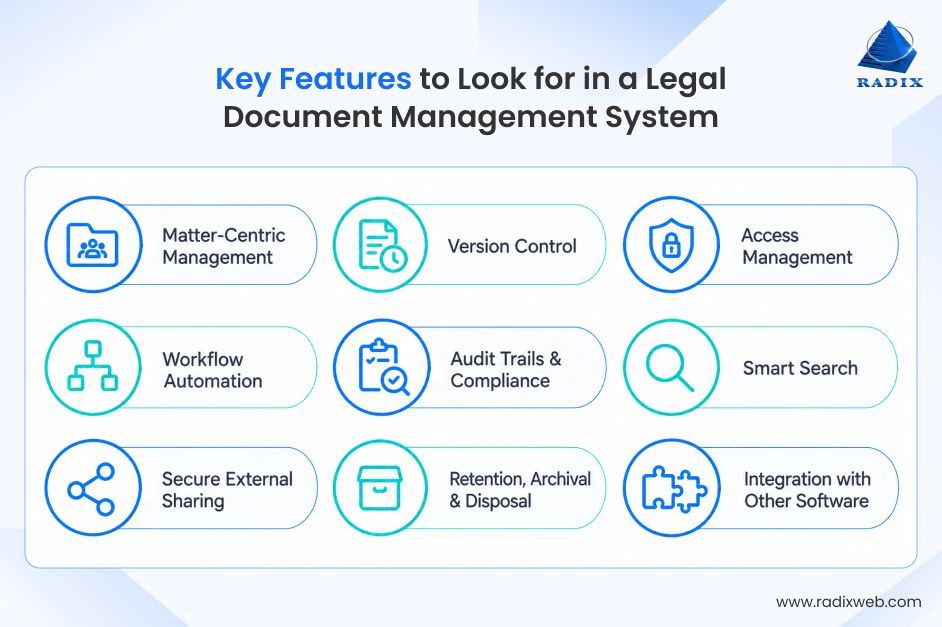
A matter-centric structure organizes all documents around the client, case, or deal they belong to, rather than scattered folder hierarchies. The feature brings contracts, emails, research, billing records, communications, and other matter-related files into a single, organized workspace. With such a law firm document management system in place, legal teams can quickly access the complete matter history, track current documents and deliverables, and give authorized users the context they need without searching across multiple folders or systems.
| Aspect | Details |
|---|---|
| Importance/Priority Grade | Critical (A+) |
| Sub-Features | Matter dashboard, multi-stakeholder access, matter hierarchy, linked communications, timeline view |
| Key User/Stakeholder Type | Partners, Associates, Practice Managers |
For example, when a new associate joins mid-matter, instead of asking five people where things are, they see the entire decision history, all deliverables, and the current status. A partner can review progress without opening 47 different folders. Billing gets tied to deliverables automatically.
Document version control for law firms is important for tracking every change with timestamps, user details, and revision history, allowing authorized users to review, compare, and restore earlier versions when needed. Final versions can be locked, while drafts retain a complete record of edits and iterations. This feature creates a reliable audit trail, helping legal teams verify what was changed, who made the change, and which version was approved or signed.
| Aspect | Details |
|---|---|
| Importance/Priority Grade | Critical (A+) |
| Sub-Features | Change tracking, timestamp records, rollback capability, lock/unlock functionality, comparison view, audit trail |
| Key User/Stakeholder Type | Partners, Senior Associates, Compliance Officers |
For example, a partner signs off on a contract at 5 PM. A junior makes a "small" edit at 6 PM. Three months later, a clause is disputed. With a cloud document management system that offers version control, you pull up the history and see exactly what was agreed to and that document is your proof.
Client privilege is only privilege if you control who sees what. If a document sits in a folder with loose permissions, you might lose the privilege claim entirely.
Access management is the law firm document management feature that gives you granular control over who can view, edit, download, or share documents at the folder, document, and user levels. Role-based permissions can differentiate access for partners, associates, clients, and other users, while matter-level controls help keep sensitive client information isolated. Access can also be updated or revoked when a user changes roles or leaves a matter.
| Aspect | Details |
|---|---|
| Importance/Priority Grade | Critical (A+) |
| Sub-Features | Role-based access control, document-level permissions, time-based access, audit logging, automatic revocation, client segregation |
| Key User/Stakeholder Type | IT Administrators, Compliance Officers, Partners |
For example, when an associate is removed from a client matter, their access to its documents can be automatically revoked without affecting the rest of their permissions. This helps ensure that confidential contracts, case files, and client communications remain accessible only to authorized users throughout the matter lifecycle.
With intelligent automation of workflows, documents move through predefined legal processes without requiring teams to manually track every step. A newly uploaded contract can be routed to the assigned partner for review, trigger reminders for pending approvals, and automatically move to the appropriate matter folder once finalized. Email integration can also capture relevant correspondence and associate it with the correct matter.
| Aspect | Details |
|---|---|
| Importance/Priority Grade | High (A) |
| Sub-Features | Email integration, automatic routing, approval workflows, task assignment, reminder systems, status tracking |
| Key User/Stakeholder Type | All Users, Practice Managers |
For example, automated review reminders and filing can cut repetitive work, helping legal professionals reclaim hours each week with document workflow automation for law firms.
Audit trails record every significant document action, including who accessed, edited, downloaded, printed, or shared a file and when it happened. A centralized, searchable record gives authorized teams clear visibility into document activity and supports compliance reviews, internal investigations, and regulatory requests.
| Aspect | Details |
|---|---|
| Importance/Priority Grade | Critical (A+) |
| Sub-Features | Access logging, action tracking, retention policy management, compliance reporting, automated alerts, regulatory templates |
| Key User/Stakeholder Type | Compliance Officers, Partners, Regulatory Team |
For example, if a compliance team needs to verify who accessed a sensitive client document during a specific period, they can review its activity history instead of piecing together records from emails and separate systems. This makes it easier to demonstrate proper document handling and respond to compliance requirements.
Smart search enables legal teams to find documents using full-text queries, OCR search, and filters such as date, author, matter, document type, or specific content. AI-powered search can understand and process natural-language queries (with custom NLP modules, if needed), identify relevant clauses and concepts, and surface context from documents rather than simply matching filenames. This is particularly useful when important information is buried in scanned agreements, PDFs, emails, or older case records.
| Aspect | Details |
|---|---|
| Importance/Priority Grade | High (A) |
| Sub-Features | Full-text indexing, metadata search, advanced filters, natural language queries, search analytics, saved searches |
| Key User/Stakeholder Type | All Users |
For example, a RAG-powered AI legal document search system that we built combines keyword and vector search to retrieve relevant information from large document collections. The system achieved 97% coverage of complex queries, helping surface clauses that could previously be overlooked or buried in documents.
Secure document management for law firms means sharing without surrendering control. Teams can set link expiration dates, restrict downloads, track document activity, and revoke access at any time. Permission-based sharing ensures recipients only access the documents specifically authorized for them.
Building a security-first cloud solution lets legal teams share documents with clients, opposing counsel, and third parties while retaining control over access.
| Aspect | Details |
|---|---|
| Importance/Priority Grade | High (A) |
| Sub-Features | Permission-based sharing, expiration dates, download restrictions, access tracking, watermarking, revocation capability |
| Key User/Stakeholder Type | All Users, Clients, External Partners |
For example, during due diligence, a firm can give an external reviewer access to selected case documents while keeping the rest of the matter restricted. Once the review ends, access can be revoked without changing the permissions of internal users.
Retention and archival controls help firms manage documents according to matter type, jurisdiction, and applicable regulatory requirements. The system can apply retention schedules, move inactive records to secure archives, and initiate controlled disposal when their retention period ends. These capabilities support legal document management best practices while reducing reliance on manual tracking and preventing inconsistent handling of records.
| Aspect | Details |
|---|---|
| Importance/Priority Grade | Critical (A+) |
| Sub-Features | Retention policy engine, automated archival, scheduled deletion, destruction certificates, regulatory templates, jurisdiction mapping |
| Key User/Stakeholder Type | Compliance Officers, Practice Managers |
For example, after a matter closes, the firm can place its records under a defined retention schedule while keeping them available for future reference. Once the required period expires, authorized administrators can review the disposal queue and permanently delete eligible records with a documented record of the action.
Integration connects document management with the tools legal teams already use, including Microsoft 365, Gmail, case management, billing, time tracking, and calendar platforms. APIs and connectors facilitate integrated apps that allow relevant data to move between systems, reducing duplicate entry and keeping matter information synchronized. This makes cloud-based legal document management part of the firm's existing technology ecosystem.
| Aspect | Details |
|---|---|
| Importance/Priority Grade | High (A) |
| Sub-Features | Email integration (O365/Gmail), calendar sync, billing system integration, matter management links, API access, webhook support |
| Key User/Stakeholder Type | All Users, IT Teams, Integrations Manager |
For example, when a lawyer receives an email containing a revised agreement, the integration setup can associate the message and attachment with the relevant matter while preserving the existing email workflow. The team can then access the correspondence alongside the document without manually uploading or reorganizing files.
So, the best legal file management system isn't just an expensive Dropbox with compliance stickers on it. It's a nervous system for your practice. Documents don't just sit in it, they flow through it. The system routes them, controls them, audits them, and integrates them into your actual work.
Also Read: How to Build a Cloud-Based Law Firm Management Software
Not every firm needs all law firm document management features. Budget varies. Industry needs differ. The question isn't "What is the best document management system for law firms?" but "What's the right legal document management software for us?"
You have three paths:
The scenarios below can help you decide whether you should buy or build software for cloud document management for law firms.
Buy a cloud document management system when:
Customize a law firm document management system when:
Build a custom software for cloud document management for law firms when:
To make the right choice, start by mapping your actual needs. Write down the 10 things your current system doesn't do that cost you time or create risk. Evaluate what's available against that list. Run the numbers on purchase price versus implementation time versus training overhead.
Then ask: Is this solving the right problem for the money we're spending? If the answer is yes, move forward. If you're choosing based on price alone, you'll regret it.

Moving Beyond Storage to Real Document Governance
The firms ahead of the curve aren't the ones with the most cloud storage for their files. They're the ones who moved to specialized cloud document management for legal professionals. They have developed proprietary legal software solutions that treat documents as workflow artifacts, not just files. So, your next move is straightforward but crucial: audit what you actually need, explore the benefits of cloud document management for law firms, and build the right system.At Radixweb, we specialize in developing a tailored, cloud-first legal software for document management that goes beyond storage. We understand the legal workflow because we've lived inside it with clients who trusted us to rebuild how they work. Our approach is custom-fit to your firm, integrated with your existing tools, and built to scale with you. No black boxes. No guessing about compliance. No paying for features you'll never use. So, if you are exploring legal file management systems, schedule a consultation with our experts to map out what your firm actually needs.
Ready to brush up on something new? We've got more to read right this way.

