Read More


Recognized for AI Excellence at 2026 Globee® Awards - Read More

Anand Trivedi

Inside Modern Web App Development: An average custom web application project today costs anywhere between $50,000 and $300,000+ and can take anywhere from 4 to 12 months depending on complexity, integrations, compliance requirements, and scale. Before investing that kind of time and money, you should understand what web application development actually involves, how modern web apps are built, and where projects quietly go wrong. Based on 26+ years of building web applications across industries, this guide breaks down the fundamentals and the realities most vendors leave out.
You already know you need a web application. Someone in the room has sketched what it should do. You've probably had a few conversations with vendors and gotten quotes ranging from surprisingly cheap to absurdly expensive, even when the feature set remained the same.
That disconnect exists for a reason. Web application development is one of those industries where the polished process shown in proposals and the reality of how projects actually unfold are often very different things. The real complexity usually appears later: during integrations, scaling, testing, security reviews, or the moment business requirements start changing mid-build.
With 15+ years of experience in designing, building, launching, and maintaining web applications, below I walk you through what actually happens inside a web app project: where the real decisions live, what kills timelines, how to pick the right type of app and stack for your situation, and what the warning signs look like before things go sideways.

Web application development is the process of designing, building, testing, and deploying software that runs inside a browser and is delivered over the internet. Unlike installed software, users don’t download a web app. They simply access it through a URL while the app logic runs on remote servers.
Modern web applications do far more than display information. They process user input, manage workflows, connect with third-party systems, handle authentication, store and retrieve data, and support real-time interactions across thousands or even millions of users.
That distinction also changes how the software is architected. A web application has to manage two tightly connected layers simultaneously: the front end users interact with, and the back end systems responsible for business logic, databases, APIs, authentication, and integrations. Every web application architectural decision affects both layers, and changes to one almost always ripple into the other.
Most guides and vendors explain web applications using diagrams full of boxes and arrows that make little sense outside engineering teams. That is not particularly useful when you are the one approving the budget, timeline, or vendor.
While you do not need to learn how to code, understanding how a web application actually works makes it much easier to evaluate technical decisions, spot inflated complexity, and understand where projects usually go wrong.
So, when a user interacts with a web application (logging in, submitting a form, loading a dashboard) here's what happens on the backend:
The user's browser sends an HTTP or HTTPS request to your server. That request includes what the user is asking for (the URL and route), who they are (authentication tokens stored in cookies or headers), and what data they're sending (a form submission, a search query, an API call).
Your backend receives the request and decides what to do with it. This is where most of the business logic lives, including authentication checks, permission validation, database queries, calls to third-party services, calculation logic. The server is the part of the application your users never see, and your developers spend most of their time building.
For almost every meaningful user action, the server reads from or writes to a database. A user loads their order history, that's a read. They submit a payment, that's a write. Plus, a call to a payment processor like Stripe, plus potentially a write to an audit log. The data model determines how fast those operations are and how reliably they stay consistent.
The server sends back either a rendered HTML page (in a server-rendered app) or a JSON payload (in an API-driven app that the front end consumes). That response travels back across the network to the user's browser.
The browser takes whatever came back and displays it. In a traditional server-rendered app, it reloads the page. In a Single Page Application, it updates only the part of the interface that changed, without a full reload. That difference is why SPAs feel faster for complex interactions.
This cycle (request, process, query, respond, render) runs hundreds of times per session in a complex application. The speed and reliability of each step is what separates an application users trust from one they abandon.
The request-response cycle explained above looks clean in architecture diagrams. But production environments are different. Most web application failures usually come down to four recurring problems:
Understanding this cycle is what lets you ask the right questions when a vendor presents a proposal. If they can't explain how each step works in the context of your specific application, that's information worth having before the contract is signed.
Most web application cost overruns do not start during development. They start before development begins. That is the part most guides skip entirely, and one of the biggest reasons projects drifts off scope, timelines, and budgets later.
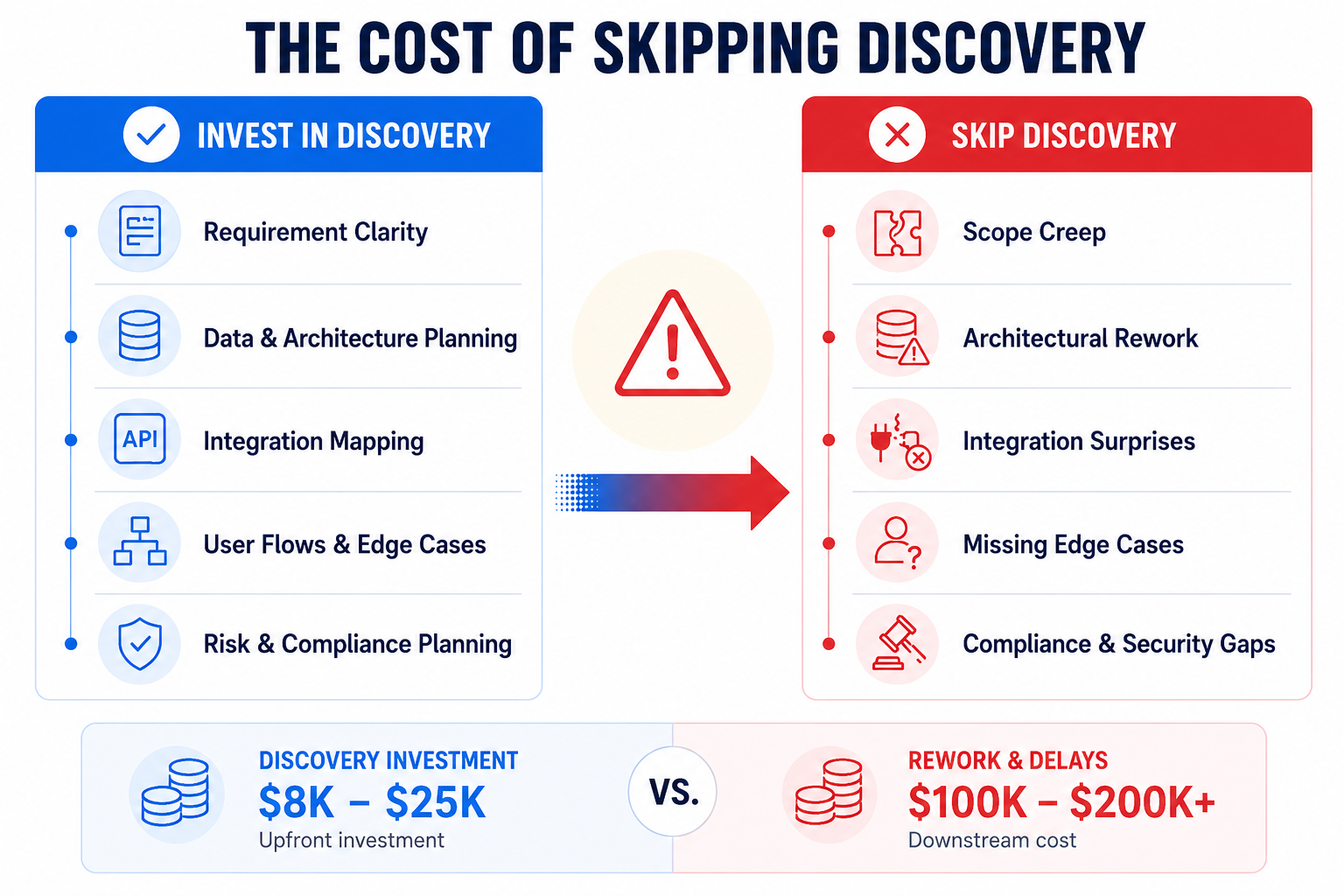
Before any serious development starts, a project needs a proper discovery phase. Not a high-level sales discussion or a few requirement-gathering calls. A real technical discovery process that produces artifacts the engineering team can actually build from.
Here's what a proper discovery phase delivers:
| Deliverable | What It Prevents |
|---|---|
| Technical requirements document | Scope creep from verbal agreements |
| Data model sketch | Structural rework after code ships |
| API surface map | Surprise integrations added mid-sprint |
| User flow documentation | Missing edge cases found in UAT |
| Risk register | Compliance gaps discovered post-launch |
This phase typically costs between $8,000 and $25,000 depending on project complexity. Most clients initially push to skip it. On the surface, it feels like spending money on planning instead of visible product development.
But skipping it is much more costly. Here's what happens when you skip it:
I inherited a project last year from a healthcare SaaS company in Denver. They had shipped a Phase 1 build without a proper data model discussion. Six months into development, they discovered that their HIPAA audit logging requirements affected every single write operation in the system. The entire data layer had to be restructured. That added four months and roughly $180,000 in rework. A proper discovery phase would likely have surfaced the issue in week 2.
Discovery is not documentation overhead. It is one of the few stages in a web application project specifically designed to reduce downstream risk.

Every guide lists the different types of web applications. But what most of them skip is this: each type of web application solves a different problem, and choosing the wrong one creates complexity you pay for later in development, scaling, and maintenance.
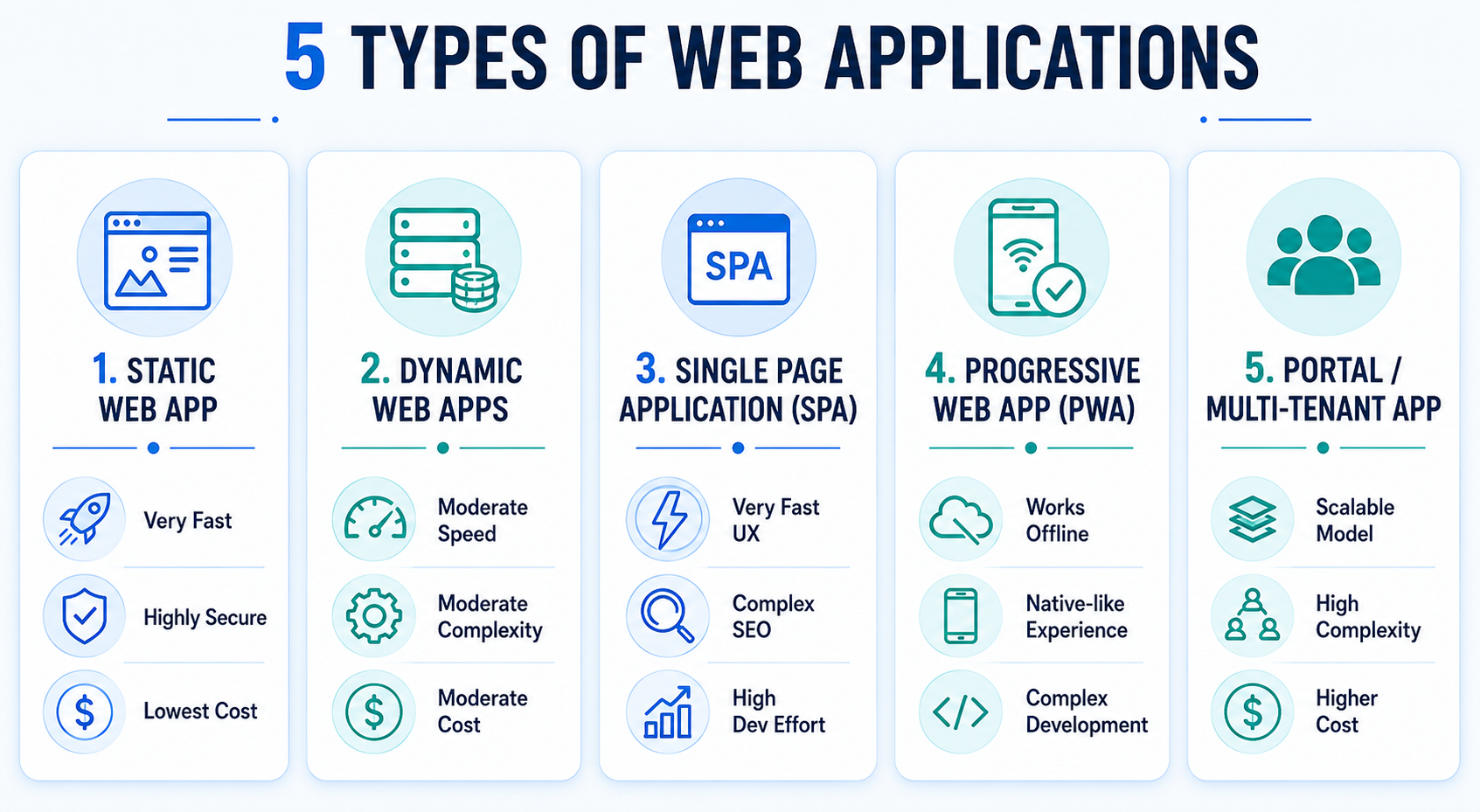
Here’s where each type works well and where it usually becomes the wrong choice.
| Type | What It Is | Build This When | Don't Build This When |
|---|---|---|---|
| Static web app | Pre-built HTML/CSS/JS, no server-side processing | Marketing sites, documentation, content pages with low interactivity | You need user-specific data, authentication, or real-time updates |
| Dynamic web app | Server generates pages based on user/data context | E-commerce, dashboards, content platforms with logged-in users | You need high interactivity without full page reloads |
| Single Page Application (SPA) | One HTML shell, all rendering done in the browser | Complex tools, admin dashboards, apps where UX speed matters more than SEO | Your primary users arrive from search engines — SPAs are harder to index reliably |
| Progressive Web App (PWA) | Web app with offline capability, installable on device | Mobile-first audiences, low-connectivity environments | Enterprise employees on managed corporate devices |
| Portal / multi-tenant app | One codebase, multiple isolated tenant environments | B2B SaaS, platforms serving multiple organizations | You're building version 1 — multi-tenancy adds complexity that kills early-stage velocity |
Remember: The right choice is rarely the most complex architecture. It is the one that fits your users, business model, operational realities, and growth stage.
The Progress Web App market was worth USD 2.08 billion in 2024 and is expected to grow at a 29.9% CAGR to reach a valuation of USD 21.24 billion by 2033. That growth is largely driven by one idea: PWAs promise an app-like experience without the cost and friction of managing separate native mobile applications.
And that is true in the right context. So, knowing when to develop progressive web apps and when not matters.
Build a PWA when:
Do not build a PWA when:
Note: In many enterprise environments, a well-built server-rendered application or SPA performs identically for users without adding the operational complexity PWAs introduce through service workers, cache management, and browser compatibility handling.

I remember working with a B2B logistics company in Atlanta that needed an internal quoting tool for their operations team. The application was used by roughly 40 employees, entirely on desktop, entirely within a controlled corporate network.
They already had a proposal from another vendor: A full React SPA with a separate Node.js API layer. Technically impressive. Completely unnecessary.
We recommended a server-rendered Next.js application with progressive enhancement instead. The result: the platform shipped six weeks earlier, required less infrastructure complexity, and the operations team still uses it daily without performance issues.
This is not a one-off case. It happens constantly because many vendors default to the stacks their teams are most comfortable building, not necessarily the architecture the business actually needs. Modern frameworks become the answer before anyone properly evaluates the problem.
A simple way to avoid this is to ask every vendor one question during technical discussions:
“What is the simplest architecture that can reliably support this use case over the next 3–5 years?”
The quality of the answer usually tells you very quickly whether the recommendation is driven by business fit or developer preference.
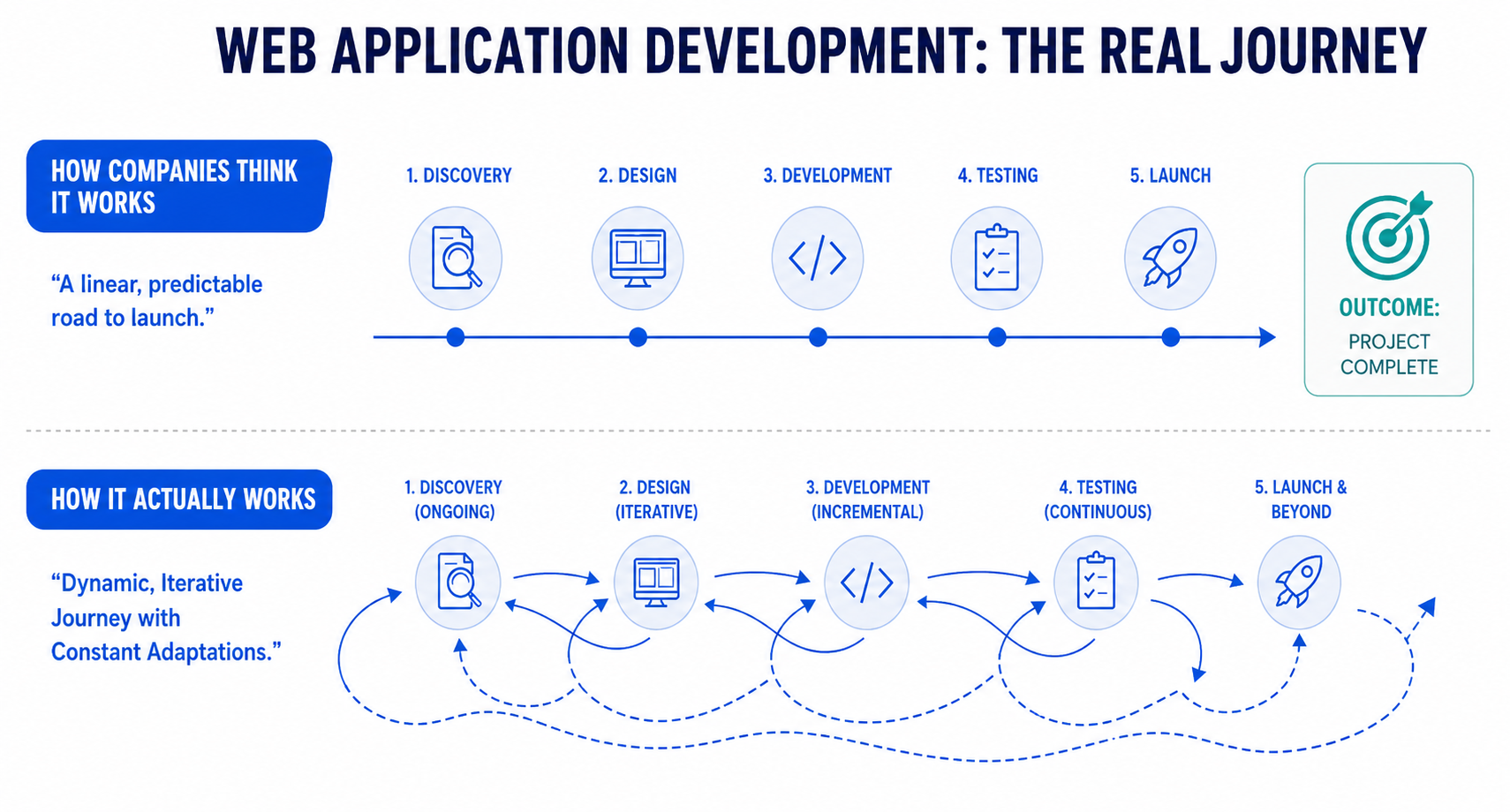
On paper, the steps required to develop a web application look like a clean sequence: requirements, design, development, testing, deployment. Reality doesn't look like that. Phases overlap. Design decisions get revised during development. Testing starts before the build is finished. And deployment infrastructure gets built in parallel with features.
Here is what a typical web application development process at Radixweb actually looks like in practice, including where the important technical and business decisions are usually made.
A real discovery is a working session, not a questionnaire. Your technical team and our team work through every assumption in the project together. The output isn't a slide deck. It's a set of working documents that reduce ambiguity before the sprint clock starts.
The questions that save the most money when answered here:
That last one is the most important and the most skipped. Scope creep doesn't start in month three. It starts in the kickoff call when nobody defines what's out of scope.
A discovery phase at Radixweb runs two to three weeks and produces five documents: a technical requirements spec, a data model sketch, an API surface map, user flow documentation per user type, and a risk register that names the parts of the build that are genuinely uncertain. Every one of those documents becomes a reference point that resolves arguments later.
Design is the phase most clients think of as just visuals like UI screens, color palette, brand application. That's part of it, yes. But the part that actually determines project outcomes is the UX architecture that happens before any pixels are drawn.
Information architecture comes first. It covers:
These decisions affect every development decision that follows. Changing the information architecture mid-development is expensive. Changing it after launch is more expensive.
Then come interaction design and interface design, which includes:
These details feel minor in a mockup and become significant quality signals in a live product.
Wire frames and clickable prototypes should be tested with real users from your target audience before a line of code is written. I've watched companies skip this step and spend three months building a workflow that their actual users found confusing on first contact. A $5,000 usability test would have caught it in week two of design.
The phase of a development project produces professionally-delivered UI/UX design solutions including component library or design system and a full set of approved screens. Development should not begin without approved designs. "We'll figure out the UI as we go" is how you end up with inconsistent interfaces and an extended QA phase.
Development is where the most misunderstanding lives on the client side. Here's what is actually happening during a sprint.
Each sprint typically runs one to two weeks. At the start of a sprint, the team pulls a set of tickets from the backlog that have been estimated and prioritized. Each ticket represents a specific, testable unit of work, not "build the dashboard" but "build the dashboard filter component with date range, status, and user type inputs, connected to the /api/reports endpoint."
That level of specificity matters. Vague tickets produce vague estimates and vague output.
During the sprint, developers write code, write tests, open pull requests, and get those PRs reviewed before merging. Every PR gets reviewed, not just the significant ones. This is where bad patterns get caught before they replicate across the codebase. A PR review policy that has exceptions will always find ways to expand those exceptions under deadline pressure.
Front end and back end development run in parallel. This requires clear API contract definitions early — both sides need to agree on what data the back end will provide and in what shape before either side can build reliably. Without that agreement, you get integration surprises in the final sprint.
The three things I look for in a development process that indicate the project will finish well:
Testing is the phase clients most often misunderstand. "We test it" is not a testing strategy. Here's what a real testing plan covers and what each layer catches.
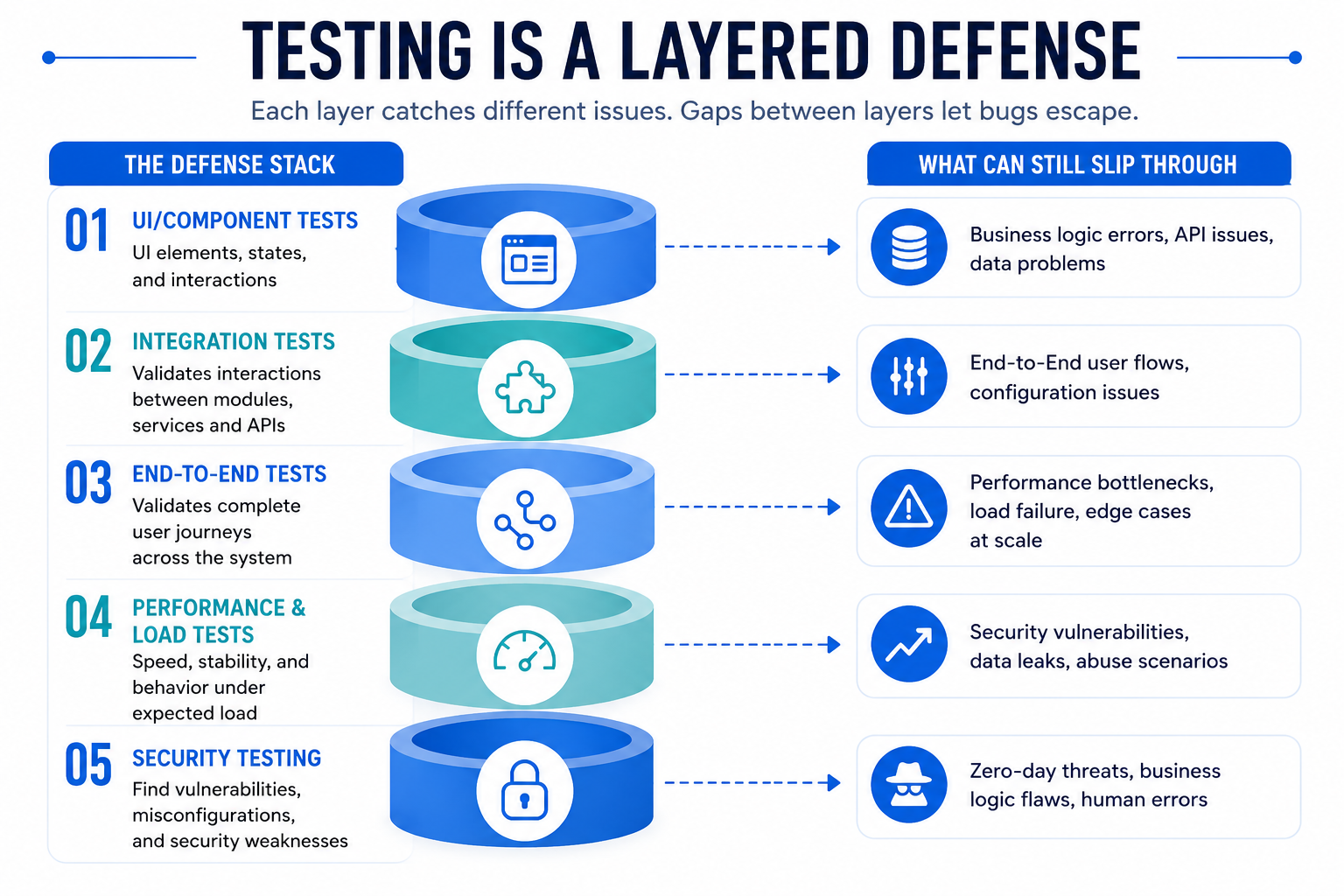
The most expensive bug I've seen reach production was an authentication failure in a multi-tenant application. A misconfigured session handling function allowed users to access data scoped to the wrong tenant. It passed unit tests because each function in isolation behaved correctly. It passed functional QA because testers only tested with a single account. A hospital administrator in Ohio discovered it when she saw patient records that weren't hers.
Integration testing and end-to-end web application penetration testing against realistic multi-user scenarios would have caught it in staging. They weren't part of the QA plan. That’s why now here’s what I recommend to every client I work with:
Build the full testing stack. Every layer exists because the layers above it miss something real.
Also, testing should be integrated into development from sprint one, not scheduled as a phase after development completes. By the time the development phase ends, integration and end-to-end tests should already cover the core user journeys. The final testing phase focuses on edge cases, load testing, cross-browser validation, and security review.

Deployment is not a single event at the end of the project. By the time you reach production launch, your deployment pipeline should have run dozens of times. Every merge to staging is a deployment. Every staging sign-off is a rehearsal for production.
The actual production launch involves four things:
Clients often treat launch as the finish line. It's actually the start of the maintenance phase. A well-built application requires ongoing work: dependency updates, security patches, performance tuning as usage grows, and feature iteration based on real user behavior.
So, make sure you budget for maintenance from day one. A web application that goes 12 months without updates is accumulating security debt and compatibility risk simultaneously.
Most web application vendors approach the tech selection process the wrong way. They give you a ranked list of “top frameworks” as if there is a universally correct answer. There is not.
So, instead of giving you a generic list of popular technologies, here are 5 important factors worth considering that help evaluate what actually matters when choosing a web application stack.
The best framework is the one your team can hire for and maintain. A technically superior framework your team can't staff is a liability, not an advantage.
A startup shipping an MVP in 90 days has different requirements than an enterprise platform built for 50,000 concurrent users. Optimizing for the wrong scenario adds months and cost.
If your app connects to five existing enterprise systems, you need a backend that handles complex data transformation cleanly.
If organic search traffic matters to your business, server-side rendering is not optional. A full client-side SPA will consistently underperform in search compared to server-rendered content.
React developers are significantly easier to hire in most US markets than Angular developers. That matters when you're staffing your internal team of web developers for long-term maintenance.
Remember: The technology stack isn’t just a technical choice, it also affects the time-to-market and cost of your project. The cost to build a web application using Node.js, for example, would different from the cost if you were to develop a web app using Python. So, make sure you are involved in the decision.
Here is a simplified decision matrix that maps common business scenarios to practical stack choices:
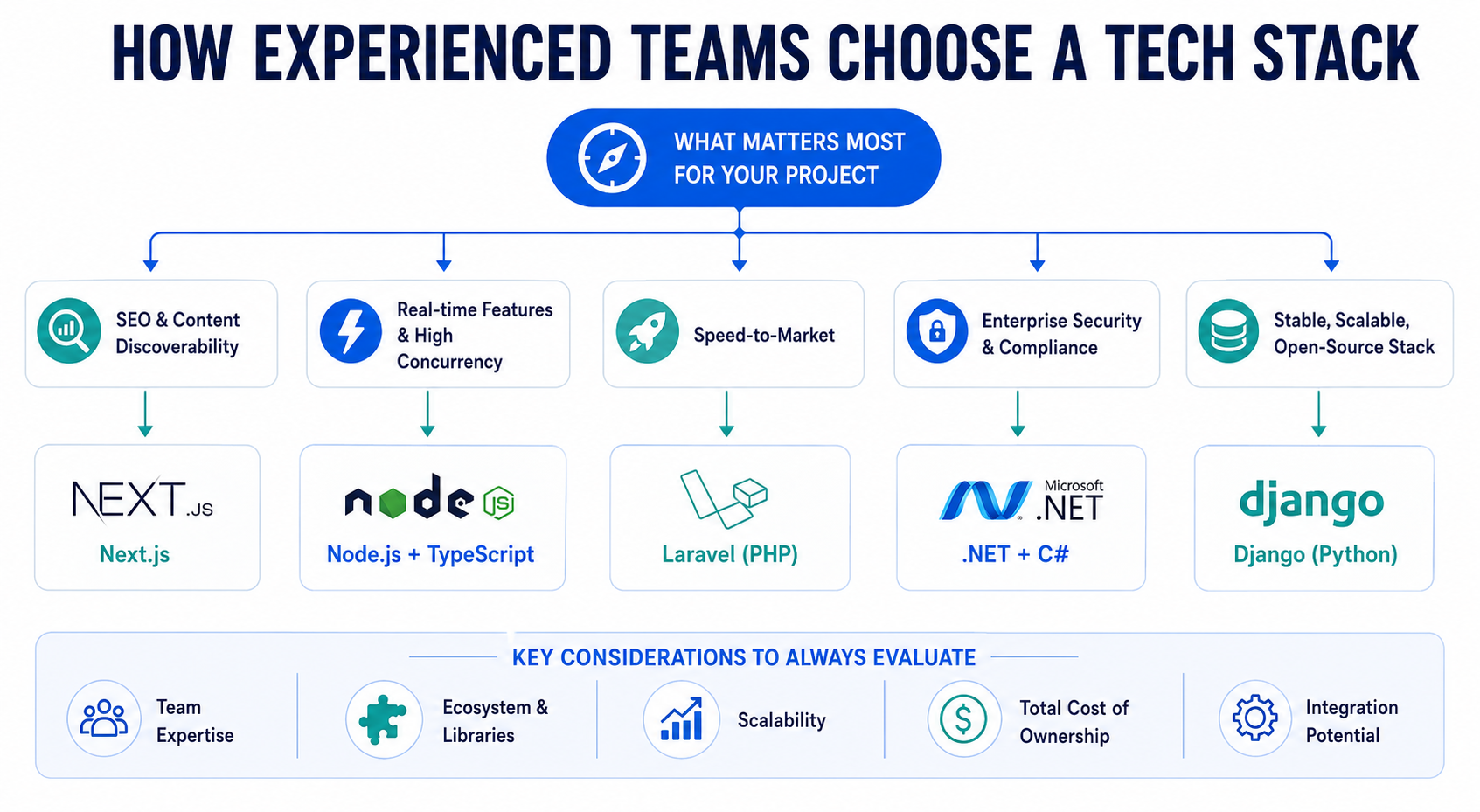
Remember: There is no “best stack”, only the most suitable option for your goals, constraints, and future.
Based on the type of web app you are building, here’s a quick decision table to help you make the right choice:
| Type of Web App | Tech Stack | Benefits of the Stack |
|---|---|---|
| Content-heavy app with SEO requirements | Next.js + PostgreSQL | SSR out of the box, large talent pool, strong ecosystem |
| Complex internal tool, minimal SEO needs | React SPA + Django or FastAPI | Fast to build, Python backend handles complex data logic well |
| High-concurrency, real-time features | Node.js + WebSockets + Redis | Event-driven architecture handles concurrent connections efficiently |
| Enterprise app with strict security and compliance | .NET Core + SQL Server + Azure | Mature enterprise tooling, strong audit trail support, Azure compliance certifications |
| Early-stage startup, tight timeline, small team | Laravel + Blade or Livewire | Batteries-included framework reduces decision overhead, ships fast |
One opinion I'll state directly: if your team is under ten engineers and you're on a runway of less than 18 months, don't start with microservices. You'll spend more time managing service communication than building product. Start with a well-structured monolith. You can always split it apart later and splitting it at real scale is a far better problem to have than never shipping because the architecture was too complex to move fast in.
The first question most clients ask me during project discussions is: How much does it cost to develop a web application?
Most of them are confused because they’ve either received quotes from vendors that were 3X what they expected or 3 quotes with 3 different numbers for the same project. Now, you need to first understand why that happens.
Web app development costs are driven by variables, not by the type of application. Two "custom web apps" can differ in cost by a factor of ten based on the following factors:
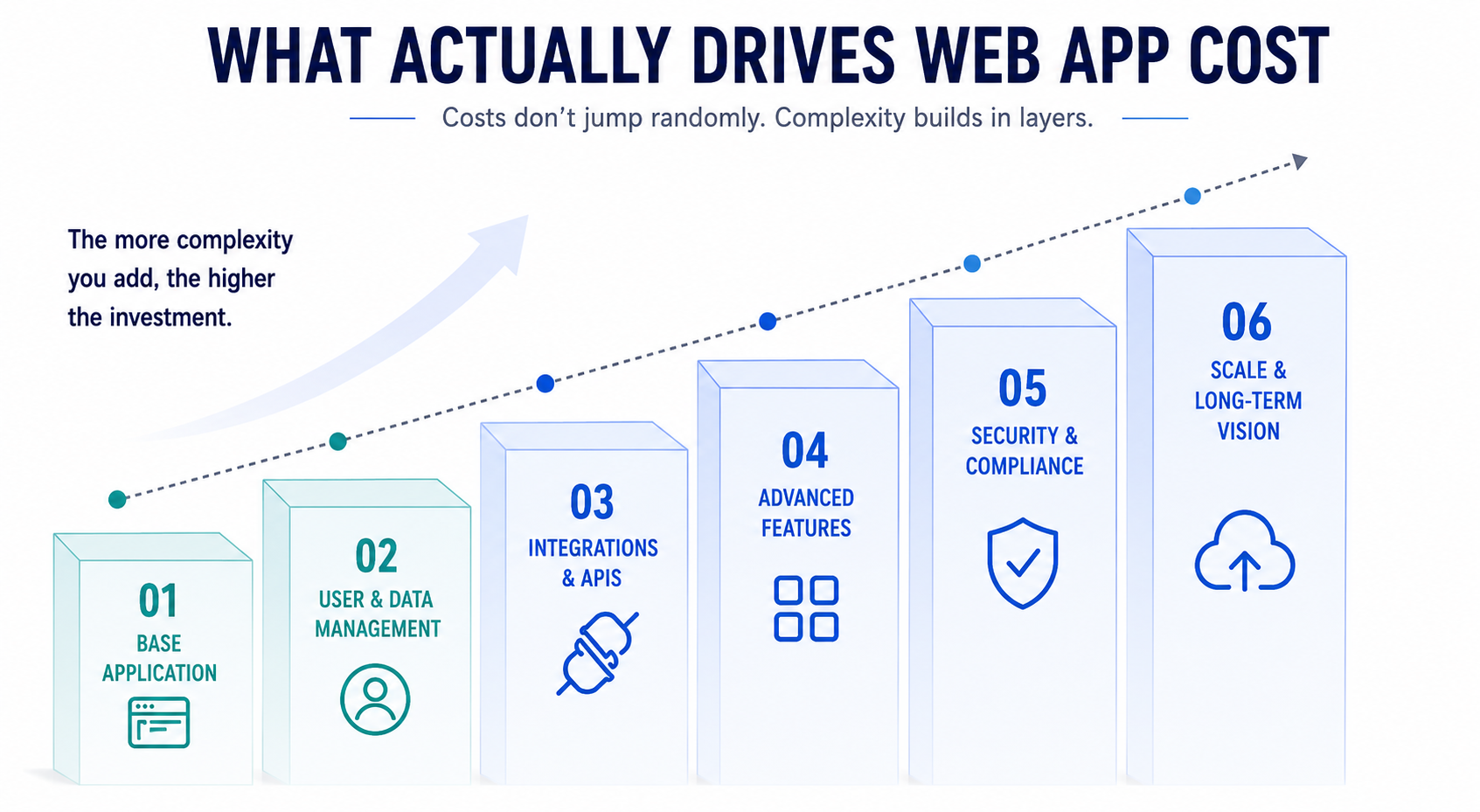
This is what your web app is basically built to do. It includes core screens, workflows, and business logic required to launch the product. The larger the foundation, the higher the initial development effort (and the cost!)
This includes the complex data relationships, permissions, and user roles increase system complexity. Real-time sync, audit trails, and structured data handling add more scope.
Every external system introduces dependencies, testing, and error handling requirements. Some APIs are simple, while others demand heavy customization and maintenance, resulting in higher web application development cost.
Custom workflows, analytics, AI, automation, and real-time capabilities increase build effort. The more tailored the experience, the greater the engineering investment.
SSO, MFA, encryption, and compliance standards affect system architecture early on. But instead of considering this as an expense you can postpone, remember that building securely from the start is far more cost-efficient than retrofitting later.
Scalable architecture, testing, documentation, and maintainability require upfront planning. Applications built for long-term growth cost more initially but reduce future risk.
While the most accurate way to know how much your web application development project will cost is through a custom project assessment, the ranges below should give you a practical benchmark for what different types of web apps typically cost to build.
| Project Type | Estimated Range (2026, US rates) | Key Cost Drivers |
|---|---|---|
| Simple internal tool (3–5 features, no integrations) | $25,000 – $60,000 | Data complexity, number of user types |
| Mid-complexity customer-facing app (5–10 features, 2–3 integrations) | $75,000 – $180,000 | Integrations, auth complexity, testing scope |
| Complex platform (multi-tenant, compliance, 5+ integrations) | $200,000 – $600,000+ | Compliance requirements, scale architecture, integration depth |
These ranges assume senior engineers at US market rates. A well-scoped project with a proper discovery phase will produce a more accurate estimate than anything quoted from a 30-minute sales call. Building a custom web application without that scoping process is where most cost overruns begin.
Project rescue services are far more common than most companies realize. By the time leadership starts hearing phrases like “unexpected complexity,” “integration delays,” or “we need to revisit the architecture,” the project is usually already under pressure.
After 15+ years of working on both successful builds and projects brought to us for recovery, I have noticed the same warning signs appear again and again. If you spot any of these early, pause, fix the underlying issue, and then continue. It is significantly cheaper than trying to rebuild trust, timelines, and architecture later.
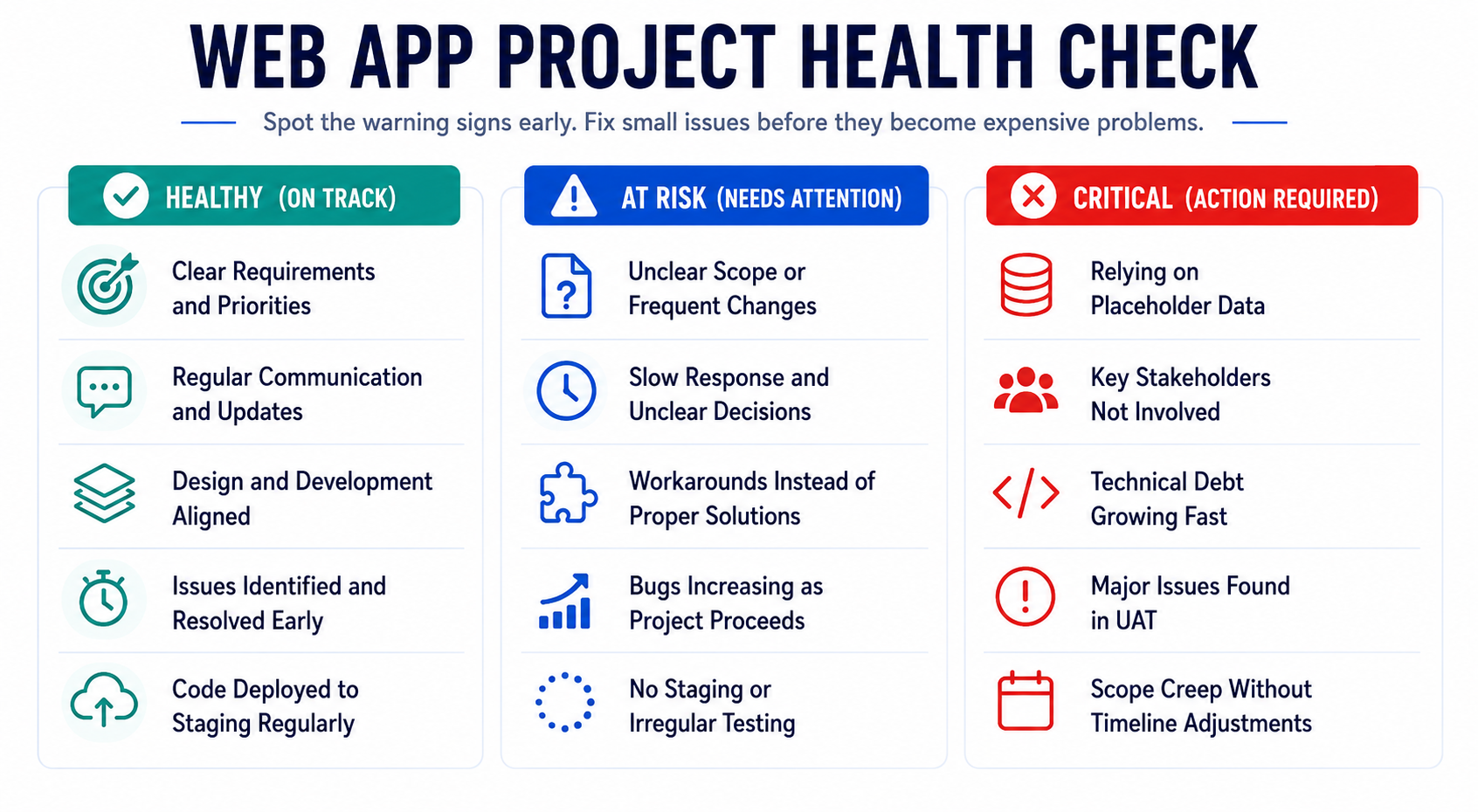
If your team is presenting polished interfaces but the data is always hardcoded or mocked, they're building front to back or UI first, backend later. This produces impressive demos and brittle foundations. The real integration work surfaces in the last third of the project when there's no time left to do it properly. A healthy project demos real data, even if the UI is unfinished, by the end of the second sprint.
When feature requests and scope changes are handled informally (like in chat, on calls, via email) they're not being estimated, prioritized, or tracked. Every informal agreement is a hidden commitment that's either going to delay the launch or get dropped without anyone noticing until the client notices. Scope should live in the backlog. All of it. If it's not in the backlog, it doesn't exist as a commitment.
This one is invisible until it's expensive. If your team hasn't established a deployment pipeline from version control to a staging environment that mirrors production in the first few weeks, you're accumulating environment debt. When the pipeline finally gets built under deadline pressure, it breaks things that worked fine locally and has never been tested in combination.
Deployment infrastructure should be boring by the time you're halfway through the build. If it's still being configured in the final sprint, something went wrong early.
Important: Seeing these signs does not mean the project has failed yet. It usually means there is still time to stabilize things before expensive rework, missed launches, and full-scale rescue mode begin.

Building A Scalable, Secure, and Future-Ready Web Application
Based on what I’ve seen across hundreds of web app development projects, the ones that scale successfully over time usually share the same foundations: a proper discovery phase, realistic architecture decisions, strong testing discipline, and a delivery process that treats scope changes as a formal engineering conversation instead of reactive improvisation. The projects that struggle almost always skip at least one of those early.At Radixweb, we have 26+ years of experience and deep technical expertise in building web application projects across healthcare, fintech, SaaS, logistics, and enterprise operations. One thing that this experience of having built 500+ web apps has taught us: the right solution is not always the most complex one. Sometimes the best technical decision is simplifying the architecture, reducing unnecessary infrastructure, or challenging assumptions before expensive development begins. If you are planning a new web application, modernizing an existing one, or trying to recover a project that already feels off track, schedule a consultation with our experts to get cost and time estimates plus an understanding of technical decisions, risks, tradeoffs, and architecture choices that shape the future of the product you are building.
Ready to brush up on something new? We've got more to read right this way.