Read More


Recognized for AI Excellence at 2026 Globee® Awards - Read More

Dhaval Dave

Quick Summary: Modernizing an end-of-life EHR is more than a technology upgrade. It’s a race against growing security, compliance, and operational risks. This guide explores how healthcare organizations can plan HIPAA-compliant migrations, protect PHI throughout the transition, validate data integrity, and choose the right modernization approach to ensure a secure, low-risk move forward.
When an EHR vendor announces end-of-life, the migration clock starts whether you are ready or not. You have a fixed deadline, protected health information you cannot lose or expose, and the mandate to keep clinical operations running. The real HIPAA compliance risk isn’t at migration completion. It is during the transition window.
The February 2025 incident where Oracle Health discovered unauthorized access to Cerner patient data sitting on legacy migration servers that hadn't been moved to Oracle Cloud yet is the perfect example. A threat actor used compromised credentials to access systems. By the time they noticed, data had already been copied. 80 hospitals were affected.
Now, this wasn't a sophisticated attack, but basic credential compromise exploiting the exact infrastructure gap that appears during migrations: legacy systems still connected to the network, still holding patient data, but not yet upgraded with modern security controls. It's the kind of gap most healthcare organizations don't want to think about when they're racing against a vendor end-of-life deadline.
Also, most legacy modernization guidance you’ll find online is for organizations choosing to modernize. But below, we guide you through the more urgent scenario. Read on to see how to migrate off end-of-life EHR and patient management systems methodically, with the HIPAA compliance checkpoints that need to happen at each phase.
Looking for general guidance? Check out this legacy application modernization guide.
EHR legacy modernization is the process of migrating an organization's electronic health records and clinical workflows from an aging or end-of-life system to a modern, interoperable platform while maintaining regulatory compliance, data integrity, and continuity of patient care.
It differs from standard software migration because the data being moved is protected health information (PHI) governed by HIPAA (Health Insurance Portability and Accountability Act), the ONC Cures Act, and state-specific data retention laws. A migration error that corrupts patient records or creates unauthorized PHI access isn't just an IT problem. It's a federal compliance event.
When an EHR system reaches end of life, several PHI-related compliance risks activate simultaneously:
None of this triggers an immediate HIPAA violation on its own. But running patient data on an unpatched system with known vulnerabilities, without a documented remediation plan, is a condition OCR examiners flag during audits as evidence of failure to implement reasonable security measures under the HIPAA Security Rule.
The practical answer: when your EHR goes EOL, you have a defined window to migrate before the compliance risk becomes a formal liability. That window is typically 12 to 18 months from the EOL announcement for systems still under extended support, and shorter if you're already past it.
While this is seen as a crisis, it is often an opportunity to actually modernize your legacy application. You can decide which type of modernization fits your needs and plan a total or partial system overhaul.
The financial case for migration becomes clearer when you calculate what staying actually costs, not just the license or maintenance fee.
According to IBM's Cost of a Data Breach Report 2024, the average healthcare data breach costs $9.77 million. That figure is the highest of any industry. Running PHI on an unpatched, EOL system is not the same as a breach, but it's a documented contributing factor in breach post-mortems. The risk exposure is real and it's quantifiable.
Beyond breach risk, there are many other costs associated with delaying software modernization, especially for EOL systems:
Vendors typically charge premium rates for extended support after the standard EOL date. Organizations that have stayed on legacy Meditech Magic or Allscripts Sunrise Acute instances post-EOL report maintenance costs running 40 to 60 percent higher than active-support equivalents.
Modern lab systems, imaging platforms, and payer portals push FHIR R4 APIs. Legacy EHR systems built for HL7 v2 don't connect to them natively. Every new integration requires custom middleware. That technical debt compounds with each new system your organization adopts.
Clinical staff trained on modern EHR interfaces (Epic, Oracle Health) experience measurable productivity drops when forced to work on legacy interfaces. Nursing documentation time and order entry errors both increase on systems that predate modern UX design standards.
These costs may not show up as clean line items in your balance sheet, but that’s a software modernization trap that you should avoid. The costs do affect the bottom line and also have an impact on practitioner experience and patient trust.
Not all legacy EHR data needs to move to the new system. Some of it needs to be archived, not migrated, and the distinction matters for both compliance and cost.
| Consideration | Full Migration to New EHR | HIPAA-Compliant Archival |
|---|---|---|
| Best For | Active patient records and data needed for ongoing care | Historical records retained primarily for compliance or audit purposes |
| Typical Data | Active patient charts, recent encounters, medication history, care plans, regulatory reporting data | Legacy patient records, inactive patient files, historical billing data, closed cases |
| Access Frequency | High and ongoing | Low and occasional |
| Clinical Workflow Usage | Required for daily clinical and operational activities | Not typically used in routine care delivery |
| Integration Requirements | Must connect with current EHR workflows, labs, imaging systems, and payer platforms | Minimal integration requirements |
| Migration Complexity | Higher due to data mapping, transformation, and validation requirements | Lower because data remains outside the operational EHR environment |
| Cost Impact | Higher migration and storage costs | Lower migration costs while still meeting retention requirements |
| Compliance Requirements | Subject to HIPAA, retention policies, access controls, and audit logging | Subject to the same HIPAA requirements, including encryption, access controls, audit logging, and data retrieval capabilities |
| Recommended Approach | Data required for continuity of care and active operations | Data retained solely for legal, audit, or retention obligations |
Once you have decided to migrate, here’s what you need to do and how.
The HIPAA risk in EHR migration isn't the migration itself. It's the transition period, when two systems hold PHI simultaneously and access controls, audit logs, and data governance need to function across both.
Here is how we ensure healthcare compliance-readiness when we are planning for legacy modernization engagements
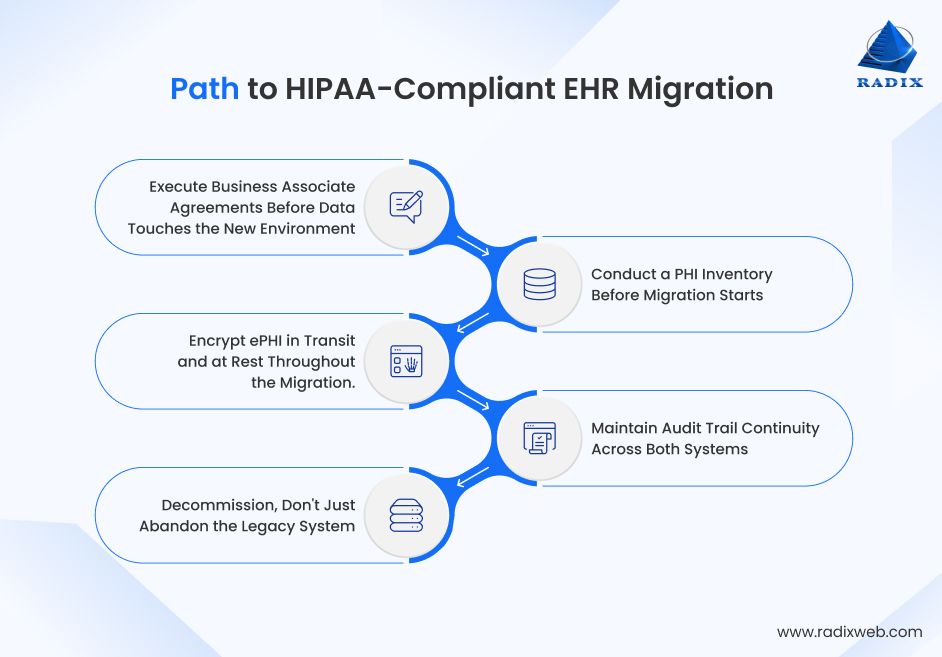
If your migration partner, cloud provider, or new EHR vendor will have access to PHI during the transition, a Business Associate Agreement (BAA) must be signed before data transfer begins. This is not optional, but a major mistake that can collapse your system modernization process if skipped in the early stages of migration planning. Every vendor in the migration chain who will handle ePHI needs a current, signed BAA in place.
You cannot protect data you haven't mapped. Before migration begins, document every location where PHI exists in the legacy system: structured data in the primary database, unstructured data in documents and attachments, archived records, audit logs, and any data replicated to reporting systems. This inventory drives the migration scope and the compliance verification at completion.
HIPAA requires encryption for ePHI transmitted over open networks. During migration, data moving between the legacy system, migration tooling, staging environments, and the target system must be encrypted end-to-end. Encryption keys should be managed by the healthcare organization, not the migration vendor.
During the transition window, clinical events may be documented in the legacy system while new admissions go into the modern EHR. Both systems must maintain complete, tamper-evident audit logs. Audit log coverage cannot lapse during the switchover period.
When migration is complete, the legacy system needs formal decommissioning: revoking all access credentials, terminating network connectivity, and either securely deleting or archiving the data per your retention schedule. An abandoned system with active credentials and PHI still in it is a live HIPAA liability, even if nobody is using it.
A compliant EHR migration isn't defined by moving data successfully but by maintaining security, auditability, and patient trust throughout the transition.
HIPAA compliance isn't a single gate at the end of migration. It's a series of checkpoints that need to pass before each phase can proceed. Below we highlight the HIPAA requirements for each stage of healthcare data migration:
Following these checkpoints helps keep EHR migration secure, compliant, and audit-ready from start to finish.
Data integrity validation is the most technically demanding part of EHR migration and the one most frequently compressed under project deadline pressure. Compressing it is where patient safety and compliance problems originate.
We've seen this firsthand. During an IT infrastructure modernization engagement for a US-based health insurance organization, our validation process uncovered field-level mapping errors in claims data that automated record-count checks failed to detect. Identifying the issue before legacy system decommissioning prevented a significant reprocessing event and reinforced an important lesson: successful migration is not just about moving data, but proving that every critical record remains accurate and usable.
Here's what a comprehensive validation process should include:
Pre-migration baseline: Before migration starts, capture record counts, data checksums, and a statistical sample of complete patient records across your data types like demographics, clinical notes, lab results, imaging references, medication history, billing records. This baseline is what you validate against after migration.
Mid-migration spot checks: For large migration projects running over weeks, run integrity checks on completed batches before moving to the next. A data corruption problem caught after 20 percent of records have migrated is manageable. The same problem found after 100 percent of records have migrated requires a full rollback.
Post-migration validation protocol:
Reconcile record counts between source and target. Every record present in the source must be accounted for in the target or in documented archival storage.
Validate structured data fields against the baseline sample: patient demographics, encounter dates, diagnosis codes, medication names and dosages, lab values with units. Discrepancies in clinical data are patient safety issues, not just data quality issues.
Verify document and attachment migration. Clinical notes, consent forms, imaging reports, and referral letters are frequently stored as unstructured documents. They're often underrepresented in automated migration tooling and need explicit verification.
Test system integrations in the target environment before decommissioning the legacy system. Lab interfaces, pharmacy systems, imaging viewers, and payer connections all need to function correctly in the new environment under production conditions.
Thorough validation is what turns a completed migration into a trusted one.
When they first come to us, a lot of clients ask us: How long does EHR migration take for a hospital? Well, there is no single answer. According to market data on application modernization, 58% of projects take 16 months to complete. That said, the timeline depends heavily on organization size, system complexity, and whether you're doing a full cutover or a phased migration.
For example, we completed legacy application modernization for a Colorado-based digital healthcare client in a phased approach in just 7 months. During this rapid healthcare application modernization, we also ensured clinical continuity without a single day of care disruption.
For a mid-size hospital or multi-site practice with 50,000 to 200,000 active patient records, here’s how the migration timeline is like:
Months 1 to 3: Assessment and Planning
PHI inventory, BAA execution, risk analysis update, vendor selection if replacement EHR hasn't been chosen, migration tooling evaluation, and compliance framework documentation. This phase is frequently underinvested and it's where the downstream problems originate.
Months 4 to 6: Environment Setup and Pilot
Target environment configuration, encryption and access control implementation, integration development, and a pilot migration of a defined subset of records: one department, one facility, or one record type. Pilot validation against the baseline before proceeding.
Months 7 to 12: Phased Migration
Migration runs in batches by patient population, date range, or record type depending on the approach. Each batch validated before the next begins. Clinical staff training on the target system runs in parallel with migration.
Months 12 to 18: Cutover, Validation, and Decommission
Full cutover to the target system, post-migration validation protocol executed, legacy system access revoked, formal decommissioning documented. The 12-month mark is often when EOL extended support ends. Having decommissioning complete before that date removes the security patch exposure entirely.
For larger health systems with 500,000 or more patient records and 20 or more integrated systems, add 6 to 12 months to the migration process.
Technical competence is table stakes when you are exploring reliable app moernization companies to work with. The differentiator in healthcare modernization partnerships is compliance track record and clinical workflow knowledge.
| Parameter | Basic Expectation | What You Need | How to Judge |
|---|---|---|---|
| HIPAA Compliance | Compliance awareness | Proven healthcare migration experience | Review case studies and compliance processes |
| HL7/FHIR Expertise | General integration skills | HL7, C-CDA, and FHIR R4 proficiency | Ask about conversion and validation methods |
| Clinical Workflow Knowledge | Technical understanding | Healthcare operations expertise | Evaluate healthcare project experience |
| Migration Approach | Single cutover plan | Phased migration capability | Review migration methodology |
| Data Validation | Basic testing | End-to-end data verification | Ask about QA and reconciliation processes |
| Integration Capability | Standard integrations | EHR, lab, imaging, payer connectivity | Review integration track record |
| Post-Migration Support | Project handoff | Hypercare and ongoing support | Check SLAs and support commitments |
| Risk Management | Issue response plan | Rollback and contingency planning | Assess risk mitigation framework |
At Radixweb, our legacy modernization services include compliance documentation support, phased migration planning, and post-migration validation protocols built specifically for regulated industries. That’s one of the reasons why we have consistent near-perfect ratings from 3000+ global clients.
Moving Forward Before the EOL Deadline
EHR end-of-life is more than a technology deadline. It is a security, compliance, and operational challenge. Organizations that plan early and start PHI inventory and compliance planning before the migration tooling conversations begins, reduce disruption, maintain HIPAA compliance, and avoid the risks that often emerge during migration. This is where legacy application modernization services tailored for healthcare EHR migrations help healthcare providers transition securely while maintaining continuity of care.At Radixweb, we help healthcare organizations modernize legacy EHR platforms through secure data migration, cloud modernization, interoperability enablement, and compliance-focused engineering. Our teams work to minimize migration risk, protect patient data, and keep critical systems running throughout the transition. If your EHR is approaching end-of-life or you're already past extended support, schedule a strategy session with our healthcare application modernization team to map your migration timeline and compliance requirements before the deadline pressure compresses your options.
Ready to brush up on something new? We've got more to read right this way.