Read More


Recognized for AI Excellence at 2026 Globee® Awards - Read More

Anand Trivedi

Only 39% of software projects are delivered on time, within budget, and with the features originally planned, according to the Standish Group’s 1995 CHAOS Report. In the two decades since, the figure hasn't changed much.
At the same time, custom web development projects typically cost anywhere between $30,000 and $150,000. That's a substantial investment to put at risk. Yet, most failed projects don't collapse because of poor coding. They fail because discovery is rushed, requirements are incomplete, stakeholders aren't aligned, or critical phases of the web development process are overlooked. By the time these issues surface during development, fixing them is far more expensive than preventing them upfront.
This guide walks through all 7 phases with the timelines that are actually realistic, the specific failure point in each phase, and what you as the person commissioning the project should be doing at every stage. After 26 years and 4,500+ web projects delivered across healthcare, fintech, manufacturing, and retail, this is the version of the web development process that changes how you run the first two weeks, because that is where the budget is either protected or lost.
The web development process is the structured sequence of phases a team follows to take a project from initial concept to a live, functional web product, and then keep it performing after launch.
It applies whether the deliverable is a marketing website, a customer portal, or a complex web application. The phases are consistent across project types. What changes is the depth, duration, and complexity of each phase depending on scope, integrations, and the number of stakeholders involved.
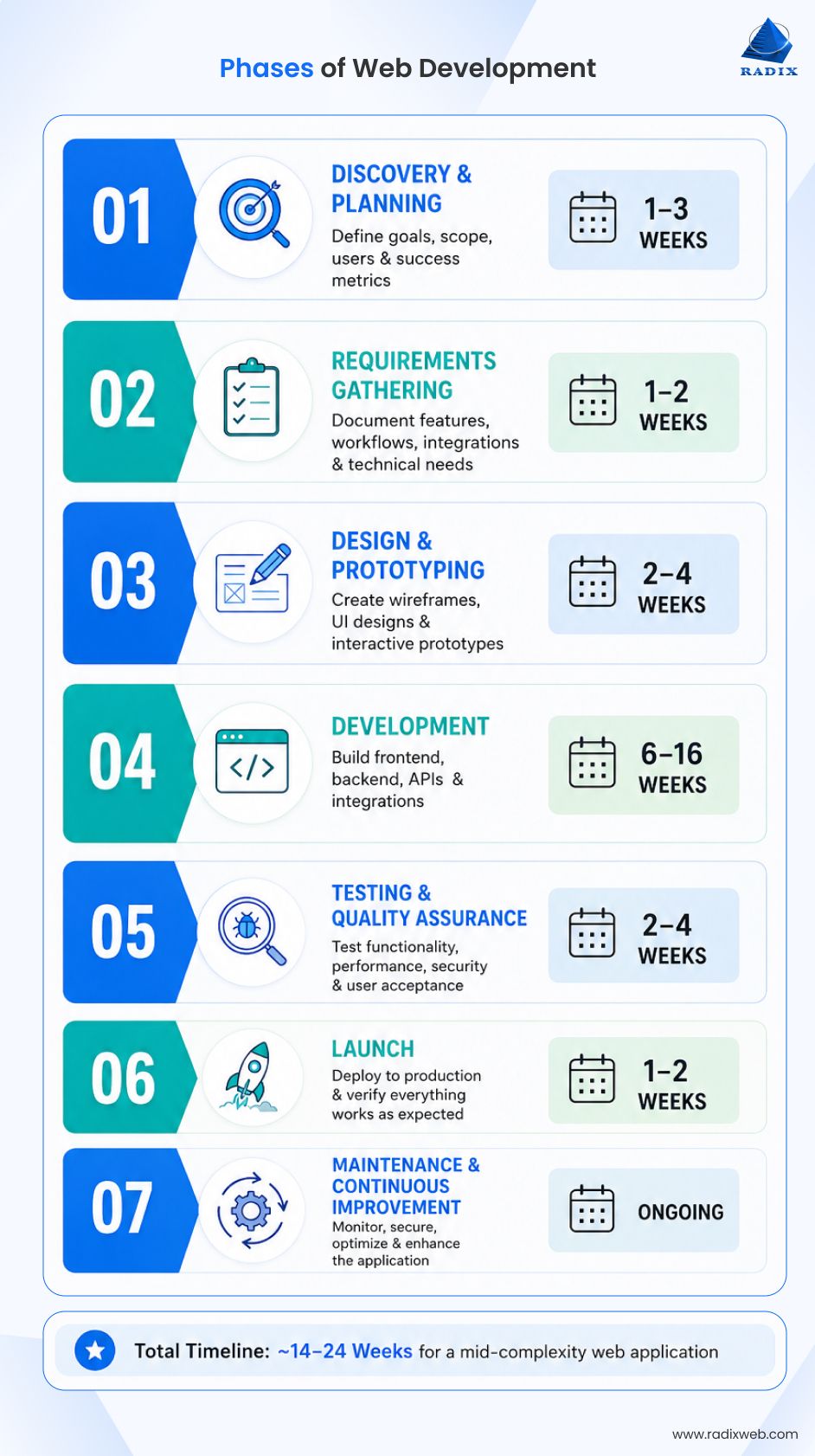
Before diving into the details, here's the complete web development process at a glance. In less than a minute, you'll understand what happens during each phase, how long it typically takes, and the most common issues that can delay or derail a project.
| Phase | What Happens | Realistic Duration | Most Common Failure |
|---|---|---|---|
| Discovery & Planning | Define business goals, scope, users, and success metrics | 1–3 weeks | Unclear business objectives and success criteria |
| Requirements Gathering | Document features, integrations, workflows, and technical requirements | 1–2 weeks | Missing requirements and unresolved technical dependencies |
| Design & Prototyping | Create wireframes, UI designs, and interactive prototypes | 2–4 weeks | Delayed stakeholder approvals and late design changes |
| Development | Build frontend, backend, APIs, and integrations | 6–16 weeks | Mid-project scope changes and unanswered business questions |
| Testing & Quality Assurance | Test functionality, performance, security, and user acceptance | 2–4 weeks | User Acceptance Testing (UAT) planned too late |
| Launch | Deploy to production and verify everything works as expected | 1–2 weeks | Poor launch planning and inadequate rollback preparation |
| Maintenance & Continuous Improvement | Monitor, secure, optimize, and enhance the application | Ongoing | Treating launch as the finish line instead of the starting point |
For a mid-complexity web application, expect 14–24 weeks from project kickoff to launch. Projects that stay on schedule usually don't rush Discovery and Requirements, instead they invest enough time upfront to avoid expensive rework later.
Discovery is where a project gets its shape. The team works with your stakeholders to define “what problem the web product solves”, “who uses it”, “what success looks like”, and “what the constraints are: budget, timeline, compliance requirements”, and existing systems it connects with.
The output of this phase isn't a report. It's alignment. Every stakeholder on both sides finishes discovery with the same understanding of what is being built and, just as importantly, what is explicitly out of scope.
Typical timeline: 1–3 weeks for mid-sized projects. Enterprise applications involving multiple departments, legacy systems, or regulatory requirements may require 4–6 weeks. Compressing this phase is the single most common cause of scope creep downstream. In our work with clients who had prior bad experiences with other agencies, the most common complaint was that discovery lasted one call and then everyone moved straight into design. That pattern doesn't save time. It borrows it from Phase 4.
Where discovery breaks down
Most problems begin with vague business goals rather than technical issues.
"We want a website that generates more leads" is not a scope. "We want a website that converts paid traffic at 3% or higher, measured by form completions to our service inquiry form" is a scope. The more specific the definition of success, the less room there is for misaligned expectations later. Bring your internal subject-matter experts to discovery, not just your project manager.
Requirements gathering translates the discovery conversation into a documented specification. This covers functional requirements (what the system does), non-functional requirements (performance benchmarks, security standards, accessibility compliance under WCAG 2.1), content requirements, and technical constraints.
A complete requirements document lets the development team build a web project architecture without asking clarifying questions mid-sprint. An incomplete one generates change requests throughout Phase 4.
Here’s what gets defined in this phase:
When do web development projects actually fail?
The gap between requirement sign-off and design kickoff is where we see the highest rate of project problems across our delivery history.
Here is why: a team completes requirements, declares the phase done, and moves into design. Then during design, or worse during development, someone discovers that a feature assumed to be simple requires a complex backend integration with a third-party system. That discovery surfaces as a change request in Phase 4, when the cost to resolve it is far higher than it would have been in Phase 2.
Research published by IEEE confirms that scope creep from unresolved requirements can cost up to four times the originally estimated development expense.
The fix is a technical pre-check at the end of Phase 2. At Radixweb, before any designer opens a tool, a senior developer reviews the requirements for integration complexity, undocumented dependencies, and ambiguous feature definitions. This step takes less than a day and consistently surfaces the issues that would otherwise appear 6 weeks into development.
Ask any vendor you're evaluating whether this step is part of their process. If they can't confirm it, ask for it explicitly.
Design translates requirements into what the product will look and feel like. It moves from information architecture (how pages and content are structured) through wireframes (layout and user flow) to high-fidelity mockups and interactive prototypes that stakeholders can navigate before a line of code is written.
The most commonly used web development tools at this stage include Figma, Adobe XD, and InVision. But what matters isn't the tool but the signed-off prototype is formally approved before development begins.
What to actually review in the design phase
Review designs against your user's decision-making process, not your own aesthetic preference. The question is not whether you like how it looks. It is whether a first-time visitor will understand what to do within five seconds of landing on the page. If you have existing customers available for even informal feedback at prototype stage, that input prevents expensive UX rework post-launch.
After having delivered hundreds of web application development projects, we have seen that the projects where even one or two actual end-users are involved in the prototype review consistently report fewer post-launch change requests than projects that rely entirely on internal stakeholder opinions.
Where Phase 3 breaks down
Approval delays. Every week a prototype sits waiting for stakeholder sign-off is a week of developer capacity idle. Set a hard approval deadline at the start of this phase. Design changes requested after web development engagement has begun are change requests and billed accordingly.
Development runs on two parallel tracks: frontend web development frameworks that cover everything the user sees and interacts with and backend development that includes the server, database, APIs, and business logic.
Frontend teams build the interface using HTML, CSS, and JavaScript, typically with frameworks like React, Angular, or Vue depending on project requirements. Backend teams handle data storage, authentication, third-party integrations, and application logic. The right web development stack is the one that is selected during the requirement gathering phase itself, not improvised in Phase 4 based on developer preferences.
Most well-run teams work in two-week sprints with working demos at the end of each cycle. This gives you regular visibility into progress and the ability to catch direction problems while they are still inexpensive to fix.
What causes cost overruns in web development
Almost never the development itself. Cost overruns in Phase 4 originate in Phase 2. Ambiguous requirements that weren't resolved before design become blocking questions mid-sprint. When a developer has to stop and ask what a feature is supposed to do, it is a sign the requirements document didn't go far enough.
What to DO and NOT DO in Phase 4
The most expensive client-side mistakes we see in Phase 4 is going silent during development and sharing a list of changes during the launch review. These changes become additional scope and have to be billed separately.
Business stakeholders should instead attend every sprint demo. Monthly check-ins are not enough to catch direction problems early on. So, it is important to not treat sprint demos as a formality because that’s exactly where the cheapest corrections are still possible.
Testing in a well-run process runs alongside development in sprints, not as a single end-of-project checkpoint. QA engineers write test cases during development cycles so each feature is tested as it's built.
Standard testing types in a complete web development process:
Why UAT scheduling is a Phase 1 problem, not a Phase 5 problem
UAT requires your internal team or customers (the actual users of the system) to be available for structured testing during a specific two-week window. Getting those people scheduled is a coordination challenge that consistently surprises clients when it is left to the week before UAT begins. Plan UAT participant availability in Phase 1, not Phase 5.
Issues discovered in UAT that were in the original scope are the development team's obligation to fix before launch. Issues that weren't in scope are post-launch change requests.
Launching a website or web app is not a single action. It is a checklist-driven sequence that moves the product from a staging environment to production.
That checklist covers server configuration, domain and DNS setup, SSL certificate verification, content migration confirmation, analytics and tracking activation, redirect implementation for any URLs being replaced, and a final smoke test confirming the live environment matches the approved staging version exactly.
Don't launch on a “Friday afternoon”. If something breaks in production, a full team needs to be available immediately. Tuesday or Wednesday morning, with a tested rollback plan agreed in advance, is the standard recommendation from our experienced delivery team.
Also, post-launch monitoring, uptime tracking, error logging, and analytics verification should be active from the moment the site goes live.

A launched web product is a starting point, not a finished deliverable.
Ongoing maintenance covers security patches (CMS updates, plugin updates, dependency updates), performance monitoring, content updates, bug resolution, and feature iterations based on user behavior data. Outdated dependencies are among the most common loopholes in web application security. Security patching is not optional. It is the baseline for keeping a production system “trustworthy”.
3 situations consistently generate unplanned maintenance work:
Budget for maintenance before signing Phase 1. Teams that treat launch as the endpoint of their investment consistently find that their products degrade faster than their business grows. At Radixweb, structured maintenance tiers are a part of all our web development service offerings, because clients who skip this planning consistently return with emergency work that costs more than scheduled maintenance would have.
Our 97% repeat client revenue reflects what happens when Phase 7 is treated as a continuation of the partnership rather than a separate negotiation.
Here’s a quick summary of the seven phases of web development:
Each of the different types of web development projects demands a different level of investment, not just financially, but also in time and stakeholder involvement. Knowing where your budget goes and what your team needs to contribute helps prevent delays, reduce rework, and keep the project moving.
| Phase | Typical Timeline | Budget Allocation | What Your Team Should Do |
|---|---|---|---|
| 1. Discovery & Planning | 1–3 weeks | 5–10% | Define business goals, success metrics, key users, and nominate decision-makers. |
| 2. Requirements Gathering | 1–2 weeks | 10–15% | Review and approve functional requirements, integrations, user roles, compliance needs, and priorities. Resolve open questions before design begins. |
| 3. Design & Prototyping | 2–4 weeks | 10–15% | Review wireframes promptly, consolidate stakeholder feedback, and provide formal sign-off before development starts. |
| 4. Development | 6–16 weeks | 45–60% | Attend sprint demos, review working features regularly, answer business questions quickly, and avoid introducing new scope mid-sprint. |
| 5. Testing & UAT | 2–4 weeks | 10–15% | Allocate business users for structured testing, validate workflows, and report issues against agreed requirements. |
| 6. Launch | 1–2 weeks | 2–5% | Confirm go-live readiness, approve deployment, and ensure internal teams are available for launch-day support. |
| 7. Maintenance & Optimization | Ongoing | 10–20% annually | Monitor performance, prioritize improvements, apply security updates, and plan future enhancements based on user feedback. |
The timeline and budget allocation above represent a typical distribution for custom web development projects. Actual time and percentages may vary depending on project complexity and scope.

Build Better Web Projects by Getting the Process Right
Web development is changing rapidly. AI-assisted development, modern frameworks, and other latest trends dominating the web development landscape are helping teams build better digital products faster. But that happens only when they're backed by a structured process. And the most successful projects don't start with code. They start with clear goals, complete requirements, and a team of web developers who understand how to turn ideas into prod-ready web app. When you invest in that, the process becomes faster, predictable, and less expensive.At Radixweb, we've spent more than 26 years delivering over 4,500+ software and web development projects. We've served fast-growing startups to global enterprises across 30+ industries and geographies. Our process combines strategic discovery, modern engineering practices, AI-assisted development, and transparent Agile delivery, which produces scalable, secure, and future-ready web solutions. Schedule a no-cost initial assessment with our experts to discuss your web project and build a practical roadmap for success.
Ready to brush up on something new? We've got more to read right this way.