Read More


Recognized for AI Excellence at 2026 Globee® Awards - Read More

Pratik Mistry
Companies spend an average of $1 million building software. Yet research shows that 80% of software product features are rarely or never used. Even more concerning, only 1 in 3 software projects is delivered on time, within budget, and with the intended scope.
So, why do organizations keep building software that customers barely use?
The answer usually isn't engineering capability. It's that most product decisions are made with incomplete information. Teams commit to feature sets, interface designs, and user workflows before a single real user has interacted with the product. Development moves forward. Weeks or months later, user testing, stakeholder reviews, or early customer feedback reveal that a core assumption was wrong. By then, changing direction is no longer simple or inexpensive.
That's where software prototyping comes in. It isn't just a design activity, but a risk reduction strategy that helps validate critical assumptions before they become production code, when changes take days instead of weeks and cost a fraction of what they would after development is complete.
The question is not whether to prototype. It is what to prototype, at what fidelity, and how to use the output to make a better development decision.
Software prototyping has evolved far beyond wireframes and clickable mockups. It has become a strategic way to validate product ideas, test user experiences, assess technical feasibility, and reduce development risk before significant engineering effort begins. Understanding the different types of prototypes, choosing the right level of fidelity, following a structured prototyping process, and leveraging modern AI-powered tools can help teams make informed product decisions, minimize costly rework, and build software that better aligns with user and business needs.
| Aspect | Details |
|---|---|
| What this guide covers? | Why prototyping matters before development, four prototyping models with trade-offs, step-by-step prototype process, fidelity levels and when to use each, prototyping tools in 2026, when ROI is highest, common mistakes, cost breakdown, integration with Agile and Waterfall environments |
| Who should read this? | Product Managers, Design Leaders, Engineering Leads, CTOs, and Founders making decisions about whether to prototype before committing to development. Also for teams commissioning prototyping from external partners |
Software prototyping is the process of creating a preliminary model of a software product to test assumptions about design, functionality, or user behaviour before committing to full-scale enterprise grade software development. A prototype is not the product.
It is a tool for learning how users will interact with it, whether the intended workflow makes sense, and which design decisions need revision before development begins.
In 2026, prototyping spans from hand-drawn sketches (paper prototypes) through clickable wireframes to fully interactive high-fidelity models built in Figma or generated by AI tools. The common thread is that a prototype produces learning at lower cost than production code, and the learning changes the development decision.
Before building a prototype, it's important to know whether a prototype, an MVP, or a proof of concept is the right starting point for your product.
Prototype, MVP and proof of concept are instruments are often used at adjacent moments in the product lifecycle. But they aim to answer very different questions, and it is important to understand what a proof of concept is and how MVPs and prototypes differ, before making a choice.
Here's a quick comparison of the three:
| Instrument | Question it answers | What it produces | When to use it |
|---|---|---|---|
| Instrument | Question it answers | What it produces | When to use it |
| Prototype | Should it work this way? | A model of the user experience, workflow, or interface | Before development, when design assumptions need testing |
| PoC (Proof of Concept) | Can this be built technically? | Working code that proves a technical capability is achievable | When technical feasibility is the primary uncertainty |
| MVP | Does anyone want this enough to use it? | A minimal but shippable product with real users | When market demand is the primary uncertainty |
In short:
Note: Running all three sequentially is common for genuinely novel products. However, choosing the wrong one for the wrong question produces validated answers to questions nobody was asking.
Also Read: Prototype vs. MVP Development
Not every prototype serves the same purpose. The right prototyping model depends on what you want to validate, how much you already know, and the prototype's relationship to the final product (whether the prototype will evolve into the final product or be discarded after testing).
Choosing the wrong model produces either throwaway work that should have been evolutionary, or evolutionary work that accumulates the wrong technical foundation.
Here are the four types of prototypes and what they are best for:
| Model | What it tests | When to use | Key risk |
|---|---|---|---|
| Throwaway (Rapid) | Specific design or workflow assumptions | Early-stage exploration where learning matters more than the artefact | The prototype is mistaken for the product, "just ship it" |
| Evolutionary | The product itself, refined through iteration | When the initial prototype is good enough to build on without incurring debt | Technical debt from prototype-quality code in production |
| Incremental | Individual components of a complex system, separately | Large products where different modules have different design uncertainties | Integration between separately prototyped components |
| Vertical (Feature-deep) | One complete feature from UI to backend | When a specific feature's end-to-end feasibility is uncertain | Depth at the expense of breadth, other features remain unvalidated |
Each model serves a different purpose, and choosing the right one is key to successful prototyping.
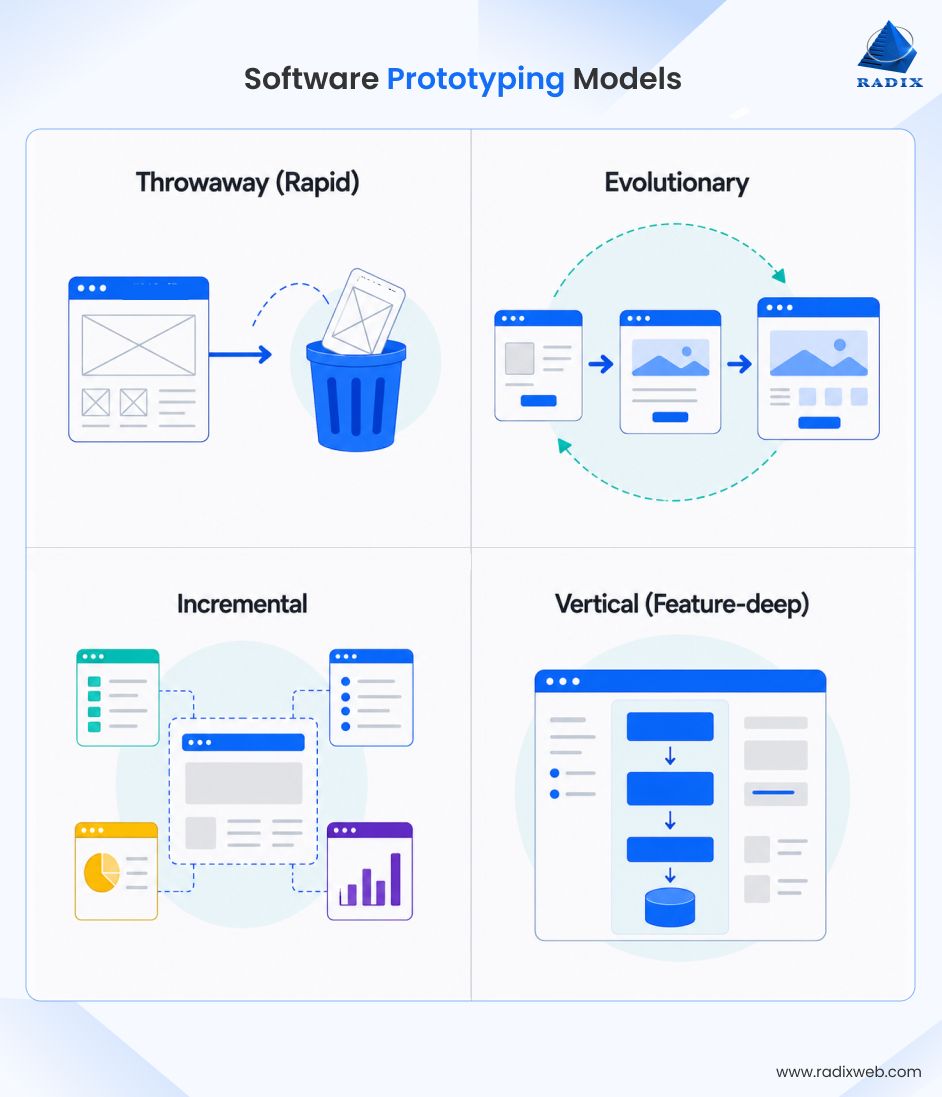
In practice, evolutionary prototyping is the model most often misused when teams sometimes continue building on a prototype that was only meant for validation, creating technical debt and a weak foundation for the final product.
Throwaway or rapid prototyping, on the other hand, is the most effective approach for validating user experience and testing ideas quickly. It is also the approach most teams use today and it's worth understanding how it works and when to use it.
Rapid prototyping builds and tests prototypes in short iteration cycles, typically measured in days rather than weeks, to accelerate learning before product development begins. The objective is to validate ideas quickly, gather feedback, and refine the design through successive iterations.
Rapid prototyping is most effective when:
It's important to distinguish rapid prototyping from Rapid Application Development (RAD). Rapid prototyping focuses on validating concepts and user experience, while RAD is a complete software development methodology.
In Agile projects, rapid prototyping is commonly performed during Sprint Zero or the discovery phase, using a repeatable cycle: define the question or assumption to validate → build the prototype → test it with representative users → analyze the results → update requirements and priorities before development.
It is important to note that the outcome of rapid prototyping is not production-ready software but a validated design that reduces uncertainty and improves the accuracy of subsequent development sprints.

A successful prototype follows a clear process. Each step builds on the previous one, helping teams validate assumptions, gather meaningful feedback, and make informed product decisions. Skipping steps can lead to unclear findings, wasted effort, and prototypes that fail to answer the questions that matter most.
Here's how the software prototyping process should look like:
Start with a clear question, not a vague goal. Instead of asking, "Can users complete checkout?" ask, "Do users understand the payment summary before entering their card details?" Every part of the prototype should help answer a specific question.
You don't need to prototype the entire product. Focus on the user journeys with the most uncertainty, where multiple design approaches are possible or important decisions still need validation.
You need to match the prototype's fidelity level to the question you are asking and the problem you're solving. It is the single most consequential decision in prototype design. Too low and the findings are not credible. Too high and the investment in the prototype exceeds the learning it produces.
| Fidelity level | Build time | What it validates | When to use |
|---|---|---|---|
| Low (paper, Balsamiq) | Hours to 1-2 days | Structural layout, navigation hierarchy, content organisation | Earliest-stage exploration; when rapid iteration is more valuable than realistic representation |
| Mid (clickable wireframes, Figma without visual design) | 2-5 days | User workflow, task completion, information architecture | When the interaction model is the primary uncertainty, not the visual design |
| High (pixel-perfect interactive prototype) | 1-3 weeks | Visual design comprehension, micro-interaction clarity, brand perception | When the product is ready for final design validation before development begins |
In most cases, a simple wireframe is enough to test navigation or workflows. High-fidelity prototypes work better when visual design, branding, or interactions need user feedback.
The false economy of starting at high fidelityA team that invests three weeks in a pixel-perfect prototype to validate a workflow that a day of paper sketches would have tested has spent twenty times the resource for the same learning. Also, users also give different feedback to high-fidelity prototypes. They comment on design details rather than workflow problems, because the visual finish signals that design decisions are already made.So, make sure you start at the lowest fidelity that can answer the question. Move up only when the question genuinely requires it.
Use tools that fit your chosen fidelity. Here are the top options to choose from:
| Tool | Best For | Key Features | Limitations |
|---|---|---|---|
| Figma | High-fidelity UI design and prototypes | Real-time collaboration, reusable components, clickable prototypes, animations, Dev Mode for developer handoff. | Limited support for complex business logic and conditional interactions. |
| Axure RP | Logic-heavy and workflow-based prototypes | Conditional logic, variables, branching flows, dynamic interactions, realistic application behavior. | Steeper learning curve and less polished visuals than Figma. |
| Adobe XD | Teams using Adobe Creative Cloud | UI design, wireframing, prototyping, Adobe app integration. | Limited ongoing development; not recommended for new projects. |
| Balsamiq | Low-fidelity wireframes | Quick sketch-style wireframes for early ideas and feedback. | Not suitable for polished designs or realistic prototypes. |
| v0 by Vercel | AI-generated functional prototypes | Generates React UI components from text prompts for rapid prototyping. | Works best for common UI patterns; requires review before production. |
| Galileo AI | AI-assisted UI design | Creates Figma-ready UI designs from text prompts. | Designs need human refinement and usability validation. |
| Uizard | Fast AI prototyping | Converts text, sketches, or screenshots into editable UI designs. | Output often needs refinement for branding and UX quality. |
In general, Figma is the best suited tool for mid-to-high fidelity clickable prototypes. Balsamiq or pen and paper are ideal for low-fidelity wireframes and Axure is useful for prototypes requiring conditional logic.
The practical impact of AI prototyping tools in 2026The cost of the first prototype iteration has dropped significantly. Teams that previously could not afford to prototype a feature before committing to development can now generate a starting point in hours. The learning phase (testing the prototype with users) remains unchanged though, as AI tools accelerate creation, not validation.
The test script specifies the tasks users will be asked to complete, in the sequence they will be given, without revealing what the correct path is. A test script written after the prototype is built is influenced by knowledge of how the prototype works.
Also, write the testing tasks before recruiting participants and include clear, unbiased tasks that help users behave naturally and produce feedback you can trust.
Test the prototype with people who match your target audience. Nielsen Norman Group's research on usability testing shows that five users uncover approximately 85 percent of usability problems. Testing with twenty users adds marginal learning at significant additional cost.
Organise findings around the questions defined in step one. A finding that does not relate to a defined question belongs in a separate section labelled "additional observations", not in the primary findings.
Once you have the final findings, it should support one of three decisions:
Following this process helps teams learn faster and reduce development risk before writing production code.
The cost of a prototype is measured in days. The cost of building the wrong thing is measured in weeks, or months, if the wrong thing reaches production before being discovered. However, software prototyping can reduce the actual cost of software development, but only when it's used at the right stage.
So, here's if and when you should invest in prototyping:
Remember: Not every project needs extensive prototyping, but every product benefits from validating its biggest assumptions early. The sooner those questions are answered, the smoother development becomes.
Even the best prototype can fail if it's planned or tested the wrong way. Most costly mistakes don't happen because of poor design. They happen because teams validate the wrong assumptions, involve the wrong users, or skip important steps in the process.
Feedback is only useful when it comes from the right audience. Product managers, designers, and developers already know how the product is supposed to work. Their feedback reflects intent, not usability. Test your prototype with people who closely match your target users and have no prior knowledge of the product.
Every prototype should answer a specific set of questions. Without clear validation goals, teams often build features that generate feedback but fail to produce meaningful insights. Define what you want to learn before creating the prototype, not after.
A polished prototype isn't always the right prototype. Spending weeks perfecting visuals to test a simple workflow wastes time and effort. Match the fidelity to the problem you're solving. Use low-fidelity prototypes for structure and workflows, and high-fidelity prototypes only when visual design or interactions need validation.
A validated prototype confirms that users understand the experience, but it doesn't define how the software should be built. Development still requires technical architecture, performance planning, security considerations, and implementation of decisions that a prototype cannot provide.
Users often say they like designs, even when they struggle to use it. Instead of relying only on comments, observe how people complete tasks. Where they hesitate, backtrack, or ask questions often reveal more than what they say during interviews.
Experience helps, but it doesn't replace user validation. Even successful product teams make assumptions that don't match real user behavior. Spending a few days testing those assumptions can prevent weeks or even months of costly rework later.
The goal of software prototyping isn't to prove your product is perfect. It's to uncover the biggest risks early, learn from real users, and move into development with greater confidence.
The cost of software prototyping is driven by fidelity level, number of screens and user flows, whether user testing is included in scope, and whether the prototype is built by an in-house team or commissioned externally.
Here's a general estimate of how much software prototyping costs based on our experience and industry averages:
| Prototype type | Typical cost | Timeline | What is included |
|---|---|---|---|
| Low-fidelity wireframes (Balsamiq, paper) | $1,000-$5,000 | 2-5 days | Core user flows, structural layout, navigation |
| Mid-fidelity clickable prototype (Figma) | $5,000-$15,000 | 1-2 weeks | Interactive flows, component structure, basic interactions |
| High-fidelity interactive prototype with visual design | $15,000-$40,000 | 2-4 weeks | Full visual design, micro-interactions, edge cases |
| Full UX research and prototyping engagement | $30,000-$80,000 | 4-8 weeks | User research, prototype, user testing, findings report |
At Radixweb, we offer accurate costs for not just development but also prototyping right during the initial software strategy consulting.
The real question, however, isn't how much prototyping costs. It's how much expensive rework it can prevent. A single sprint of development (two weeks, two to four engineers) costs $15,000-$40,000 at market rates. A prototype that prevents one misaligned sprint pays for itself. And from our 26+ years of experience, I can say this with confidence that most products contain more than one misaligned sprint waiting to be discovered.
The role of prototyping differs between Agile and Waterfall because each development methodology handles change differently.
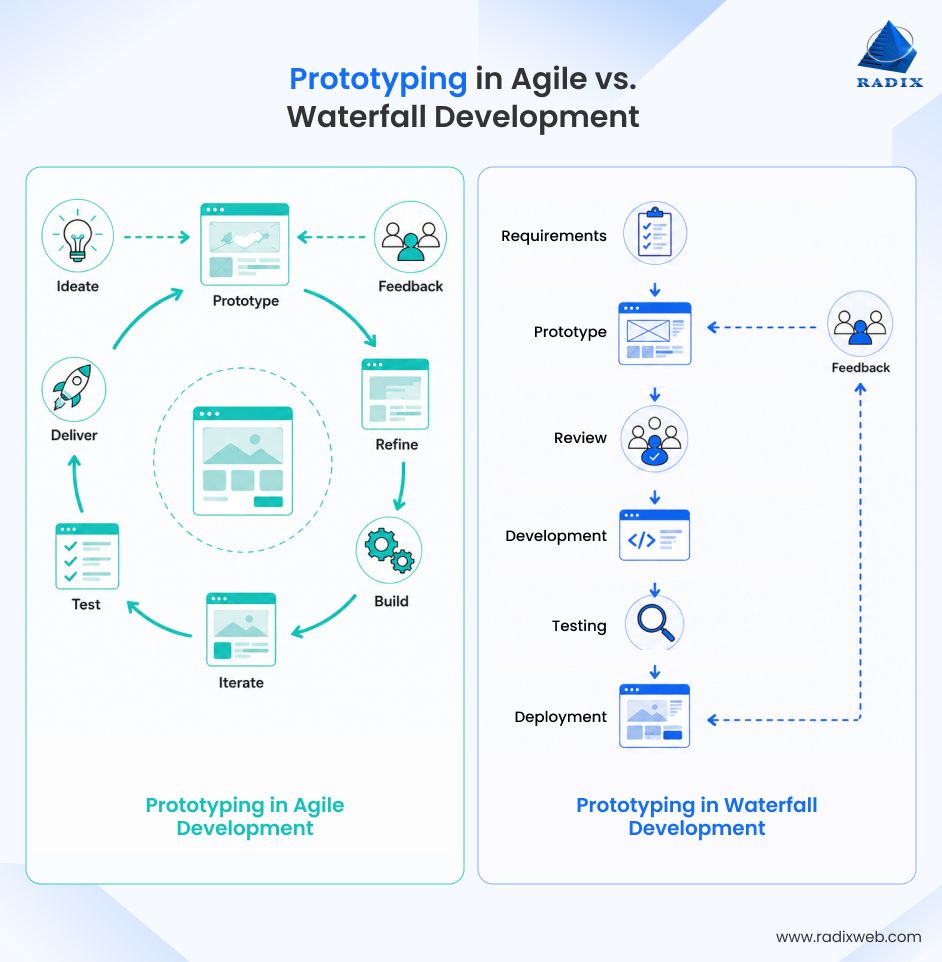
Prototyping typically takes place during Sprint Zero or the discovery phase if the Agile methodology of software development is followed. The prototyping phase helps validate ideas before they enter the product backlog. In continuous delivery environments, prototyping often stays one step ahead of development, with the next major feature being tested while the engineering team builds the current one.
The prototype evolves throughout the project as new requirements and user feedback emerge.
Prototyping is performed during the requirements and design phase, before development begins. Its purpose is to validate requirements before they are finalized, reducing the likelihood of costly changes during implementation.
Once the prototype has been reviewed and approved, it becomes the basis for the development phase.
Neither approach is inherently better. The choice depends on where uncertainty exists in the project. If most uncertainty is resolved early, Waterfall prototyping can be effective. If requirements are expected to evolve throughout development, Agile prototyping provides greater flexibility.
Approving a prototype is an important milestone, but it doesn't mean the product is ready for development. It simply means the design and user experience have been validated. Before engineering begins, those insights must be translated into clear technical requirements.
A prototype shows what users should experience, not how the software should be built. The development team still needs detailed specifications, including:
Without this documentation, you will just end up hiring software developers to make implementation decisions that were never validated.
Throwaway prototypes are created for speed, experimentation, and learning. They are not designed for production-quality performance, security, or scalability. Reusing prototype code often introduces unnecessary technical debt and makes future maintenance more difficult.
Unlike throwaway prototypes, evolutionary prototypes are designed to grow into the final product. However, early technical decisions are often made to enable quick validation rather than long-term scalability. As the product evolves, teams should revisit those decisions and address technical debt before it affects performance or maintainability.
A smooth transition from prototyping to development requires more than approved screens. The handoff should include:
A successful prototype doesn't replace technical planning. It gives developers a validated direction, allowing them to build with greater confidence and fewer costly surprises during implementation.
A software prototyping engagement is not the same as a design engagement. The output of prototyping includes findings from real user testing, not just a design artifact.
So, when commissioning prototyping from any reputable external software development service provider the engagement scope should specify the number of user flows to prototype, the target fidelity level, the deliverable format (Figma file, clickable prototype URL, PDF findings report), and the number of revisions rounds within the fixed scope.
Here are some of the questions you should ask before commissioning:
Note: Prototyping engagements scoped as fixed fee with a defined deliverable produce better outcomes than open-ended design retainers.
The prototype exists to answer specific questions and only when those questions are answered, is the engagement complete.
Make Better Product Decisions Before Development Begins
Software prototyping is no longer just a UX activity. It is one of the smartest ways to reduce product risk before development starts. Rapid prototyping for faster product validation helps validate ideas before committing to full-scale development. End-to-end software prototyping further ensures proper user validation and technical assessment. ideas before committing to full-scale development. End-to-end software prototyping further ensures proper user validation and technical assessment.At Radixweb, our software engineering team tailors the prototyping engagement to your product goals. So irrespective of whether you're building a new SaaS platform, modernizing an existing application, or planning an AI-powered product, the outcome is a validated prototype and a roadmap that helps you move into engineering with confidence. Schedule a consultation with our software product experts and build your next product with a team that has been successfully doing it for more than two decades.
Ready to brush up on something new? We've got more to read right this way.