

Read More


Recognized for AI Excellence at 2026 Globee® Awards - Read More

Faisaluddin Saiyed
Quick Insights: Node.js 25, released on October 15, 2025, introduces performance improvements, updated Web APIs, and enhanced developer experience features. As a Current release following Node.js’ predictable cadence, it offers a preview of what’s coming next, helping developers prepare for future long-term support versions.
Node.js 25 was officially released on October 15, 2025, marking the latest milestone in Node.js’ biannual release cycle. As an odd-numbered release, Node.js 25 is classified as a Current version, meaning it delivers the newest features and improvements while paving the way for the next Long-Term Support (LTS) release.
Node.js follows a predictable release cadence with new major versions released every April and October. All even-numbered versions (like Node.js 20, Node.js 22, and Node.js 24) eventually become LTS. Node.js 25 aligns perfectly with this schedule, offering developers early access to advancements that will mature in future stable releases.
While not intended for long-term production use, Node.js 25 (and other odd numbered updates like Node.js 19, Node.js 21, and Node.js 23) play a crucial role in the ecosystem. They allow developers to experiment with modern JavaScript capabilities and evaluate performance enhancements. So, Node.js 25 can help you prepare your applications for the upcoming Node.js 26 release, expected in April 2026.
But what is actually new in this update? And should you upgrade your applications to Node.js 25? Read on as we answer all these questions and more.
Node.js 25 introduces a set of enhancements focused on performance, modern JavaScript support, and developer productivity. As a Current release, it delivers early access to features that are expected to stabilize in future LTS versions. Below are the key updates explained with practical examples, to help you understand how they impact real-world development.
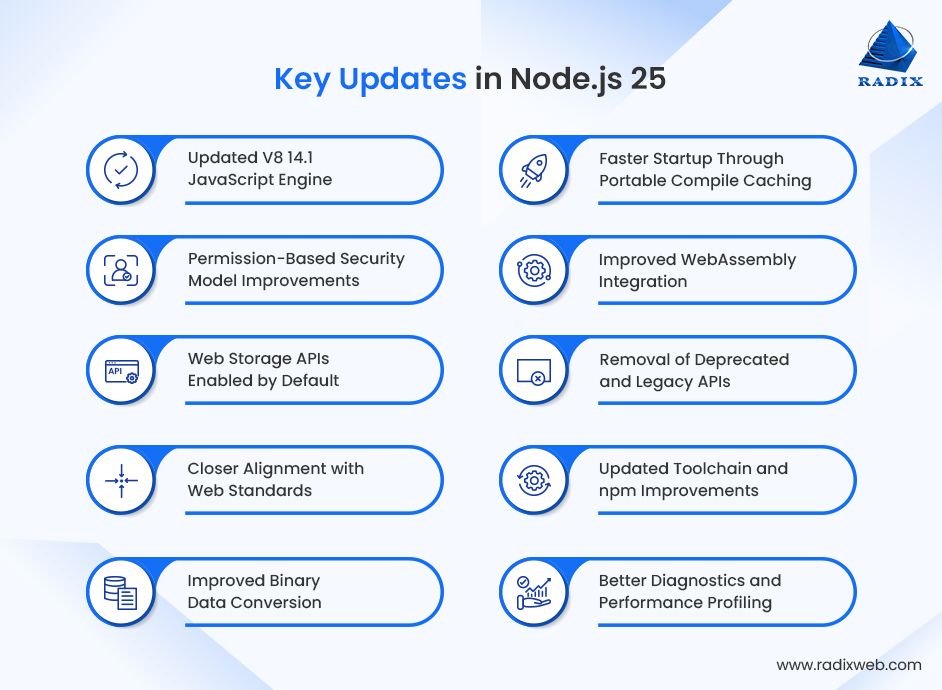
Node.js 25 upgrades the underlying JavaScript engine to V8 14.1. This brings meaningful performance improvements across the runtime. Many everyday operations, including object handling and JSON serialization, execute faster and more efficiently. Applications that process large volumes of data or serve frequent API responses benefit the most from these improvements, with reduced CPU usage and quicker response times.
// Efficient handling of large datasets using modern JS features
const numbers = Array.from({ length: 1_000_000 }, (_, i) => i);

const evenSum = numbers
.filter(n => n % 2 === 0)
.reduce((sum, n) => sum + n, 0);

console.log(evenSum);
With the newer V8 engine, operations benefit from improved JIT optimizations, resulting in better performance without changing your code.
The permission model in Node.js 25 continues to mature. It now allows applications to explicitly declare which system capabilities they are allowed to use. Access to the file system, network, environment variables, and child processes can be restricted unless permissions are granted at runtime. This model helps reduce the blast radius of bugs or compromised dependencies. Overall, that makes Node.js better suited for running untrusted or third-party scripts safely.
node --allow-net app.js
Node.js 25 enables browser-style storage APIs like localStorage and sessionStorage without additional configuration. This makes it easier to reuse logic across browser and server environments. It also simplifies scenarios where small amounts of persistent or session-based data need to be stored without introducing extra dependencies.
localStorage.setItem("mode", "dark");
console.log(localStorage.getItem("mode"));

Node.js 25 continues its effort to behave more like a first-class web runtime by improving support for standard web APIs. Objects like ErrorEvent and other DOM-adjacent interfaces now behave more consistently with their browser counterparts. This reduces edge cases when running the same libraries in multiple environments. The result is improved interoperability with modern tooling built around web standards.
Working with binary data is simpler and more ergonomic in Node.js 25. Common conversions from Uint8Array to base64 or hexadecimal strings are now supported directly, reducing the need for helper functions or external utilities. This is particularly useful for cryptographic operations, encoding payloads, and handling low-level network or file data.
const bytes = new Uint8Array([222, 173, 190, 239]);
console.log(bytes.toString("hex"));    // deadbeef
console.log(bytes.toString("base64")); // 3q2+/w==
Node.js 25 improves how compiled JavaScript is cached and reused across executions and environments. This allows previously compiled code to be reused more effectively, reducing startup time and improving responsiveness in scenarios where applications are frequently restarted, such as development servers, serverless functions, and CI pipelines.
WebAssembly support in Node.js 25 continues to mature. It now includes better handling of asynchronous execution and closer integration with JavaScript’s event loop. This allows native, high-performance modules written in languages like Rust, C, or C++ to interact more naturally with JavaScript code. These improvements make Node.js a stronger platform for compute-heavy workloads that benefit from near-native performance.

Several long-deprecated APIs have been removed in Node.js 25. This cleanup reduces maintenance burden, improves security, and encourages use of modern alternatives. While this may require updates in older codebases, it results in a cleaner and more predictable runtime going forward.
Node.js 25 ships with a newer version of npm and updated support for modern build tooling. Improvements include:
These updates help keep the Node.js ecosystem aligned with modern JavaScript development practices.
Node.js 25 includes improvements to built-in diagnostics and profiling capabilities, making it easier to analyze performance issues and resource usage. CPU profiling, execution tracing, and runtime diagnostics are more accessible and reliable, helping developers identify bottlenecks and optimize applications without relying heavily on third-party tooling.
To sum up what’s new: Node.js 25 focuses on performance, security, web-standard compatibility, and developer tooling. While it is not an LTS release, it represents the direction of the platform and previews features that are likely to become standard in future long-term versions.
There is no straight answer to that question. It depends on the type of Node.js application you have.
Node.js 25 is a Current release, which means it is designed for innovation and early adoption rather than long-term stability. Whether you should upgrade depends largely on your Node.js architecture, project’s goals, risk tolerance, and lifecycle.
For long-running production applications, it’s generally best to wait for the next Long-Term Support release, expected in April 2026 with Node.js 26. LTS versions receive extended security updates and stability fixes, making them the preferred choice for enterprise and mission-critical systems.
However, Node.js 25 can be a smart choice if you’re experimenting with new features, building prototypes, maintaining libraries, or preparing your application for upcoming changes. Early adoption allows teams to test compatibility, provide feedback, and stay ahead of future upgrades.
Here’s a quick table to help you decide whether you should upgrade to Node.js 25 or wait for the next LTS version:
| Upgrade to Node.js 25 | Wait for Next LTS |
|---|---|
| You want access to the latest JavaScript and platform features | Your real-time Node.js application is mission-critical or customer-facing |
| You are experimenting, prototyping, or learning Node.js | You require long-term stability and security support |
| You are building internal tools or non-critical services | Your infrastructure is tightly controlled or heavily regulated |
| You want to evaluate upcoming features before they reach LTS | You depend on older native modules or legacy APIs |
| You rely on the latest V8 performance improvements | You want guaranteed compatibility with the wider npm ecosystem |
| Your project is in early development and can tolerate breaking changes | You prefer infrequent upgrades and predictable maintenance windows |
If you’ve decided to try Node.js 25, upgrading is straightforward. Since Node.js 25 is a Current release, it’s best to test the upgrade in a development or staging environment before using it in production. This helps catch compatibility issues early.
Important: Unless you have professional development experience, it is best to let an expert Node.js development team take up the upgrade.
Start by confirming which version of Node.js you’re currently using:
node -v
The recommended way to install Node.js 25 is by using a version manager, which allows you to switch versions easily.
Using Node Version Manager (nvm) (recommended):
nvm install 25
Using the official installer:
If you’re using nvm, activate Node.js 25 with:
nvm use 25
Confirm that Node.js 25 is now active:
node -v
You should see a version number starting with v25.
After upgrading, make sure everything works as expected:
Following these steps helps ensure a smooth upgrade and reduces the risk of unexpected issues when working with a Current release like Node.js 25.
Getting Started with Node.js 25
Staying up to date with Node.js releases helps teams take advantage of performance improvements, modern JavaScript features, and evolving platform capabilities. While Node.js 25 is not intended for long-term production use, it plays a key role in helping developers prepare for future LTS releases and adapt early to upcoming changes.Whether you’re experimenting with new features, validating compatibility, or planning your next upgrade, choosing the right Node.js version is a strategic decision.At Radixweb, a trusted Node.js development company, we help businesses evaluate when and how to upgrade, assess risks, and plan seamless transitions. From experimentation to full-scale production development, our experts guide you through every step to ensure your applications stay future-ready. To explore whether or not you should upgrade to Node.js and to get expert upgrade support, schedule a consultation with our Node.js team here.
Ready to brush up on something new? We've got more to read right this way.

