Read More


Recognized for AI Excellence at 2026 Globee® Awards - Read More

Dhaval Dave
The Reality of v2 Product Development: Building v2 isn't harder because of technical complexity. It is harder because of users, data, integrations, and workflows that can't be disrupted. This guide explores the seven shifts that separate successful second-version product development from costly rewrites. Plus, the exact roadmap you need to evolve a product without losing the people who rely on it.
Windows 8 is one of Microsoft's least successful launches. Windows 7 was a success. And Windows 8 was supposed to be better than that. But that didn't happen. The new version introduced radically different interface designed around touch devices. Existing user didn't really like that. Industry data says that Windows 8 caused a slow down in the computer market because people didn't want to upgrade.
That's a classic second-version product development problem.
And Microsoft isn't alone. Product history is full of successful companies that had botched v2 launches. While Microsoft survived it and came back stronger with Windows 10. But your software product may not get that luxury. You need to get the second version right the first time itself.
To help you with that, in this guide we explore what actually changes when you move from building a product to rebuilding one.

Second-version product development is the process of building a major new iteration of a software product that already has live users, real data, and running integrations. It is different from v1 development in one fundamental way: every technical decision you make carries a user consequence.
That's essentially makes second-version product development harder.
When you built v1, you were working with assumptions. You made decisions based on what you believed users would need, how the product might scale, and which integrations would eventually matter. Some of those assumptions were right. Many weren't.
V2 changes the equation completely.
You are no longer building on a blank canvas. Existing users have workflows built around your current product. Integrations depend on your existing APIs. Years of production data need to move forward with the product, not be left behind. Every major change has to account for the people and systems already relying on what exists today. Decisions that were low-stakes earlier (data schema choices, API structures, feature scope creep) become hard constraints you have to work around.
Here's how v2 product development compares to fresh product development:
| Area | v1 Product Development | v2 Product Development |
|---|---|---|
| Users | Assumed users | Real users with established habits |
| Data | Littel or no production data | Years of production data that must be preserved |
| Architecture | Optimized for speed and learning | Constrained by existing decisions |
| Features | Built around hypotheses | Built around observed behavior |
| Integrations | Few external dependencies | Existing integrations that cannot break |
| Success Metric | Acquisition and adoption | Retention, migration, and expansion |
| Risk | Building the wrong product | Losing the users you already have |
Most product teams underestimate this. They treat v2 like a clean rebuild with more funding. But soon they realize that:
This is where many v2 initiatives run into trouble.
But the teams that succeed with v2 treat it as a user problem before they treat it as a technical problem. They don't ask what our team can build, they ask what your users can absorb, adopt, and trust.
Here's what changes when you are developing the second-version of a product:
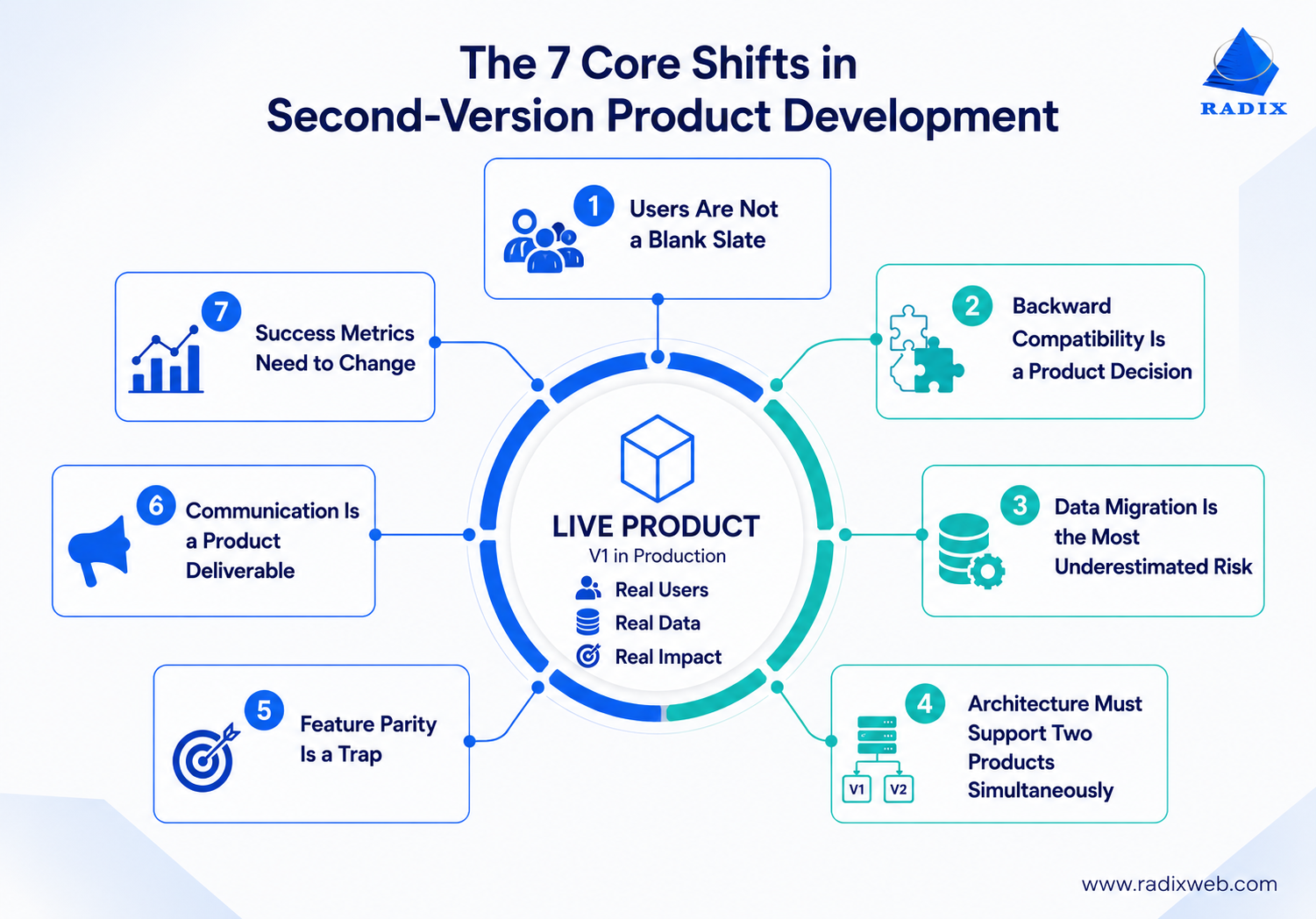
In v1, you defined the user. In v2, your users push back. They have opinions grounded in real usage patterns, not preferences in the abstract. They have built habits, shortcuts, and workarounds inside your existing product that you may not even know about.
This creates a specific problem: the features users actually rely on are not always the features on your roadmap.
In our experience working with product teams on major version releases, the features with the highest usage are often the ones built as temporary fixes in early sprints, never properly documented, and not on anyone's list for v2. But users found and loved them. So, when v2 ships without them, those users churn.
So, how do you prioritize features when building a product v2?
The most reliable method: a combination of usage data and impact-on-revenue scoring, not user interviews alone.
Step 1: Pull event data to identify which features have the highest weekly active usage.
Step 2: Layer that against your support ticket volume to find which features break most often.
Step 3: Cross-reference with churn data to find which features are present in users who stay vs. leave
This gives you a three-factor feature priority matrix grounded in behavior.
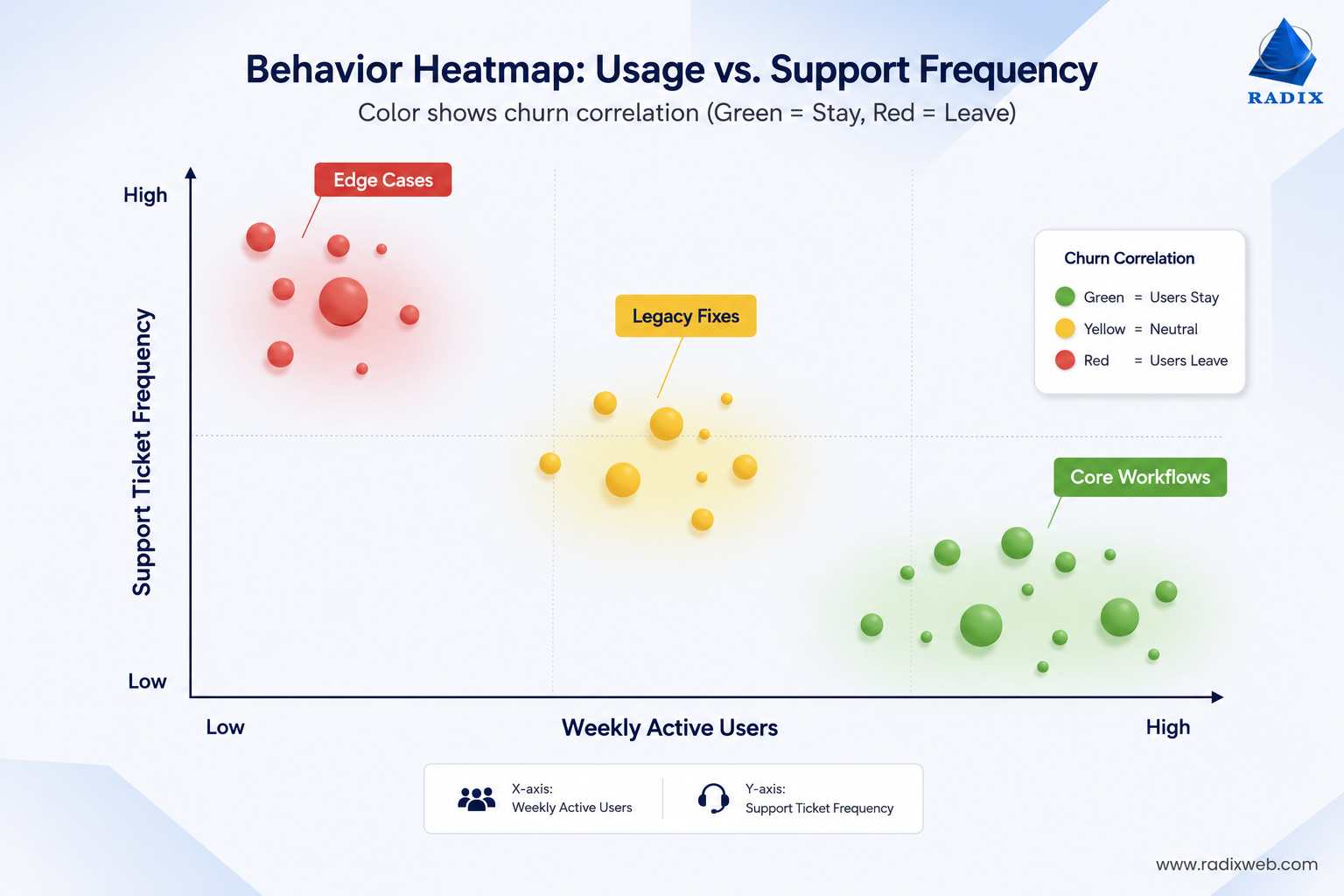
Features that score high on all three are non-negotiable in v2. Features that score high on only 1 factor go to the consideration layer for stakeholder discussion.
Every team building a v2 will eventually face this question: do we maintain backward compatibility with v1, or do we make a clean break?
Most teams frame this as a technical decision. It is, however, a user trust decision with technical implications.
Maintaining backward compatibility means existing integrations, stored data, and user workflows continue to function after the transition to v2. Users don't need to do anything. The new version absorbs the old behavior and extends it. This is harder to build and limits some of your architectural flexibility.
Making a clean break means users must migrate actively. They need to update integrations, re-configure settings, and in some cases export and re-import data. This is easier to build but transfers the cost to the user.
The right choice depends on your user base.
For example, enterprise customers with deep integrations built on top of your API will not absorb a breaking change with ease. They need significant lead time, support resources, and goodwill. If you break their integrations without warning, you lose them. Consumer SaaS users with lighter usage patterns, on the other hand, are often more willing to migrate. More so if the v2 experience is visibly better.
A common approach that works well in practice is graduated deprecation. You maintain v1 behavior in a versioned API (e.g., /api/v1/) while introducing v2 endpoints in parallel. You announce a deprecation timeline with a hard end date, provide migration documentation, and alert users proactively. Then, deprecate v1 softly (warnings in responses, documentation updates) before the hard cutoff. This gives users time to move on their own schedule while keeping your migration path clean.
The end goal is to make the transition frictionless enough that users don't notice when its done.
Product teams consistently underestimate data migration. It shows up at the bottom of every v2 planning document, estimated in hours, but it ends up consuming weeks.
Why? Because v1 data was written against v1 schema. Over time, that schema drifted from its original design. So, when you move to a new v2 schema, every piece of v1 data needs to be mapped, transformed, validated, and migrated. And the mapping is never as clean as you'd expect. There will be null values where your v2 schema expects data. There will be relationships in v1 that don't have equivalents in your new model. There will be data from edge cases you forgot existed until the migration script surfaces them.
Two migration patterns that reduce this risk significantly:
Parallel schema operation: Run v1 and v2 schemas simultaneously during the migration window. Data written in v1 format co-exists with data written in v2 format until all records are migrated. Consumers of both schemas continue to function. This is more complex to implement but eliminates the risk of a single migration event causing data loss or system outages.
Additive-first migration: Rather than modifying or deleting existing fields, add new fields. Populate the new fields progressively. Only remove the old fields once all consumers have been updated to use the new ones. This means no existing system breaks during migration, and rollback is always possible.
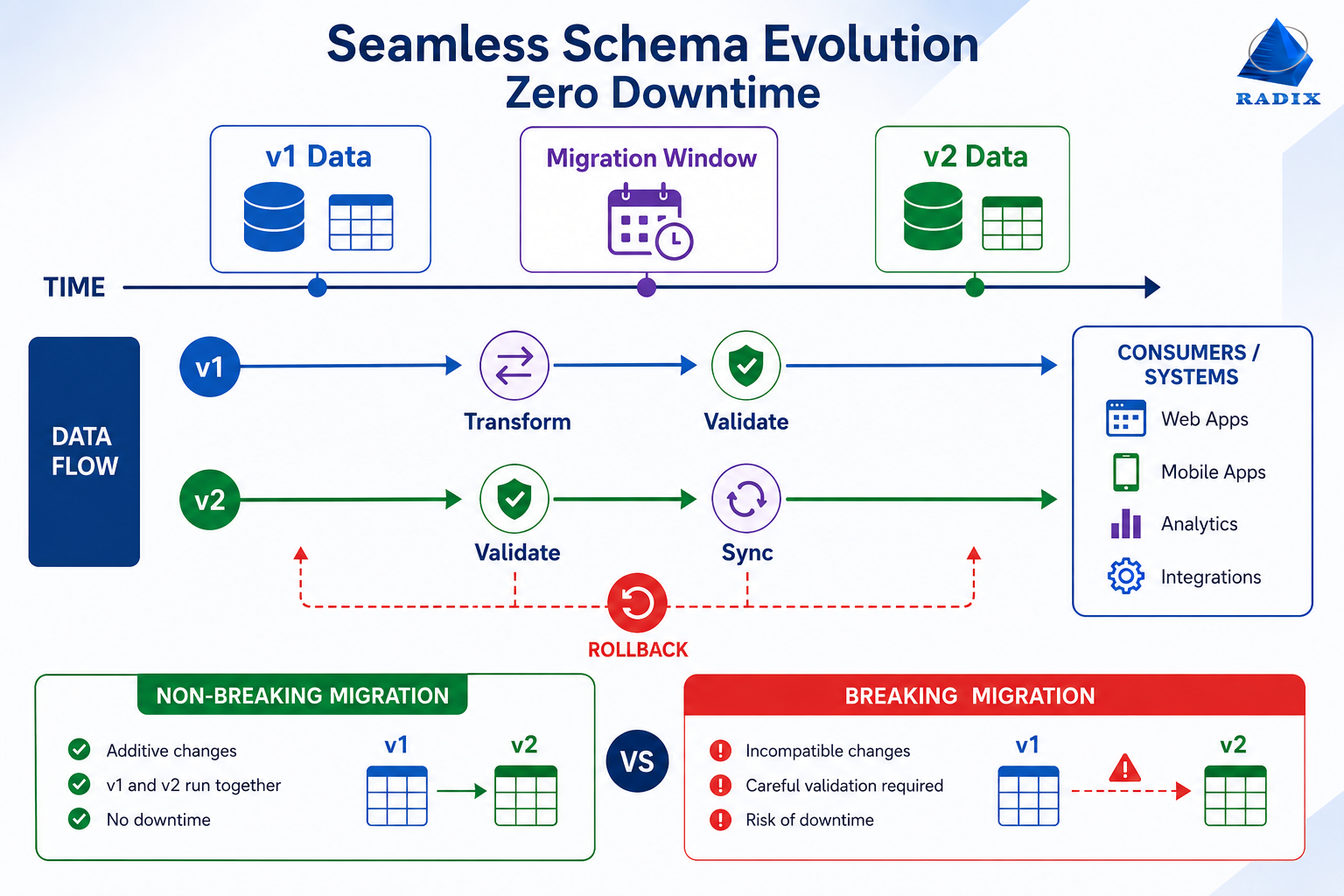
Irrespective of the method you choose, data migration from one software version to another requires upfront development time. But it saves multiples of that time in incident response later. multiples of that time in incident response later.
What are the biggest risks in product v2 data migration?The four most common risk areas are:● Undocumented edge cases in v1 data that break migration scripts when they surface● Downtime requirements during schema changes, which need to be managed with online migration tools that avoid table locks● Data integrity failures where relationships between migrated records are lost or duplicated● Partial migration states where some users are on v2 data and others are still on v1, creating inconsistent behavior in shared features.Planning for each of these is what separates successful migrations from the ones that end up needing rollback.
During the transition period between v1 and v2, you will be running both. Some users will be on v2. Some will still be on v1. Some will be in the middle of migration. Your infrastructure, support processes, and development capacity need to support all three states.
This is a planning constraint that most roadmaps don't account for during a software product's modernization to the second version. Teams estimate the cost of building v2 without factoring in the cost of continuing to maintain v1 during that build. Bugs get found in v1. Security patches need to go into v1. User support for v1 behavior continues even as the team is heads-down on v2 features.
So, you need dedicated capacity allocation for v1 maintenance when building v2. If every developer on the team is building v2 features, v1 degradation will erode user trust and create churn before v2 is even ready to migrate to.
A defining rule of thumb from product engineering teams that successfully navigated this: during active v2 development, allocate roughly 20% to 30% of engineering capacity to v1 maintenance, security, and critical bug fixes. Adjust as the migration timeline progresses and v1 usage declines.
The phrase you will hear most often in v2 planning: "We need feature parity before we launch."
This sounds reasonable. It is actually one of the most effective ways to delay a v2 indefinitely. Feature parity means building every feature your v1 has into your v2 before you ship anything.
The problem is that v1 has accumulated features over months or years of reactive development. Many of those features were built for edge cases, for specific customers, or for business contexts that no longer exist. Rebuilding all of them in v2 means inheriting v1's feature bloat.
The teams that launch v2 successfully don't aim for feature parity. They aim for workflow parity: the v2 covers the core jobs that users do with the product, even if it covers them differently. Then they ship to a limited cohort, collect real feedback, and iterate from there.
Shopify's platform team has discussed this principle publicly. When rebuilding major components of the merchant experience, they prioritized the screens that accounted for “80 plus percentage of usage,” followed by less frequently used screens.
The mental model that helps here is thinking of v2 launch as a beginning, not a completion. You're opening a new product surface, not closing out the old one.
Communication as almost always a secondary activity when teams plan to migrate their current version apps to the next version. They think it is something to handle closer to launch, once the technical work is done.
Users experience it the other way. From their perspective, silence from the product team is the signal that something is going wrong. And when v2 launches without adequate communication, the questions arrive in a rush:
Communication in v2 development needs to be built into the roadmap as a parallel workstream. It should start at least 60 to 90 days before the migration window opens for existing users.
Here's the staged communication sequence you need to follow:
1. Deprecation notices
If v1 behavior is going away, users need to know well in advance, with a specific date and a clear migration path. Vague notices without timelines don't create urgency, just anxiety and support load. Include soft deadline reminders and a hard deadline notice
2. Beta access to reduce adoption friction
Giving a cohort of existing users early access to v2 before the full migration creates advocates who can vouch for the product among their peers. It also surfaces the friction points that internal testing always misses.
3. In-product guides
Users don't read migration emails carefully. They read the prompt that appears when they open the product and see something different. In-product walkthroughs, change summaries, and contextual tooltips that acknowledge v1 habits and explain v2 equivalents are worth more than any announcement email.
Every communication should lead with what the user gains, not what they need to do. The goal is to make migration feel like an upgrade the user is choosing, not a change being imposed on them.
How you measured v1 success is probably not how you should measure v2 success.
V1 success was often framed around acquisition: signups, trial starts, activation rates. V2 success, built on a live product with existing users, needs to be framed around retention and migration:
The metric that most teams miss is migration-driven churn. It is entirely possible to build a technically excellent v2 and still see elevated churn during the migration window. That's because the transition itself created friction that the product didn't address.
Tracking churn segmented by migration status (migrated users, mid-migration users, users who haven't started) gives you the signal you need to intervene before that churn becomes permanent.
Net Promoter Score tracked specifically among recently migrated users is also more useful than general NPS during a v2 rollout. It tells you whether the migration experience itself met expectations.

The structure that works for most second-version product development projects looks like this:
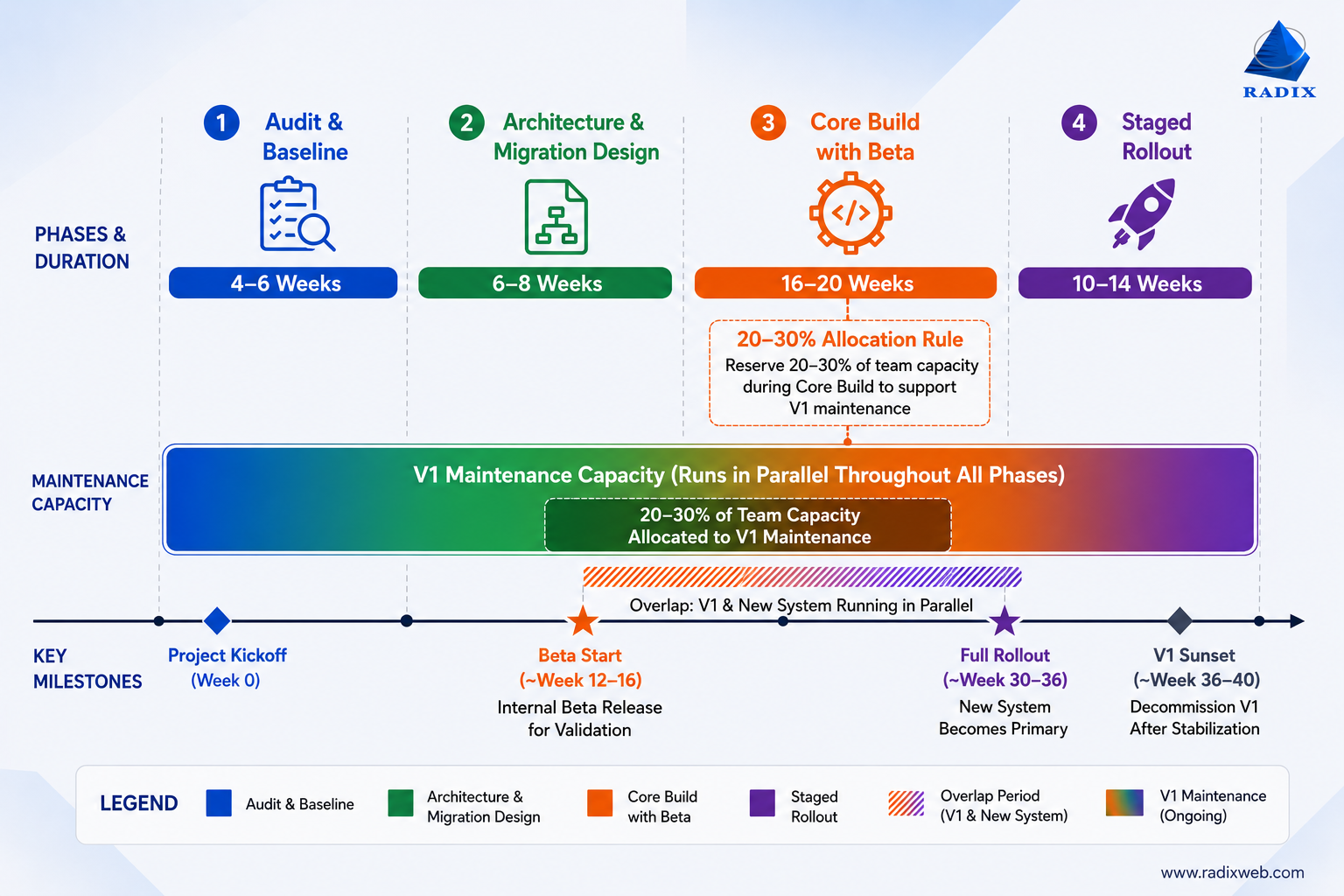
This is the foundational phase for everything that follows. Here, you need to:
Consulting with product strategists in this phase helps build a roadmap that leads to v2 success, not rollback-inducing emergencies.
This phase produces a migration specification document that the engineering and customer success teams both need to sign off on. For that, you need to:
Start by building the v2 core covering the high-frequency user journeys identified in Phase 1. Then run a closed beta with a representative group of v1 users who have varying usage depths. Use the feedback not to add features, but to identify friction in migration, gaps in workflow parity, and areas where the v2 behavior differs from v1 behavior in ways users didn't expect.
Open migration to the full user base in cohorts, not all at once. Monitor churn, support volume, and activation metrics per cohort. Maintain v1 during this period. Keep the migration path open in both directions if technically feasible (users who migrate and struggle can return to v1 temporarily). Close v1 only when 90%+ of users have migrated successfully and support volume for v1 behavior has normalized.
This timeline is longer than most product teams want to hear. But it is shorter than what most v2 projects end up taking when they try to move faster without this structure.
The companies that reach v2 have experienced teams, a proven product, and market understanding. Yet, they make mistakes that aren't evident immediately but result in v2 failure.
Here are the top four such mistakes:
| Common Mistake | Result | Better Approach |
|---|---|---|
| Treating v2 as a rewrite | Migration becomes harder than expected | Evolve the product instead of replacing everything |
| Under-investing in migration | Users struggle to move to v2 | Plan and test the migration experience |
| Rushing the launch | More rollout issues and user frustration | Launch in stages and validate |
| Ignoring non-migrating users | High churn and lower adoption | Understand why users stay on v1 |
What's notable is that none of these problems originate in the codebase. Most originate in planning decisions made months before launch.
So, while product engineering does help tackle some of the most pressing business challenges, the best v2 projects go beyond the basics. Successful teams are the ones that spent as much time understanding v1 behavior (what users actually do, not what they say they do) as they spent designing new capabilities.

Acing Second-Version Product Development
Building a v2 is a test of how well you understand your existing users and migration complexities, not a test of your team's technical ambition. That's why experienced product development services for SaaS or enterprise products make a difference. If you're at the point where a second-version development program makes sense for your product, the first question to answer is: "What do your v1 users' actual behavior patterns tell us about what v2 has to preserve, and what it can safely change? The answer will influence everything that follows.At Radixweb, we've helped organizations navigate similar challenges across industries and growth stages. We have experienced first-hand how getting it right requires more than just rebuilding software. It requires balancing modernization goals with the realities of an existing user base, production data, and business-critical workflows. Are you building v2 of a live product? A focused scoping conversation can help. Schedule a consultation with our product engineering team and we can help you evaluate architecture, plan migration and rollout, and identify risks.
Ready to brush up on something new? We've got more to read right this way.