
Read More


Recognized for AI Excellence at 2026 Globee® Awards - Read More

Disha Shah
Quick Overview: Modern businesses face growing pressure to deliver applications faster while keeping costs and complexity under control. This blog explains how PowerApps and custom development differ in speed, budget, scalability, security, and long-term adaptability. This comparison will help you identify which development model aligns best with their operational goals and future digital roadmap.
Digital transformation has accelerated rapidly, and organizations are under intense pressure to ship business apps faster, without disturbing development budgets. According to Gartner, over 75% of new enterprise applications will be built using low-code or no-code tools, up from 25% in 2020.
At the same time, around 60% of custom applications are now created outside IT departments—30% of them by employees with little to no coding expertise.
Considering this scenario, one question keeps resurfacing in boardrooms and CIO discussions:
Should we go for Microsoft PowerApps development or invest in full-scale custom development?
Both paths have merit. Both can create high-performing applications. But which one saves more time, cost, and operational effort—and in what scenarios?
Your development method should reflect your project’s objectives, growth roadmap, and operational realities.
This blog explores the core differences between PowerApps and custom development, so you can determine which approach is best for your enterprise application goals.

Microsoft Power Apps is a low-code application development platform that helps organizations build business applications quickly with minimal coding effort and expertise. As part of the Microsoft Power Platform, it empowers users and IT professionals to design, customize, and deploy functional apps that automate workflows and enhance productivity.
Power Apps offers drag-and-drop UI components, reusable templates, simplified logic rules, and 500+ connectors - capabilities often evaluated in a Power Apps assessment checklist. The main advantage it offers is its native integration within the Microsoft ecosystem, including Teams, SharePoint, Dynamics 365, and Azure.
Power Apps is a game-changer for organizations that have limited requirements for custom app development. It has a low learning curve, and deployment can be done in minutes compared to more traditional development approaches.
While talking about Power Apps vs custom app development, Power Apps stands out for its speed and accessibility. It allows businesses to build apps faster without relying on professional developers.
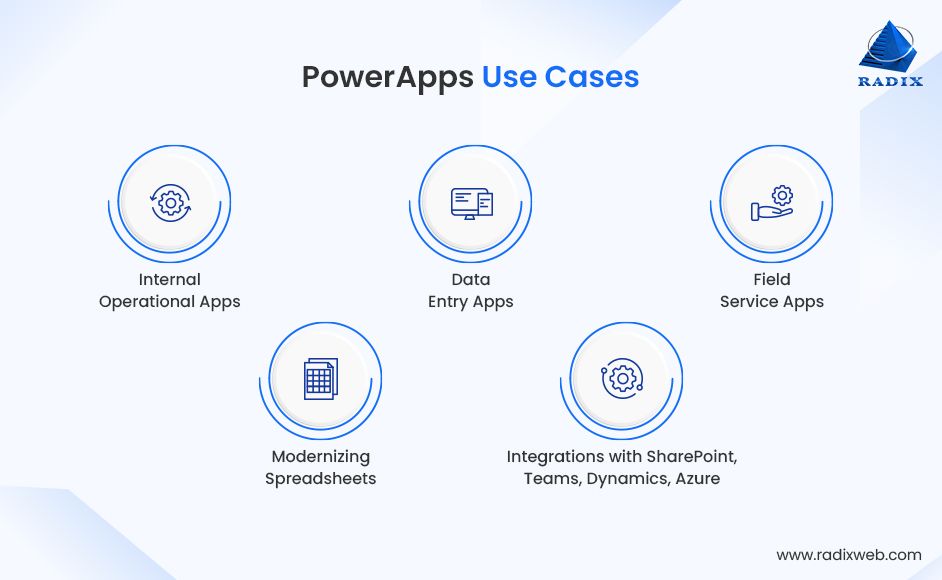
Organizations that need rapid, lightweight, internal-facing apps, especially those already invested in Microsoft’s ecosystem benefit the most.
Custom app development refers to building tailored software solutions from scratch, utilizing various programming languages, frameworks, and architectures to address specific organizational needs. It ensures that every workflow, feature, and integration directly supports a company’s operational goals and data strategy.
Unlike PowerApps, which relies on pre-built components, custom development gives complete freedom to design the user interface, business logic, integrations, data models, workflows, and scalability parameters.
This approach is ideal for businesses that require unique user experiences, proprietary processes, high performance, or large-scale systems. Custom software allows precise alignment with business models and future expansion plans.
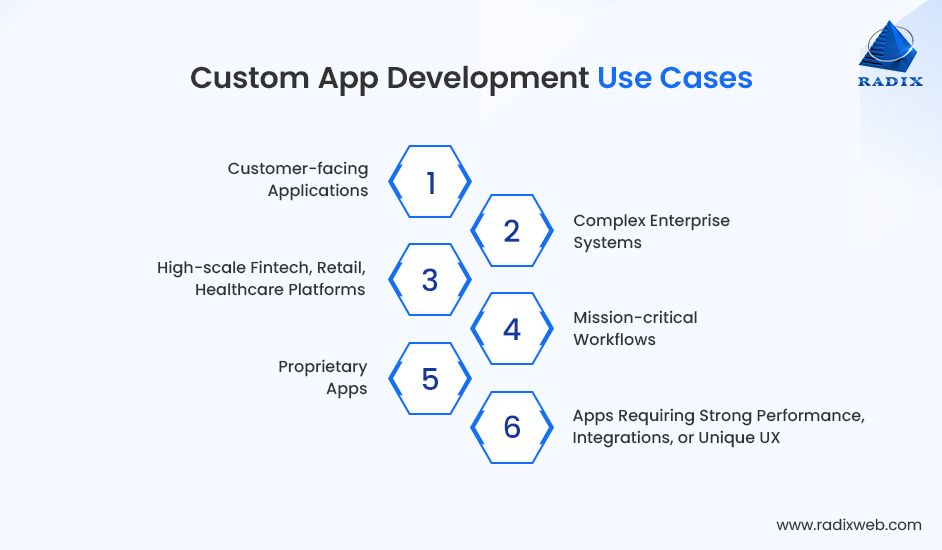
Organizations that need full control, scalability, and deep customization for long-term product or platform strategy.

Choosing between Microsoft Power Apps and custom app development depends on several factors, including development speed, customization depth, cost, and user experience design. Let’s compare PowerApps vs Custom Coding based on the above-mentioned factors.
PowerApps: Optimized for Rapid Delivery
Low code development is the foundation of Power Apps. This enables users to quickly build functional prototypes. Many organizations can build MVPs within days because the platform eliminates the need for manual front-end coding, UI design from scratch, or infrastructure setup.
Microsoft PowerApps development time gets reduced due to its low-code nature. The platform’s biggest advantage is its ability to turn ideas into functional prototypes quickly. Most organizations can build MVPs within days because the platform eliminates the need for manual front-end coding, UI design from scratch, or infrastructure setup.
Since PowerApps is integrated with Microsoft 365, many workflows, such as approvals, data capture, and form submissions, can be automated instantly.
However, PowerApps begins to lose speed when applications require complex business logic, multi-step workflows, custom UI behaviors, or advanced data processing. That’s when you need a Power Platform consultation or professional developer with Power Platform expertise.
Custom App Development: Slower Start but Better for Complex Roadmaps
Custom coding generally starts slower because the solution must be built from scratch. This includes architecture design, database creation, backend APIs, UI/UX design, development, testing, and DevOps pipelines. As a result, initial delivery cycles may run for months.
However, once the development is set, future enhancements become significantly faster. Therefore, organizations that consider software as a long-term asset or revenue generator can benefit from this approach, which ensures shorter iteration cycles over time.
PowerApps wins for speed in the beginning; whereas custom app development wins in long-term adaptability and lifecycle flexibility.
PowerApps: Lower Initial Investment, Predictable Monthly Spend
When it comes to app development cost, Power Apps significantly reduces it. The reason is very simple: it provides most of the building blocks out of the box. Sometimes, organizations don’t want to invest in backend infrastructure, DevOps operations, or expensive UI/X design. Instead, they pay for licenses, either per app or per user.
Power Apps development is the right choice for smaller teams or departmental use cases because it avoids specialized developer costs and reduces time-to-build.
Additionally, enterprise features such as premium connectors, Dataverse storage, and Power Automate flows introduce additional charges. Over time, the recurring licensing PowerApps costs may surpass the savings gained during development.
Custom Development: Higher Upfront Cost, Lower Long-Term Ownership
Custom development requires a higher initial investment because organizations need to invest in architecture design, development cycles, quality assurance, and hosting. Engineering teams need expertise across full-stack development, cloud infrastructure, security, and DevOps. This custom app development cost structure makes it more expensive during early phases.
Applications can scale to thousands or millions of users at no additional licensing cost. Cloud infrastructure costs can also be optimized using autoscaling, serverless computing, and resource tuning, something PowerApps does not allow.
PowerApps development minimizes short-term expenses, while custom app development optimizes long-term cost efficiency, particularly for large-scale usage or customer-facing applications.
PowerApps: Good for Small-to-Medium Internal Use
PowerApps performs well when handling moderate datasets, internal workflows, or department-level applications. Its integration with Dataverse improves storage efficiency, but Power Apps performance issues begin to appear when applications grow beyond their intended scale.
However, large datasets, complex logic chains, deep integrations, or heavy data manipulation can slow down PowerApps significantly. Since the app runs within a managed platform, developers have limited control over performance optimization. Scaling beyond certain thresholds often requires splitting applications or moving workloads into Azure-based services.
Custom Development: Built for High-Scale, High-Performance Workloads
Custom applications are designed to support millions of users, handle global traffic distribution, high-frequency transactions, and complex business rules. Developers have full control over caching, database optimization, concurrency handling, API performance, and cloud autoscaling.
Modern architectures, such as microservices, event-driven pipelines, and container orchestration, allow scaling individual components without affecting the entire system. For businesses building mission-critical platforms, customer-facing apps, or applications expected to grow steadily, custom development is the superior long-term choice.
PowerApps: Flexible Enough for Standard Workflows
PowerApps provides a controlled environment where users can customize layouts, logic, forms, and workflows. However, customization is restricted by what the platform allows. It’s not possible to go for advanced UI patterns, custom animations, or unique screen transitions. Similarly, complex logic or non-standard workflows become difficult to implement using formulas alone.
The platform is ideal for standardized use cases but becomes limited for businesses that want highly tailored user experiences, branding consistency, or differentiated interfaces.
Custom Development: Unlimited Customization and Tailored Experiences
Custom development gives you full freedom. Businesses can design unique flows, implement proprietary logic, build multi-device experiences, and optimize for specific user behaviors. Applications can support multilingual interfaces, custom APIs, advanced integrations, and pixel-perfect UI.
This becomes essential for organizations that want competitive differentiation, brand-driven experiences, or highly specialized operational systems. With the help of custom software development, you can integrate complex algorithms, AI-driven insights, domain-specific workflows, and high-performance capabilities that PowerApps cannot replicate.
PowerApps: Ideal for Microsoft-Centric Businesses
Application integration is one of PowerApps’ strongest value propositions. If an organization uses Microsoft tools like SharePoint, Teams, Outlook, OneDrive, Azure, or Dynamics 365, PowerApps dramatically simplifies integration. Most connectors work out-of-the-box without developer intervention.
However, integration becomes more complex when connecting with third-party, on-premise, legacy, or proprietary systems. Many external connectors require premium licensing or custom API development. PowerApps can integrate with almost anything, but not always economically or efficiently.
Custom Development: Unlimited Integration Scope
Custom app development enables AI integration, cloud integration, on-premise integration, legacy integration, or proprietary integration without restriction. Developers can build integration layers, middleware, or API gateways that support advanced workflows or high-volume data exchange.
Industries that rely on ERP systems, manufacturing tools, payment gateways, logistics platforms, or IoT devices often prefer custom development because it provides absolute control over integration logic, performance, and error handling.

PowerApps: Secure by Default, Limited by Platform Controls
PowerApps inherits Microsoft Azure’s enterprise-grade security framework, including encryption, identity management, role-based access control, and compliance certifications. This makes it highly secure for internal applications and departmental workflows.
However, organizations cannot modify backend infrastructure, customize security policies, or implement specialized encryption techniques. For regulated industries such as finance, healthcare, and insurance—including teams that have built healthcare apps with Power Apps. These Power Apps limitations can be especially restrictive. Governance also becomes difficult when citizen developers create unsanctioned apps without IT oversight.
Custom Development: Full Control Over Security Architecture
You can have full security control while choosing custom enterprise app development. Organizations can implement their own authentication flows, encryption mechanisms, compliance requirements, API protection layers, and audit systems. This makes custom development ideal for mission-critical systems, sensitive data environments, and regulated industries.
The drawback is higher responsibility as security becomes the organization’s job, not the platform’s. But in return, businesses get full transparency and control over their risk posture.
PowerApps: Minimal Maintenance, but Platform Dependency
One of PowerApps’ biggest advantages is minimal operational overhead. Microsoft manages platform updates, infrastructure, security patches, and hosting. This reduces maintenance responsibility for internal IT teams, making it easier to manage departmental applications.
However, this convenience comes with dependency. Organizations must adapt to Microsoft’s roadmap, update cycles, and licensing changes. They have limited control over debugging complex issues or optimizing backend performance.
Custom Development: Increased Responsibility, Higher Ownership
Custom development requires active maintenance, which includes bug fixes, upgrades, security patches, performance enhancements, and feature expansions. Organizations hire dedicated developers or a dedicated software development team.
The advantage is complete ownership. Businesses can evolve the product continuously without platform restrictions. For long-life applications or customer-facing products, custom development offers the most predictable long-term path.
| Criteria | PowerApps | Custom Development |
|---|---|---|
| Speed | Fastest for simple apps | Longer but scalable |
| Budget | Lowest initial cost | Higher upfront; lower long-term |
| Scalability | Moderate | Enterprise-grade |
| Customization | Limited | Unlimited |
| Integration | Strong for Microsoft | Strong for multi-system |
| Security | Strong, platform-dependent | Fully customizable |
| Maintenance | Minimal | Requires team |
| Best For | Internal tools, quick wins | Complex, high-scale systems |
While comparing Power Apps vs traditional development, Power Apps is the right choice when your needs are speed, simplicity, and Microsoft ecosystem rather than deep customization. It works best for internal, low-complexity solutions that need rapid deployment or modernization.

Custom development is the stronger choice when you need scalability, performance, unique workflows, or apps that are core to your business strategy. It provides full control over architecture, UX, integrations, and long-term scalability.
At Radixweb, we don’t believe in one-size-fits-all answers. Over the last 26 years, we’ve helped enterprises, SMBs, and ISVs deliver software using both PowerApps and full-stack custom development.
Our consultative approach usually includes:
Understanding the problem, constraints, and desired outcomes.
We map your use case into a 7-dimension decision matrix:
We deliver:
Our goal is simple: help you save time, control your budget, and maximize long-term value, without bias toward any one technology.

Make the Right Choice for Your Business
Choosing between PowerApps and custom development isn’t about which option is better, but it’s about selecting the right approach for your business needs, technical landscape, and long-term strategy.PowerApps offers unmatched speed for internal, low-complexity apps where rapid deployment and tight Microsoft integration deliver immediate value. It helps teams digitize processes quickly and cost-effectively, especially when time-to-market is the priority.On the other hand, custom development becomes essential when your application demands deep customization, large-scale performance, robust integrations, or long-term product evolution. If your app is customer-facing, mission-critical, or part of your competitive advantage, the flexibility and scalability of custom engineering offer a stronger ROI over time.Ultimately, the smartest path is the one aligned with your operational goals, whether that means leveraging PowerApps for quick wins, building custom platforms for growth, or adopting a hybrid model that blends both.With two decades of software engineering experience, Radixweb helps organizations evaluate these choices through a balanced, requirement-driven framework to ensure speed, cost efficiency, and future-proof architecture.Contact our experts today and start your journey soon.
Ready to brush up on something new? We've got more to read right this way.

