Read More


Recognized for AI Excellence at 2026 Globee® Awards - Read More

Vinit Kariatukaran
Quick Summary: Most retailers assume they can modernize POS, OMS, and inventory systems independently. Or worse, replace all three at the same time. In reality, the safest sequence is: Inventory → OMS → POS. Get the order wrong and you risk inventory mismatches, fulfillment failures, and customer-facing disruptions. Read on to understand why this sequence works and what needs to happen at each stage to keep operations running smoothly.
Most retailers approach legacy modernization the same way they'd approach typical software upgrades. The problem with that is that retail systems are different. Unlike back-office applications, POS, OMS, and inventory platforms are directly tied to customer transactions, fulfilment operations, and inventory visibility. They work together continuously. That means modernizing these applications for businesses of any size needs to be a systematically orchestrated process.
At the same time, customer expectations. Retailers are under pressure to deliver real-time inventory visibility, omnichannel experiences, and faster fulfilment. AI-powered capabilities are also becoming mainstream across the retail landscape. But older systems were never designed to support any of this. For many organizations, the question is no longer whether modernization is necessary. It is how to do it without disrupting live operations.
Based on our extensive experience delivering retail software solutions to 100+ enterprises, in this guide, we explain the sequence, timing, and decision frameworks you need. Not just to modernize retail infrastructure but do it successfully without disruptions.
Retail legacy system modernization is the process of replacing or re-architecting aging POS, order management, and inventory infrastructure with modern, integrated systems capable of supporting omnichannel commerce, real-time data visibility, and current integration standards.
It's distinct from other enterprise modernization projects because the systems being replaced are transactional and customer-facing. Downtime isn't absorbed by an internal team. It's experienced directly by customers at checkout, in fulfilment confirmations, and in inventory accuracy on the eCommerce site.
A legacy POS or OMS rarely fails outright. Things are almost always working just fine. That’s why most retailers feel like there’s no harm in pushing modernization for later. But what they don’t realize is that legacy systems in retail create computing friction. That means the failure mode is slow and invisible until it isn't. This makes the cost of delaying legacy modernization too high for most retailers.
Retailers running legacy infrastructure in 2026 report consistent patterns:
According to Shopify, 40% of brands report their current store technology can't deliver the customer experience they need to compete. The underlying cause in most cases isn't a single broken system. It's three systems that were built at different times, integrated with custom middleware, and never designed to share real-time data across an omnichannel operation.
The solution? Modernizing not just one software but your entire retail technology ecosystem.
POS, OMS, and inventory systems are not separate applications in retail. They share live transactional data continuously. The POS updates inventory and sends transactions to the OMS. The OMS routes orders and updates inventory across channels. Inventory systems provide availability data back to both the POS and eCommerce platforms.
When one system is modernized without accounting for the others, data flows break. Inventory mismatches, fulfillment errors, and overselling are often the results. That's why sequencing matters as much as the migration itself. The safest approach is to modernize from the back of the data flow toward the front.
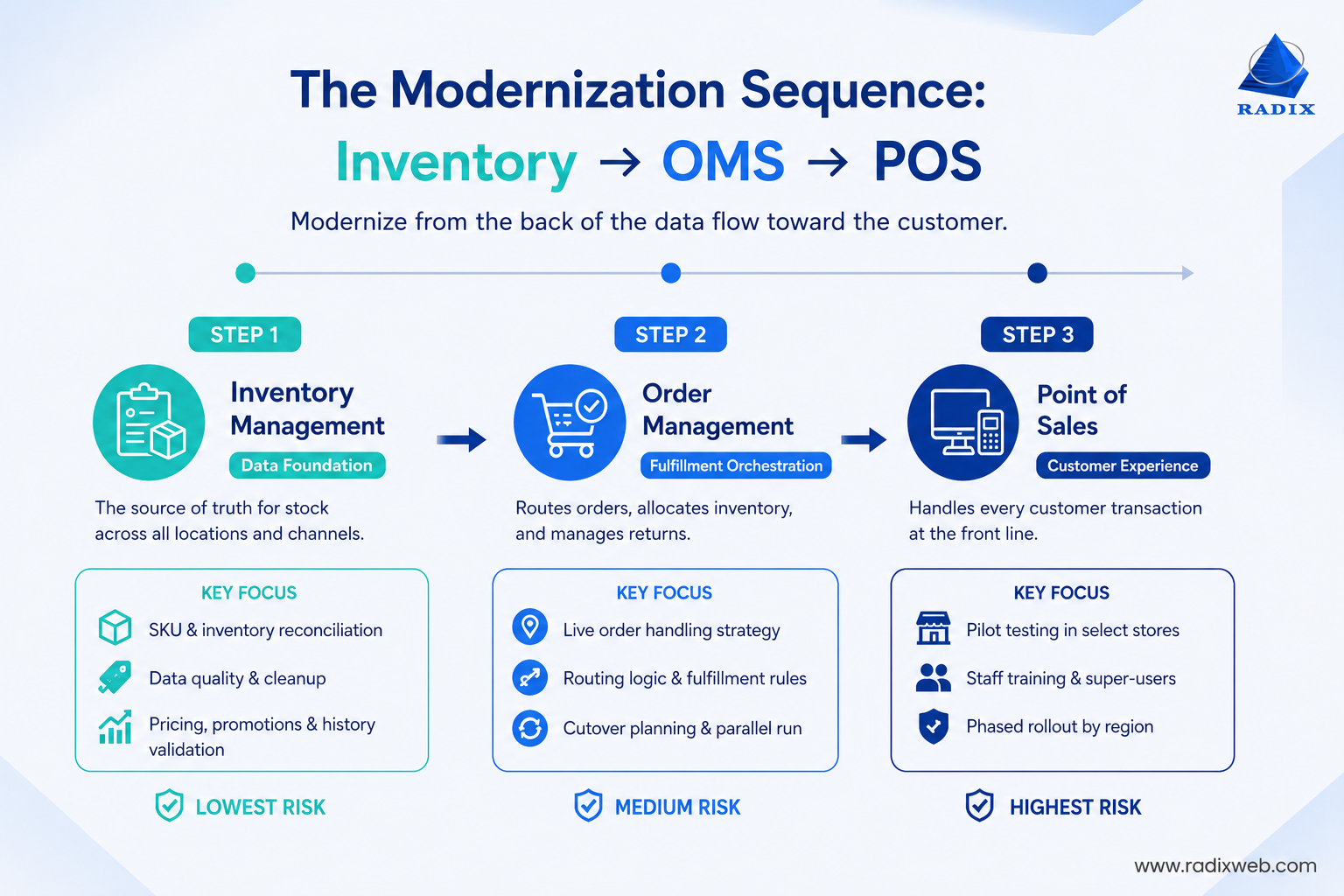
Start by modernizing your inventory management system because its the data foundation. During this phase, the legacy POS and OMS continue operating. Meanwhile, the new inventory platform is implemented, tested, and reconciled against existing data.
This is also the lowest-risk starting point. If inventory data is temporarily inaccurate, you can find (and fix!) issues before it impacts customers. The same cannot be said for POS or OMS failures, which are immediately customer-facing.
When you work with industry-leading app modernization service providers, inventory validation is something that is built right into the migration process from day one.
Before migration begins, capture a complete inventory baseline across all SKUs and locations. This provides a reference point for reconciliation after the new system goes live.
You should also review SKU quality before migration. Duplicate SKUs, inconsistent naming conventions, and obsolete product variants often accumulate over time. These create problems in the new environment if left unresolved.
Finally, validate pricing rules, promotions, order history, and loyalty balances. While inventory is the primary focus, customer-facing data issues discovered later can affect the broader modernization effort.
Once inventory is stable, the OMS becomes the next priority. An order management system is the orchestration layer for fulfillment. It determines orders routing, inventory allocation, and return processing.
Migrating OMS after inventory allows the new OMS to connect to a validated foundation. It also ensures that fulfillment workflows are working correctly before customer transactions begin flowing through a new POS environment.
We saw the benefit of this sequencing approach in a retail transformation engagement, where we first streamlined inventory and then the order management processes. Post modernization, the Minnesota-based business had a modern system for internal as well as customer-facing use which shows how retail modernization is tied to day-to-day business performance.
OMS modernization creates challenges that inventory migrations do not. There are two ways to treat orders already in progress:
In most cases, allowing existing orders to complete in the legacy system is the lower-risk option.
A common approach is to establish a cutover point. Orders created before a specified time continue through the legacy OMS. New orders are routed through the modernized platform. Both systems run in parallel until all legacy orders have been fulfilled or resolved.
Retailers with BOPIS, ship-from-store, or multi-location fulfillment models should also validate routing logic before processing live orders. Undocumented pricing rules, promotion stacking logic, and fulfillment exceptions frequently surface during testing. Based on our experience, they also require more validation time than initially expected.
POS modernization should happen last as it is the most visible and highest-risk phase. Every customer transaction passes through the POS. That means any disruption is immediately noticeable at checkout.
By this stage, inventory and OMS systems should already be operating successfully. This allows the POS migration to function as a controlled handoff rather than a foundational system change.
The safest approach to avoid store disruptions during POS replacement is a pilot. Retailers should run the new POS in parallel with the legacy system in a limited number of locations. Then compare transaction results before processing live customer transactions.
Start by selecting pilot stores that represent real-world complexity. Include stores with high transaction volume, multiple payment methods, returns, or loyalty redemptions. After successful validation, expand the rollout region by region. A company-wide cutover is almost never recommended.
Also, staff training should be completed before go-live. Identify experienced store associates who can act as super-users during rollout. Provide them with dedicated training sessions before the new system is introduced in-store.
The phased approach across inventory, OMS, and POS typically takes 9 to 15 months for mid-size retailers. For larger enterprise environments it can take up to 24 months. Following the correct modernization sequence significantly reduces operational risk and helps ensure a smoother transition to modern retail infrastructure.
Unlike other modernization projects, timing is critical in retail. A migration issue during a peak sales period doesn't just affect internal operations. It can directly impact revenue, fulfillment, and customer experience. That's why retailers need to plan migrations around trading cycles. For most retailers, the migration calendar looks like this:
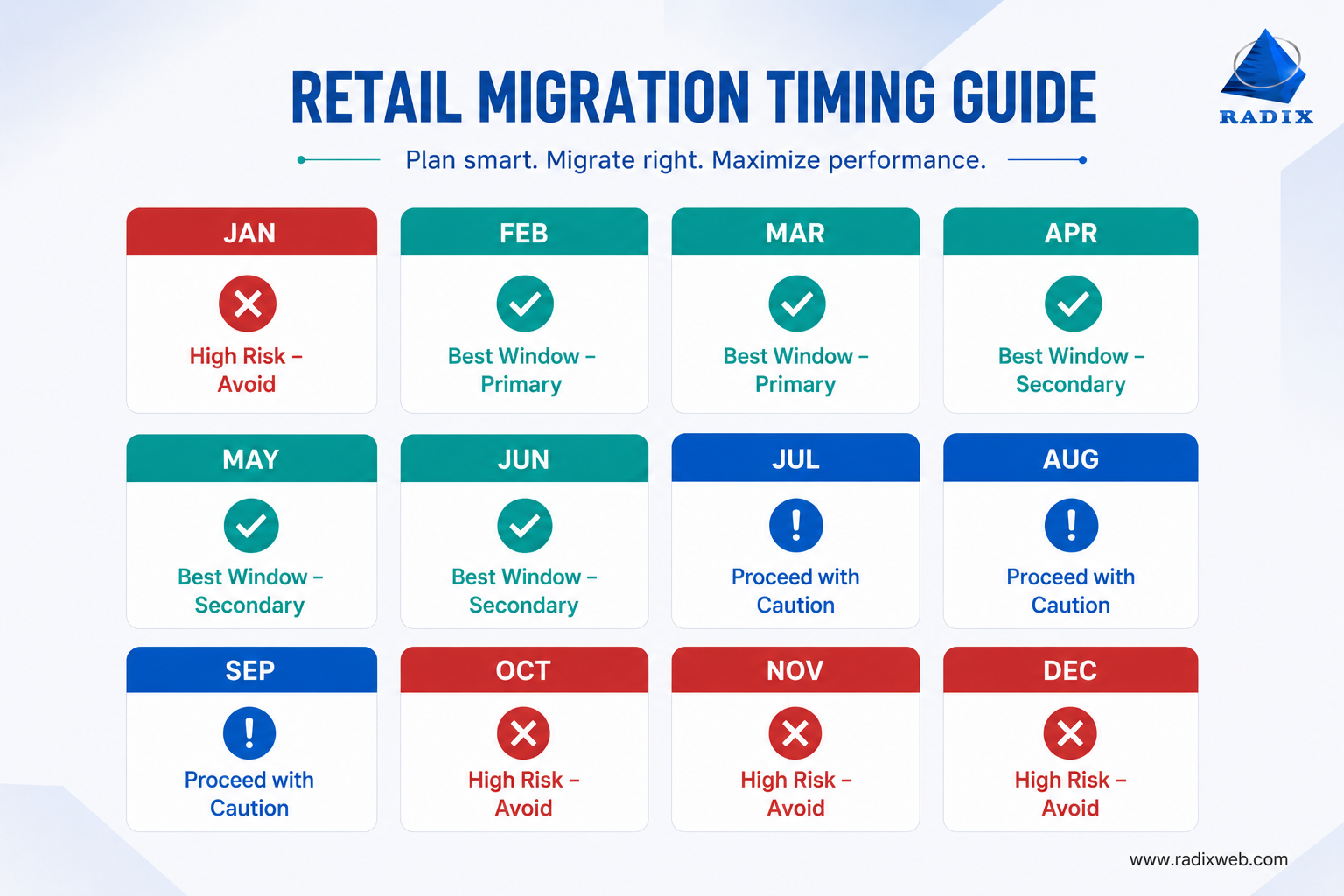
October–January
Avoid migration cutovers. This period covers holiday sales, peak order volumes, and post-holiday returns. That makes it the highest-risk time for system changes.
February–March
Primary migration window. Holiday activity has settled, and retailers have time to stabilize systems before the next major sales season.
April–June
Secondary migration window. Often used for later rollout phases or broader expansion after an initial deployment.
July
Proceed carefully. Many retailers begin preparing for back-to-school demand, so major cutovers should be completed early in the month.
The key is to plan backward from peak trading periods. Every migration phase should be fully deployed, tested, and stable before the next high-volume sales season begins.
Application modernization can have a transformative impact on retail businesses, but before planning timelines, budgets, or migration sequences, retailers need to make two major decisions. The first is whether to modernize onto a commercial platform or build a custom solution. The second is whether to migrate using a phased rollout or a big bang cutover. These choices affect project cost, risk, flexibility, and long-term scalability.
Before migration planning begins you need to decide:
Are you migrating to a commercial OMS or POS platform, or building a custom replacement?
The choice depends on fulfillment complexity. Commercial OMS platforms like Manhattan OMS or fabric handle standard fulfillment models well.
A commercial platform makes sense when:
If you need too many custom logics, building a custom retail application from scratch starts looking comparable in terms of cost and complexity.
A custom solution makes sense when:
This decision belongs in the assessment phase, before migration planning begins. Choosing the replacement platform mid-migration is the most reliable way to extend a project timeline by six months.
Organizations often consider legacy modernization when they are trying to automate their retail operations. Speed is important here and it feels logical to modernize everything at once.
A big bang migration does that by replacing systems simultaneously on a single cutover date. It may appear faster but it also concentrates all migration risk into a single event.
In fact, analysis from Replay Build shows that big bang rewrites have a 70% failure rate in high-volume retail environments. When a retailer processing hundreds of transactions per minute across dozens of locations attempts a simultaneous cutover, a single configuration error affects the entire operation at once. It only makes sense when:
For everyone else, phased migration by location or by system layer is the approach that keeps operations stable. A phased migration moves systems, locations, or business functions over time. It does take longer and requires running systems in parallel. But it significantly reduces operational risk. It delivers great results especially when:
For most retailers, the lower operational risk is more valuable than faster migration.

Modernizing Retail Infrastructure for the Next Stage of Growth
Retail legacy modernization projects rarely fail because of technology. They fail because of poor migration planning, undocumented integrations, and undiscovered dependencies. The good news, however, is that these risks can be avoided. All you need is the right sequencing strategy, proper planning, and a partner who has experience in modernizing outdated legacy systems into modern, AI-ready platforms without disrupting day-to-day operations.At Radixweb, we have 26+ years of legacy modernization experience. But that's not all. We also have experience with retail and eCommerce system modernization. That means we won't get stumped by the intricacies of your industry or systems. We understand the specifics of your retail legacy modernization project and aren't learning on the job. With that, we ensure timely and cost-effective modernization with disrupting your daily operations. Planning a modernization and want a scoped assessment of your system? Schedule a one-on-one consultation with our modernization specialists to get realistic time and cost estimates. All based on your specific environment, not vague industry averages.
Ready to brush up on something new? We've got more to read right this way.