

Read More


Recognized for AI Excellence at 2026 Globee® Awards - Read More

Maitray Gadhavi
71% of enterprises report they have moved their major workflows to the cloud. This move to the cloud has been the general trend for the past five years or so. But a 2024 Barclays report also reveals that 86% of CIOs have begun pulling workloads back from public cloud. Some are moving to private cloud and some to on-prem systems. This repatriation trend has created a lot of confusion among business decision makers, making cloud migration vs staying on premises a more complex decision.
At Radixweb, we regularly help organizations migrate from on-prem systems to the cloud. We have also helped several organizations modernize their on-prem systems and stay there. What we've learned across these projects is simple: The best decision isn't based on what everyone else is doing. It is based on what your business actually needs.
The organization moving terabytes of data for machine learning has different needs than the financial services firm with strict data residency requirements. The SaaS startup's cloud calculus looks nothing like the manufacturing company's.
So, below is the framework we use to help organizations think through their infrastructure decisions and decide between cloud migration and on-premises infrastructure.
Moving to the cloud isn't automatically cheaper, faster, or safer. Also, staying on premises isn't a sign of being behind. The right choice depends on workload, data volume, compliance needs, team capacity, and cost structure over 3-5 years. Instead of picking one side, most mature businesses have hybrid infrastructures. This combines on-premises infrastructure with public and private clouds.
| Aspect | Details |
|---|---|
| What does this guide covers? | Cloud vs on-prem comparison, hidden costs, decision framework, hybrid strategies, governance considerations, ROI calculations |
| Who should read this guide? | CTOs, infrastructure leaders, CFOs evaluating cloud spend, businesses planning system migrations, enterprises running legacy systems, mid-market companies weighing infrastructure options |
Cloud and on-premises infrastructure represent fundamentally different operational models. With cloud, your compute, storage, and networking run on vendor-managed hardware, in data centers you don't own. You pay per resource consumed. On-premises means you buy, own, and maintain the hardware in your facility (or co-location).
Here's a side-by-side snapshot of how cloud and on-premises infrastructure stack up:
| Factor | Cloud | On-Premises |
|---|---|---|
| Initial Capital Cost | Low upfront; pay-as-you-go | High upfront investment |
| Scalability | Elastic; scale up/down on demand | Requires planning and hardware procurement |
| Maintenance & Updates | Maintained by provider | Your responsibility; requires in-house expertise |
| Data Control & Residency | Multi-region; may not meet residency requirements | Full control; meets strict compliance needs |
| Speed to Deploy | Fast; resources available in minutes | Slower, hardware procurement takes weeks |
| Long-term Predictability | Variable costs; unpredictable egress fees | Predictable after capex; stable costs |
| Compliance & Security | Shared responsibility model | Full responsibility |
| Latency | Can optimize with CDNs and regions | Controlled by your network |
| Talent Requirements | Cloud-native skills (DevOps, architects) | Traditional ops skills + cloud knowledge |
This is just the starting point of the cloud migration vs on-premises comparison. You also need to understand your specific constraints and what each model enables before you can make a choice.
Cloud infrastructure (typically delivered through public platforms like AWS, Azure, or Google Cloud) abstracts away the need to own and manage physical servers. It lets you rent compute, storage, and networking on demand from a provider who manages the physical hardware, networking, security patches, and availability.
| Cloud Migration Advantages | Cloud Migration Disadvantages |
|---|---|
| Elasticity: Scale resources instantly without capex | Data Transfer Costs: Egress fees can spike unexpectedly |
| Global Distribution: Deploy to multiple regions for low latency | Vendor Lock-in: Migrating away is expensive and complex |
| Managed Services: Reduced ops overhead (no patch management) | Compliance Complexity: Shared responsibility can create gaps |
| Speed to Market: New environments in minutes, not months | Cost Visibility: Bills arrive with surprise line items |
| Reduced On-site Security Burden: Managed firewalls and DDoS protection | Latency Sensitivity: Not ideal for ultra-low-latency workloads |
| Disaster Recovery: Built-in redundancy across regions | Persistent Data: Moving terabytes in/out becomes expensive |
Also Read: The Benefits and Risks of Migrating to the Cloud
Cloud is suitable for:
But here's what doesn't get said enough: The trend toward cloud adoption doesn't mean it's the right fit for every business. That's precisely why staying on-premises makes sense for many organizations.
On-premises infrastructure means owning and operating your servers, storage, and networking equipment. You purchase or lease physical servers, storage, and networking equipment. And it is housed within your own data centers or colocation facilities. You control the entire stack. But this control comes with responsibilities and limitations that cloud doesn't have.
| On-Premises Advantages | On-Premises Disadvantages |
|---|---|
| Full Control: Complete visibility and security of your infrastructure | High Capex: Significant upfront investment in hardware |
| Data Residency: Meet strict compliance and localization requirements | Talent Dependency: Difficult to hire and retain skilled ops staff |
| Predictable Costs: No surprise egress fees or consumption spikes | Slow Scaling: New hardware takes months to acquire and deploy |
| No Vendor Lock-in: Freedom to choose tools and vendors | Aging Infrastructure: Hardware refreshes every 3–5 years are mandatory |
| Latency-Sensitive Workloads: Optimal for ultra-low-latency applications | Slower Release Cycles: Deployment processes are more rigid |
| Cost-Effective at Scale: Amortized costs drop with utilization | Operational Burden: You own patching, security, and disaster recovery |
| Data Sovereignty: No cross-border data movement concerns | Limited Elasticity: Scaling down wastes capital investment |
On-premises infrastructure is suitable for:
Here's what you should know: staying on-prem isn't for everyone either. It's important to look beyond the surface and in some cases, cloud might be the better way forward.
Everyone talks about cloud savings. You'll hear people say, "Move to the cloud, eliminate capex, and pay only for what you use." But clouds aren't always cheaper. And on premises isn't always expensive when your account for total cost of ownership.
The mistake most organizations make is thinking in only one dimension - either capex for on-prem or opex for cloud. The reality, however, is more complex. Both have upfront costs, ongoing costs, and hidden costs. For a fair cloud migration vs on-premises cost comparison, you need to understand all three cost categories over a 3–5-year period.
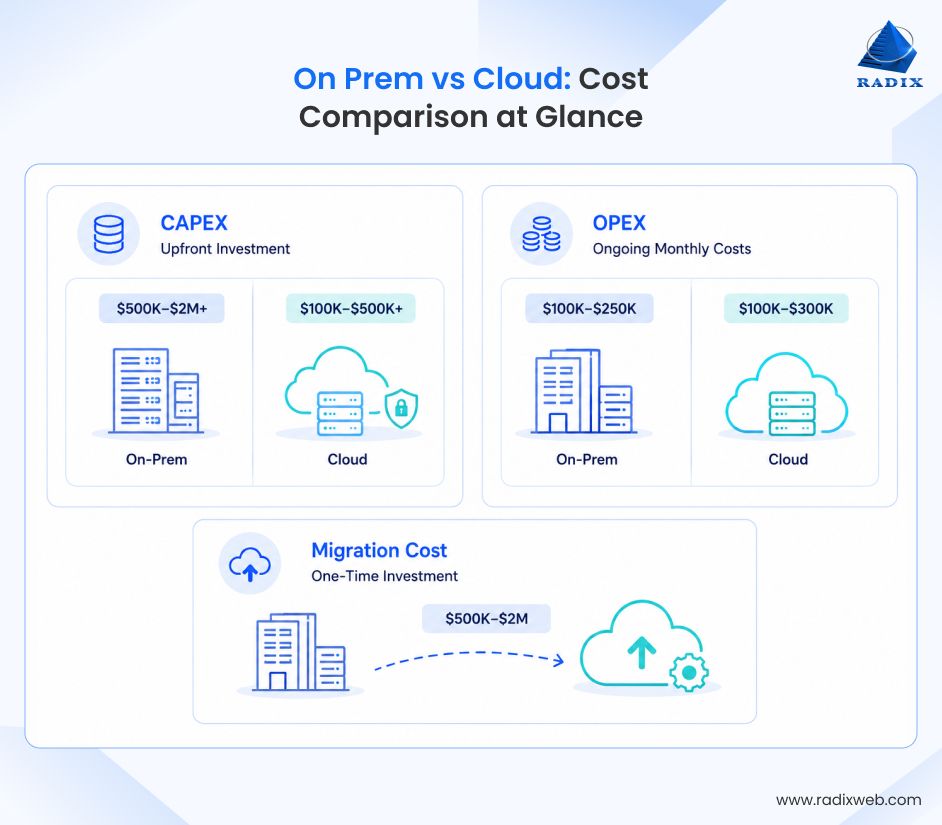
On-Premises CAPEX: You buy servers, storage, networking hardware, and often build or lease data center space. A typical on-prem infrastructure build might require $500K–$2M+ depending on scale. These are one-time purchases, but they depreciate and need replacement every 3-5 years. If you're building redundancy across multiple sites, costs multiply.
Cloud CAPEX (Yes, It Exists): You might assume cloud has zero capital costs. Wrong. Many organizations underestimate the capex hidden in cloud:
Reality: Cloud shifts capex to Year 1 (migration) rather than distributing it over 5 years like on-prem.
Cloud OPEX (Ongoing Monthly Costs): This is where cloud's reputation for lower costs lives, initially. Monthly cloud costs typically include:
A midsize company might pay $100K–$300K monthly for cloud infrastructure. It sounds predictable until you get a surprise egress bill or discover you're over-provisioning.
On-Premises OPEX (Ongoing Costs): On-prem also has monthly costs:
A midsize on-prem setup might cost $100K–$250K monthly in pure operations, similar to cloud, but this cost is stable and predictable after the initial investment.
The Difference Between Cloud and On-Prem OpexCloud opex often increases as you scale because usage-based pricing compounds. On-prem opex stays relatively flat.
Moving workloads to the cloud isn't free. So, it is important to understand what it costs to migrate from on-prem to the cloud. Here are some estimates to help you get started:
Total migration: Often $500K–$2M for a meaningful migration.
Also, if you encounter cloud migration challenges, the cloud experiment fails, or costs spiral, bringing workloads back on-prem costs just as much (or more). Why? Because you've now committed to cloud-optimized architectures that don't fit on-prem, and refactoring again is expensive.
The Real Risk: Dealing with cloud migration challenges can cost more than staying on-prem for five years.
It is also important to ensure that the cloud migration vs on-premises cost comparison should be done over 3–5-year periods for both options to get an accurate comparison. But don't pick the lowest-cost option automatically.
Think about ROI holistically: Is cloud good for this workload because it scales unpredictably? Is on-prem good because you control sensitive data and need compliance certainty? Cost is just one factor; architecture fit, risks, and business agility matter equally. Below is the framework we use to help organizations weigh all the factors together and decide between cloud migration vs on premises infrastructure
This isn't a checklist that forces you into a binary choice between cloud migration and on-premises infrastructure. It's a thinking pattern that helps you weigh tradeoffs and arrive at the decision that fits your business. You'll answer questions for each major workload or system, score them, and the pattern will emerge.
Is your usage relatively predictable, or do you have massive seasonal or unpredictable spikes?
The more unpredictable your demands, the more cloud's pay-per-use model makes sense. The more stable your workload, the more on-prem's fixed cost favors you.
If your business involves processing massive datasets, but the data lives outside cloud (data lakes on-prem, sensor data from IoT devices, customer databases you can't move), getting data into cloud and back out is expensive.
AWS charges $0.12 per GB for egress. If you're regularly moving 100TB a month, that's $12.8M per year just in egress. You also need to ensure proper database security in the cloud environment. In such situations, on premises becomes the more lucrative option. But if your data is cloud-native (SaaS metrics, logs, analytics) and moving data outside cloud is less critical; cloud migration advantages outweigh the costs.
Some industries have hard requirements: financial data in certain countries, health data behind specific controls, defense contractors needing air-gapped systems. Cloud providers have compliance certifications, but some requirements still demand on-premises or private cloud.
Other industries have softer requirements (nice-to-have compliance, not regulatory mandate). So, map your actual compliance obligations to what each model delivers. If you're building a simple SaaS tool with no regulated data, cloud compliance is easy. If you're in financial services and your data crosses borders, compliance complexity is real either way.
Infrastructure talent is expensive and hard to hire. Building and maintaining an on-premises data center requires deep expertise: storage admins, network engineers, security specialists, capacity planners.
But don't just count salary. Include hiring costs, training, onboarding time, and turnover too. Hiring a senior AWS architect in Silicon Valley: $250K–$350K annually + 6 months ramp time. Hiring an on-prem infrastructure engineer costs $150K–$200K and has a faster ramp time.
The real question is: what skills do you have, and what skills can you actually attract?
Moving from AWS to Azure to Google Cloud is one of the most painful cloud migration challenges. Each platform has different services, pricing, and APIs. Once you build applications using AWS Lambda and DynamoDB, leaving AWS means re-architecting. Some organizations see this as acceptable. Others see it as an unacceptable risk.
On-premises infrastructure has lock-in too (hardware vendor, OS, storage vendor), but it feels more like your lock-in because you own it. If your strategy depends on staying vendor-agnostic or switching later, cloud increases switching costs. If you're comfortable sticking with one provider, cloud works fine.
Recovery time objectives (RTO) and recovery point objectives (RPO) matter. If your system being down for 15 minutes costs $100K in lost transactions, you need aggressive redundancy. Cloud offers global regions and automatic failover. On-prem requires you to build and manage that redundancy.
So, if you have strict RTO/RPO, cloud offers that but with lenient tolerance, on-prem makes sense.
How to Use This Framework
Once you answer all these questions, you'll probably find that some favor cloud, some favor on-prem, some are neutral. Weight them based on what matters most to your business. A workload stability question might be worth 30% of the decision; compliance might be 20% and so on. Your weights will be different based on what really matters to your business.
Once you've weighted and scored, the picture becomes clearer. You rarely get a clean 100% answer. You usually get a 60–40 or 70–30 answer. That's normal and what we actually see in reality where instead of pure cloud or on-premises infrastructure, businesses go with a hybrid setup. If you are not sure what your infrastructure strategy should be, consult with IT specialists and architects who can help you determine the right mix based on your business needs.
The cloud migration vs staying on-premises debate is mostly theoretical. In reality, 78% of organizations operate somewhere on a spectrum with hybrid infrastructure with workloads across on-premises, public, and private clouds.
A typical hybrid infrastructure might include:
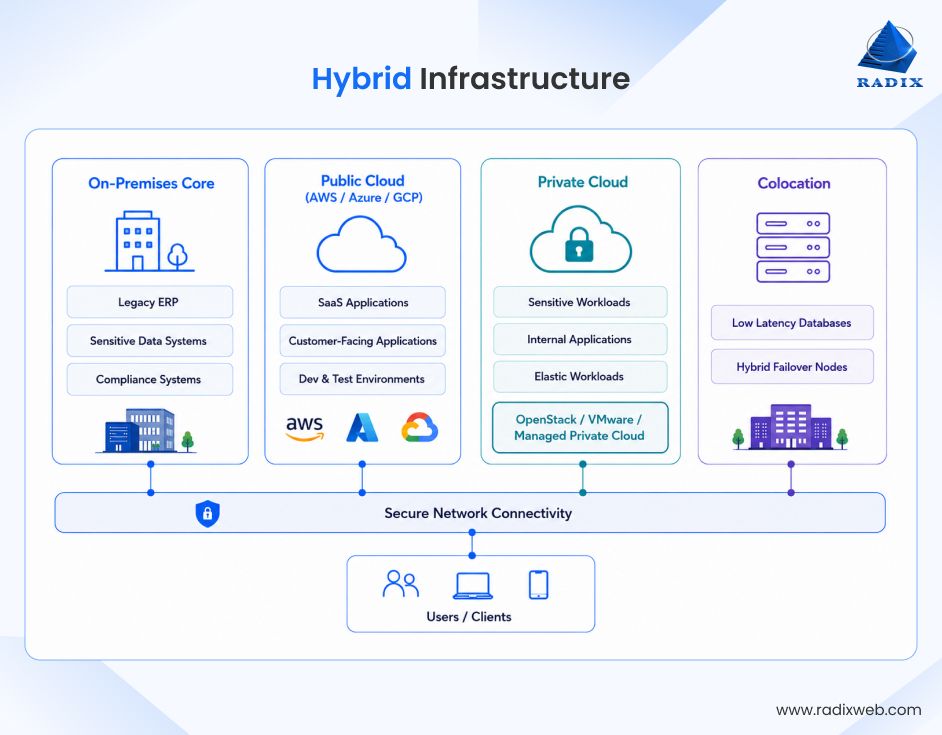
This distribution happens because different workloads have different needs. Treating the decision as binary and "moving everything to the cloud" or "keeping everything on premises" ignores reality.
While hybrid infrastructure gives you the best of both worlds, don't underestimate the complexity involved in managing hybrid cloud infrastructure.
Hybrid isn't a compromise born from indecision. It's the architecture that emerges when you design for your actual business needs rather than fitting your business to a platform choice. And in most cases, a hybrid infrastructure should be considered from the start, not as a fallback.
Getting Started with the Right Infrastructure Strategy
The cloud migration vs on premises infrastructure decision is rarely simple. There are many factors to consider before migrating to the cloud. And contrary to popular belief, migrating to the cloud isn't always cheaper, and staying on premises isn't always safer. The best choice emerges when you understand what your business actually needs, get the right guidance and consulting around cloud infrastructure, and design your software architecture around that reality.At Radixweb, we've worked with dozens of organizations through this decision. We've helped organizations compare cloud migration vs on-premises benefits, stress-test assumptions, and decide what model makes the most financial sense. We work across hybrid infrastructure - on-premises, public cloud, and private cloud. We've seen what succeeds and what fails. And we can help you compare the actual economics and make a decision that's right for your business. Schedule a call with one of our infrastructure architects to discuss your options and get a realistic roadmap.
Ready to brush up on something new? We've got more to read right this way.

